Preset chooser
 InputConfig is completely free on the Mac App Store.
Answer two or three questions and I'll point you to the preset, guide or catalog page that fits.
Pick what you are using
Pick what you want to do
Start here
Every preset can be changed afterward: the editor's Scan button rebinds any control the moment you press it.
Every answer as a list
A game controller
- Run the Mac
- Desktop Navigation preset: Built in. Left stick pointer, right stick scroll, clicks, tabs, arrows, shortcuts.
- Your first preset: Five minutes, start to finish.
- Mouse + Scroll preset: A clean base for your own layout.
- Browse and watch
- Web Browsing preset: Tabs, history, address bar, scroll.
- Media Controller preset: Real media keys and volume.
- Couch guide: Browsing, video, and reading on a TV screen.
- Play a game
- The presets index: A ready layout for 290+ games; search yours.
- Play any game guide: Aim tuning, confine and recenter, fixes.
- FPS presets: One per controller family.
- Work in an app
- Working from a controller: Office layout with chord layers; preset to download.
- Editing shuttle: Final Cut, Premiere, Resolve.
- Drawing and photo deck: Photoshop, Affinity, Lightroom.
- Make music
- Gamepad as instrument: Notes, expression, transport; preset to download.
- MIDI: DAW Performance preset: Pitch bend, mod wheel, chords.
- MIDI: Drum Pad preset: Kick, snare, hats with turbo rolls.
- Make the Mac easier to use
- A controller for an older parent: Calm layout, spoken buttons; Easy Browse preset.
- Tremor and limited range: Deadzones and curves with numbers; Steady Pointer preset.
- Every accessibility feature: The complete list.
- Run a stream
- Streaming deck guide: F13 to F19 hotkeys for OBS; Streamer Deck preset.
- System functions: Siri Shortcuts, volume, open app.
Adaptive hardware
- Run the Mac
- Access Controller guide: Pairing, the profile trap, desktop layout, driving; two presets.
- Xbox Adaptive Controller guide: Ports, switches, desktop layout; preset.
- Access Controller sends nothing: The profile fix.
- Drive in games
- One-stick driving setup: Steer, gas, brake, reverse from one stick.
- Access Controller guide: Includes the driving preset.
- One-stick driving help: The panel and its settings.
- Very few switches
- One, two, or four switches: Layouts with holds and double presses; two presets.
- Hold and double-tap actions: Three outputs on one control.
- Cursor regions: Inputs that need no switch.
- Set it up for someone else
- For OTs and AT specialists: Assess, build in layers, document, hand over.
- Backups: One file restores everything.
A MIDI device
- Control the Mac
- MIDI: Knob Deck preset: Volume fader, Dial scroll, Turn nudges, pedal click.
- MIDI devices as input: The three knob modes.
- Control surface guide: For producers; DAW remote preset.
- Control the DAW
- Control surface guide: Sixteen pads as DAW shortcuts; preset to download.
- MIDI reference: CC numbers, notes, GM sounds.
- A media panel
- MIDI: Media Deck preset: Pads as media keys, knobs as volume and brightness.
- System functions: Everything a pad can run.
A keyboard or mouse
- A macro deck
- Spare keyboard macro deck: Numpad Macro Deck preset.
- Macros, turbo, toggle: Timing that works.
- Give spare keys a job
- Keyboard and mouse as input: Per-device capture, Force Touch, safety.
- Per-app auto-switch: A layout for one app only.
- Type one-handed
- Using a Mac one-handed: Joy-Con One Hand and Modifier Holds presets, mouse buttons with jobs.
- Modifier Holds preset: Hold Right Command for Spotlight, Right Option for Dictation, Right Shift for Mission Control.
Just the MacBook
- Tap the Mac
- Tap the Mac preset: Double tap Mission Control, triple tap dictation.
- Tap the Mac help: Where to knock, which Macs.
- Use it without a keyboard
- A Mac without a keyboard: Dictation, Type Text, taps; No Keyboard preset.
- Dictation, zoom, speak: The macOS settings each needs.
One Joy-Con
- Run the Mac one-handed
- Using a Mac one-handed: Joy-Con One Hand preset.
- Joy-Cons: Pairing one or both.
- Read and present
- Presentation Remote preset: Slides, blank screen, laser pointer.
- Reading and media: Page keys, read aloud.
- Study flashcards
- Anki from a controller: The loop on four buttons.
- Anki preset: Download.
How this fits with InputConfig
These pages test a controller or look up what you need for it: a fix, a button name, a game or a preset. InputConfig is what puts it to work on a Mac: it maps every button, stick and trigger to keys, clicks, the pointer or scrolling, per app if you like, and its Live Visualizer draws the controller live with what each control does.
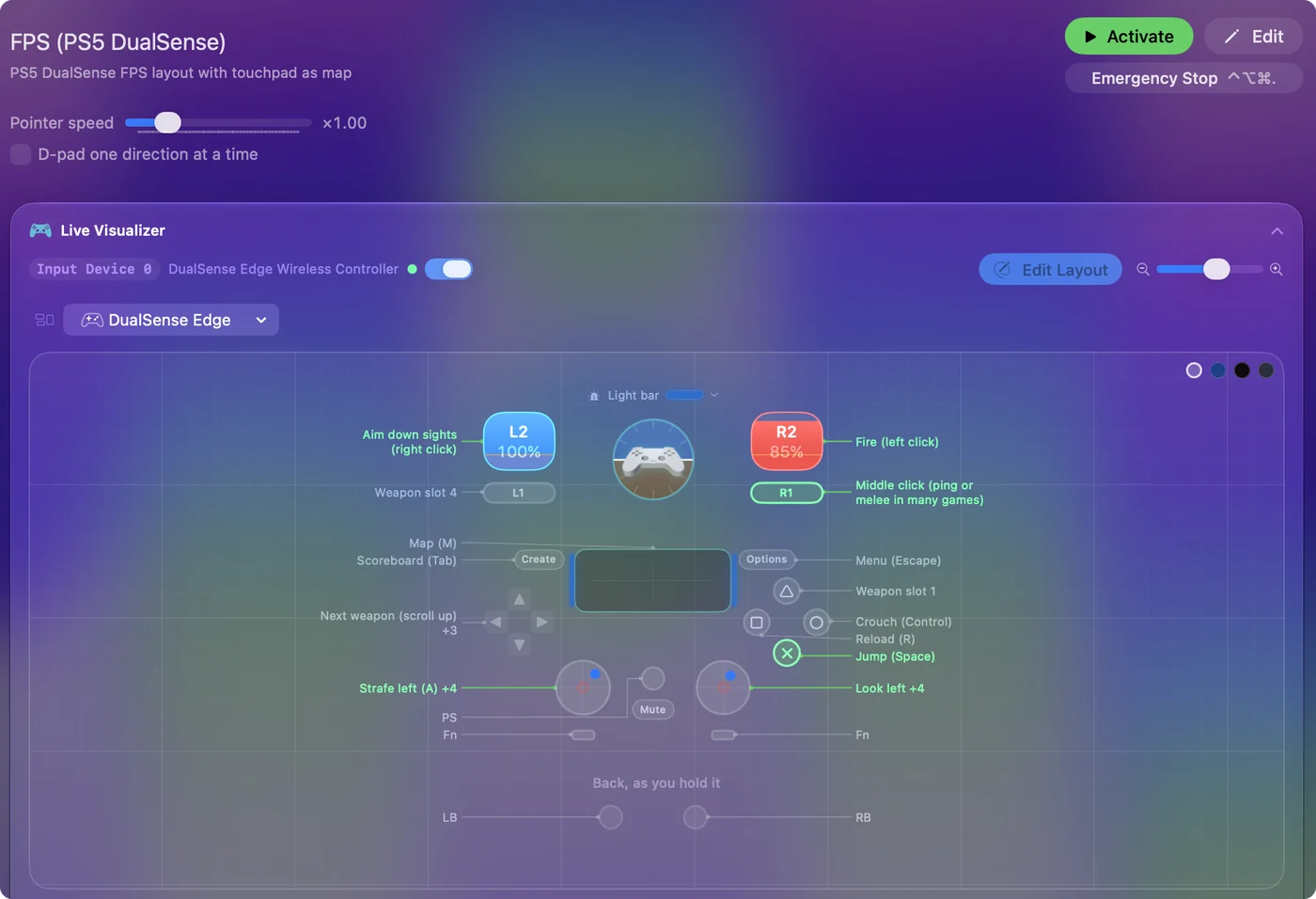
Use a controller as a mouse on a Mac shows it step by step.
More controller tests
- Gamepad tester
- Stick drift test
- PS5 controller drift test
- Xbox controller drift test
- Joy-Con drift test
- Controller vibration test
- Controller button test
- Controller trigger test
- Controller polling rate test
- Joystick test
- Racing wheel tester
- Arcade stick tester
- PS5 controller tester
- PS4 controller tester
- Xbox controller tester
- Switch Pro Controller tester
- Joy-Con tester
- 8BitDo controller tester
- Gamepad viewer and controller overlay
- Deadzone test and curve visualizer
- Controller button names and map
- Controller ID lookup
- Controller fix finder
- Mac game controller finder
Updated