Xbox controller tester
 InputConfig is completely free on the Mac App Store.
Connect an Xbox controller by USB cable or Bluetooth and press any button on it. Every control lights up under its Xbox name: A, B, X, Y, LB, RB, LT, RT, View, Menu, both stick clicks and the Xbox button. It works with Xbox Series X and S pads, Xbox One pads, and Xbox-style pads from other makers that your browser recognizes.
Check an Xbox controller in this order
- Connect it by USB cable, or pair it over Bluetooth. On a Mac, connecting an Xbox controller has the pairing steps.
- Press any button, so the browser shows the controller to this page.
- Press every button once and watch the checklist turn green.
- Let go of both sticks and press Record 5 seconds at rest, then run the circle test.
- Pull LT and RT slowly. Each should climb from 0 to 1 without a jump.
- Press Both motors, then each motor on its own.
Test on the cable first. A cable rules out a weak Bluetooth link, so anything that fails on it is the controller itself.
Xbox 360 controller test
An Xbox 360 controller has no Bluetooth, so it reaches a computer by its own cable or by the wireless receiver, and where you test it decides whether it can be read at all.
- On a Windows PC. A wired 360 pad is a standard Windows controller. Plug it in, open this page and press a button, and it should light under the same Xbox names as a newer pad. I have not tested a 360 pad in a browser, so treat that as what I expect and not as something I checked.
- On a Mac. macOS cannot read a wired Xbox 360 controller or the 360 wireless receiver, so it will not appear here or in any other tester. InputConfig lists such a pad in its Devices menu, grayed out, with the reason.
- On a Mac, the way around it. A newer Xbox pad over Bluetooth is read without any extra software. Connecting an Xbox controller to a Mac has the steps.
The 360 pad has no Share button and no paddles, so the checklist above is the whole job. If a 360 pad is dark on a Mac, the Mac cannot read it, and the pad is not the problem.
If the controller does not show up
Climb this ladder, smallest step first:
- Press a button. A browser hides every controller from a page until a button is pressed while that page is in front.
- Click the page, then press again. The tab has to be the active one when you press.
- Reconnect it. Unplug the cable and plug it back in, or turn the controller off and on so it pairs again.
- Check that the computer sees it. On a Mac, a connected PlayStation, Xbox or Switch controller is listed in System Settings under Game Controllers. If it is missing there, the fix is pairing: controller connected but not working on a Mac has every step.
- Try a second browser. Browsers read controllers in different ways, so one that is missing in one browser can show up in another.
Share, paddles and the trigger motors
- The Share button. Buttons past the standard seventeen depend on the browser and the connection, so Share on a Series pad can show as button 17 or not at all.
- Elite paddles. With a profile on, a paddle sends the button the profile gives it, so pressing one lights that button. With the default profile the paddles stand alone, and a browser has no standard place for them, so they may not show at all.
- The Xbox button. On some systems it does a job of its own when pressed, and the browser may not see it.
- Rumble on its own. The controller vibration test runs each motor by itself, at a strength and length you pick.
- Trigger motors. Xbox One and Series pads have small motors in the triggers. The Trigger motors button appears when the browser can drive them.
A control that stays dark here is not proof it is broken, so check it once outside the browser.
It works. Now give it a job
A tester tells you the controller is fine. On a Mac, InputConfig is the app I make for the next step: it turns the buttons and sticks you just tested into keys, the mouse pointer, clicks and scrolling, in any app or game. It is free, and its Live Visualizer draws the same live picture inside the app, with the touchpad and motion sensors a browser does not pass to a page. Test it here, then put it to work there.
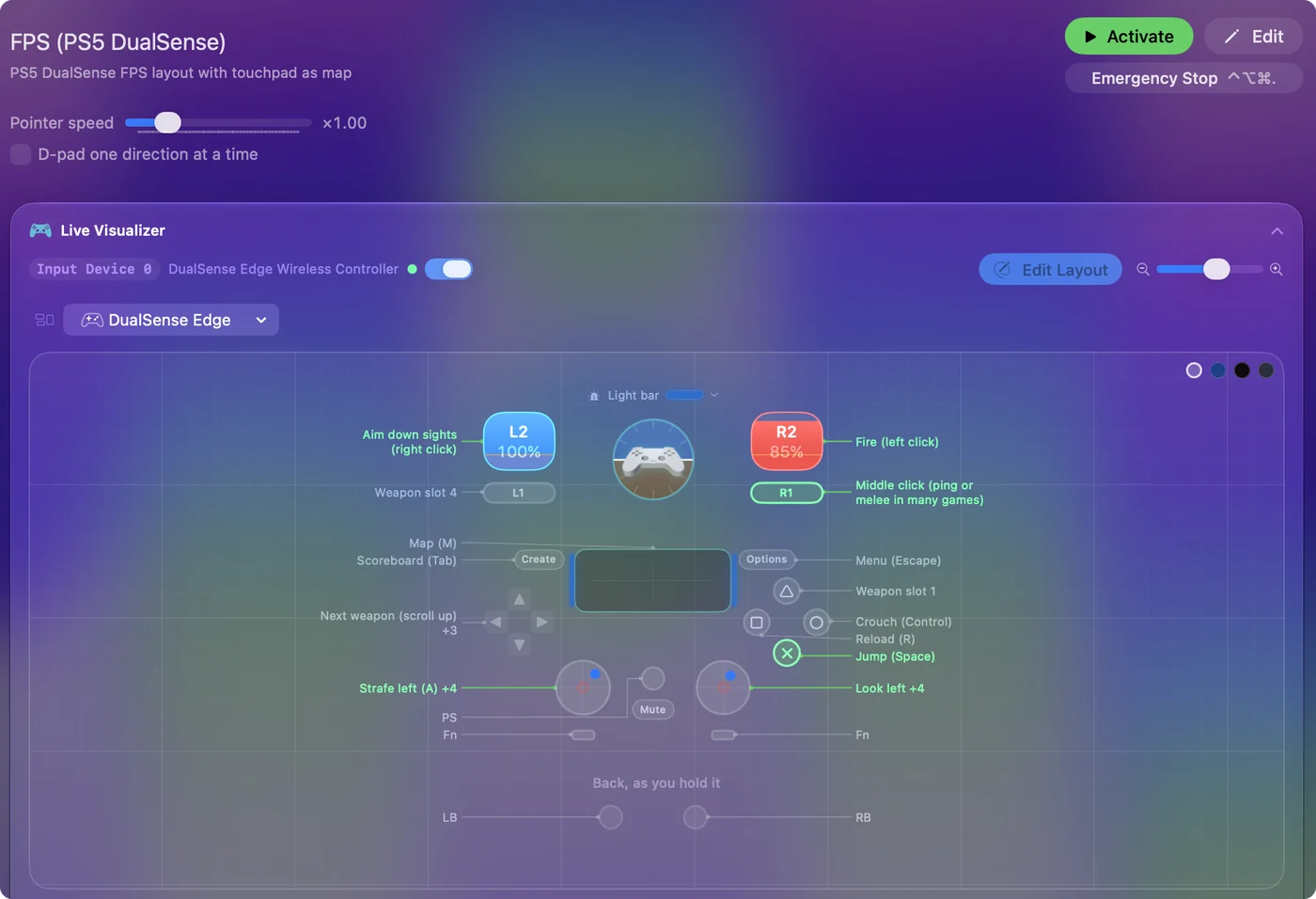
Use a controller as a mouse on a Mac shows it step by step.
More controller tests
- Gamepad tester
- Stick drift test
- PS5 controller drift test
- Xbox controller drift test
- Joy-Con drift test
- Controller vibration test
- Controller button test
- Controller trigger test
- Controller polling rate test
- Joystick test
- Racing wheel tester
- Arcade stick tester
- PS5 controller tester
- PS4 controller tester
- Switch Pro Controller tester
- Joy-Con tester
- 8BitDo controller tester
- Gamepad viewer and controller overlay
- Deadzone test and curve visualizer
- Controller button names and map
- Controller ID lookup
- Controller fix finder
- Mac game controller finder
- Preset chooser
Questions
How do I test an Xbox controller on a PC or a Mac?
Connect it by USB or Bluetooth, open this page and press any button on it. Every button, stick and trigger then shows live under its Xbox name.
How do I test a 360 controller on a PC or Mac?
On a Windows PC, plug in a wired Xbox 360 controller, open this page and press a button. Windows treats it as a standard Xbox pad, so it should appear under the Xbox names, though I have not tested a 360 pad in a browser. On a Mac, macOS cannot read a wired 360 controller or its wireless receiver, so it will not show up in any tester.
How do I test an Xbox controller for stick drift?
Let go of both sticks and press Record 5 seconds at rest. A healthy stick reads close to 0. The result is a number and a deadzone that would hide it.
Why does my Xbox controller not show up in the tester?
Press a button on it with this page in front, because a browser hides a controller until then. If it still does not appear, reconnect it and try a second browser.
Can I test an Xbox Elite Series 2 controller here?
Yes. It is read like any Xbox pad. With a profile on, a paddle sends the button the profile gives it, so pressing one lights that button. With the default profile a paddle stands alone, and a browser may not show it.
Can I check the Xbox controller's battery here?
No. A browser does not pass a controller's battery level to a page. On a Mac, InputConfig, which is free, lists each connected controller at the top of its sidebar with its battery level.
Can this page calibrate an Xbox controller?
No. It reads what the controller sends and changes nothing on it. The drift recording gives you a deadzone that hides a stick resting off center, which is what calibration is usually wanted for.
Related
Updated