Gamepad viewer and controller overlay
 InputConfig is completely free on the Mac App Store.
This is a live picture of your controller for a stream or a recording. Every button lights up as you press it, and the sticks and triggers move as you move them. You can use it on this page, or load the bare version as a browser source in your streaming app, where it draws only the controller on a clear background.
Build your overlay address
Browser source address: Paste it into your streaming app.
https://inputconfig.com/embed/gamepad-viewerWhat happens: The address opens the drawing alone, on a clear background, with the names and color you picked.
Add it to OBS or another streaming app
- Pick the button names and the highlight color above. The address under them changes to match.
- Copy the address.
- In your streaming app, add a browser source and paste the address. OBS calls it Browser.
- Set the source to 620 wide and 460 high, or any size with the same shape.
- Press a button on the controller. The overlay starts to respond after the first press.
If the overlay stays still
Climb this ladder, smallest step first:
- Press a button. A page sees a controller only after a press.
- Check it here first. If the drawing on this page responds in your normal browser, the controller and the address are fine.
- Capture a window instead. If the drawing responds here and not inside the streaming app, that app's built-in browser is not passing controller input to pages. Open the overlay address in a normal browser window and capture that window.
I built the bare page to the rules a browser source follows: a clear background and nothing on it but the drawing. I have not tested it in every streaming app, so treat the window capture as the fallback that always works.
What the viewer shows
Buttons, both sticks, the D-pad and both triggers, on one generic controller shape with the names you choose. It does not show a touchpad surface or motion, because a browser does not pass those to a page. To check a controller instead of showing it, use the gamepad tester.
It works. Now give it a job
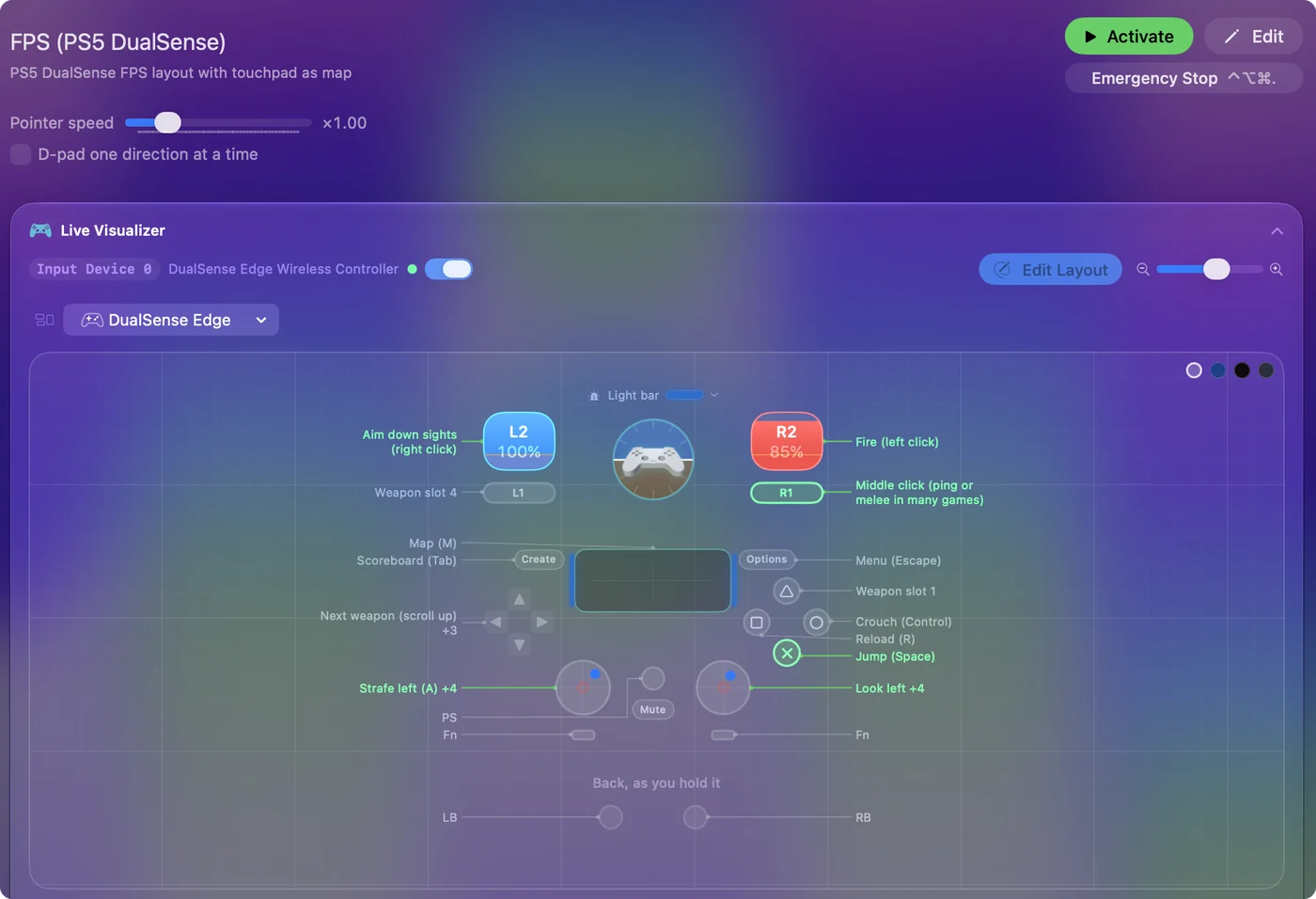
A tester tells you the controller is fine. On a Mac, InputConfig is the app I make for the next step: it turns the buttons and sticks you just tested into keys, the mouse pointer, clicks and scrolling, in any app or game. It is free, and its Live Visualizer draws the same live picture inside the app, with the touchpad and motion sensors a browser does not pass to a page. Test it here, then put it to work there.
Use a controller as a mouse on a Mac shows it step by step.
More controller tests
- Gamepad tester
- Stick drift test
- PS5 controller drift test
- Xbox controller drift test
- Joy-Con drift test
- Controller vibration test
- Controller button test
- Controller trigger test
- Controller polling rate test
- Joystick test
- Racing wheel tester
- Arcade stick tester
- PS5 controller tester
- PS4 controller tester
- Xbox controller tester
- Switch Pro Controller tester
- Joy-Con tester
- 8BitDo controller tester
- Deadzone test and curve visualizer
- Controller button names and map
- Controller ID lookup
- Controller fix finder
- Mac game controller finder
- Preset chooser
Questions
How do I show my controller on a stream?
Copy the overlay address from this page and add it to your streaming app as a browser source. It draws the controller on a clear background and lights each input as you press it.
Is this gamepad viewer free?
Yes. There's no account and no watermark, and it runs in your browser, so what it reads from your controller stays on your computer.
Can I change the button names and the color?
Yes. Pick PlayStation, Xbox, Switch or plain numbers, and any highlight color. The overlay address changes to match.
How do I add the gamepad viewer to OBS?
In OBS, add a Browser source, paste the overlay address from this page, and set it to 620 wide and 460 high. Then press a button on the controller, because the overlay responds only after a first press.
Why is the gamepad viewer not working in OBS?
Press a button on the controller first. If the drawing responds in your normal browser and stays still inside OBS, the built-in browser is not passing controller input to the page. Open the overlay address in a normal browser window and add that window to the scene as a window capture.
Does the controller overlay work on a Mac?
Yes. The overlay is a web page, so it runs in a browser on a Mac the same way it does on Windows, as a browser source or as a captured window.
Can I use the controller overlay without OBS?
Yes. Open the overlay address in a normal browser window and capture that window with whatever you stream or record with. The address draws the controller and nothing else.
Are there skins for this gamepad viewer?
Not skins as such. It draws one controller shape, and you choose PlayStation, Xbox, Switch or number names and any highlight color.
Does it show keyboard and mouse input too?
No. This overlay draws a controller only. The keyboard tester and the mouse tester show keys and clicks live, as test pages, not as overlays.
Related
Updated