Gamepad tester
 InputConfig is completely free on the Mac App Store.
Connect your controller and press any button on it. You'll see everything the browser can read from it: every button, both sticks, the triggers and the rumble motors. It works with PlayStation, Xbox and Switch controllers and most other gamepads, on a Mac, a PC or a Chromebook. If nothing shows up, press a button again with this page in front, because browsers hide a controller until you do.
Read the picture
- The drawing. Each button lights while it is held, each stick's cap moves with the stick, and each trigger fills as you pull it. The menu beside the controller's name switches between PlayStation, Xbox and Switch names.
- Sticks. The values x and y run from -1 to 1, and tilt is the distance from the center, where 1 is full tilt. A stick at rest should read close to 0.
- Triggers. 0 is released and 1 is fully pulled. Levels seen counts the different values the trigger has reported, which tells an analog trigger from one that is only on or off.
- Every button and axis. The same inputs by number. This is the view for a device the drawing does not fit: a flight stick, a wheel, an arcade stick.
The names on the drawing follow the controller the browser reports. If every button lights and both sticks rest near zero, the controller is healthy.
Test one thing at a time
This page tests everything at once. Each job also has its own page, with more room and more detail:
- Stick drift. The stick drift test records both sticks at rest, gives the drift as a number and runs a circle test.
- Rumble. The controller vibration test runs each motor on its own.
- Buttons. The controller button test is a checklist that also flags double presses.
- Triggers. The trigger test shows the range each trigger really covers.
- Speed. The polling rate test counts the updates a second that reach the page.
- Joysticks and wheels. The joystick test lists every axis by number.
- One controller. There is a bench for the PS5 controller, the Xbox controller and the Switch Pro Controller, each with its own button names.
- A stream. The gamepad viewer is the drawing alone, on a clear background, for an overlay.
If the controller does not show up
Climb this ladder, smallest step first:
- Press a button. A browser hides every controller from a page until a button is pressed while that page is in front.
- Click the page, then press again. The tab has to be the active one when you press.
- Reconnect it. Unplug the cable and plug it back in, or turn the controller off and on so it pairs again.
- Check that the computer sees it. On a Mac, a connected PlayStation, Xbox or Switch controller is listed in System Settings under Game Controllers. If it is missing there, the fix is pairing: controller connected but not working on a Mac has every step.
- Try a second browser. Browsers read controllers in different ways, so one that is missing in one browser can show up in another.
What a browser cannot see
This page reads the controller through the browser's Gamepad API, which carries buttons, sticks, triggers and, in most browsers, vibration. It does not carry a touchpad surface, motion sensors, a light bar, a microphone or the battery level, so none of those are tested here. Back paddles show only when the controller sends them as buttons of their own. The browser also has the last word on the count: the same controller can report a different number of buttons in two browsers. If a button never lights here, try a second browser before you blame the controller.
Put this tester on your own page
Repair shops, support desks and reviewers can show this tester inside their own pages. Paste this where it should appear:
HTML: The tester in a frame, with a credit link under it.
<iframe src="https://inputconfig.com/embed/gamepad-tester" title="Gamepad tester" allow="gamepad" width="100%" height="820" style="border:0"></iframe>
<p><a href="https://inputconfig.com/tools/gamepad-tester">Gamepad tester by InputConfig</a></p>
What happens: Your visitors test a controller without leaving your page. The allow="gamepad" part keeps the tester able to read a controller on sites that restrict what a framed page may do. It is free to use, and nothing the tester reads leaves the visitor's browser.
It works. Now give it a job
A tester tells you the controller is fine. On a Mac, InputConfig is the app I make for the next step: it turns the buttons and sticks you just tested into keys, the mouse pointer, clicks and scrolling, in any app or game. It is free, and its Live Visualizer draws the same live picture inside the app, with the touchpad and motion sensors a browser does not pass to a page. Test it here, then put it to work there.
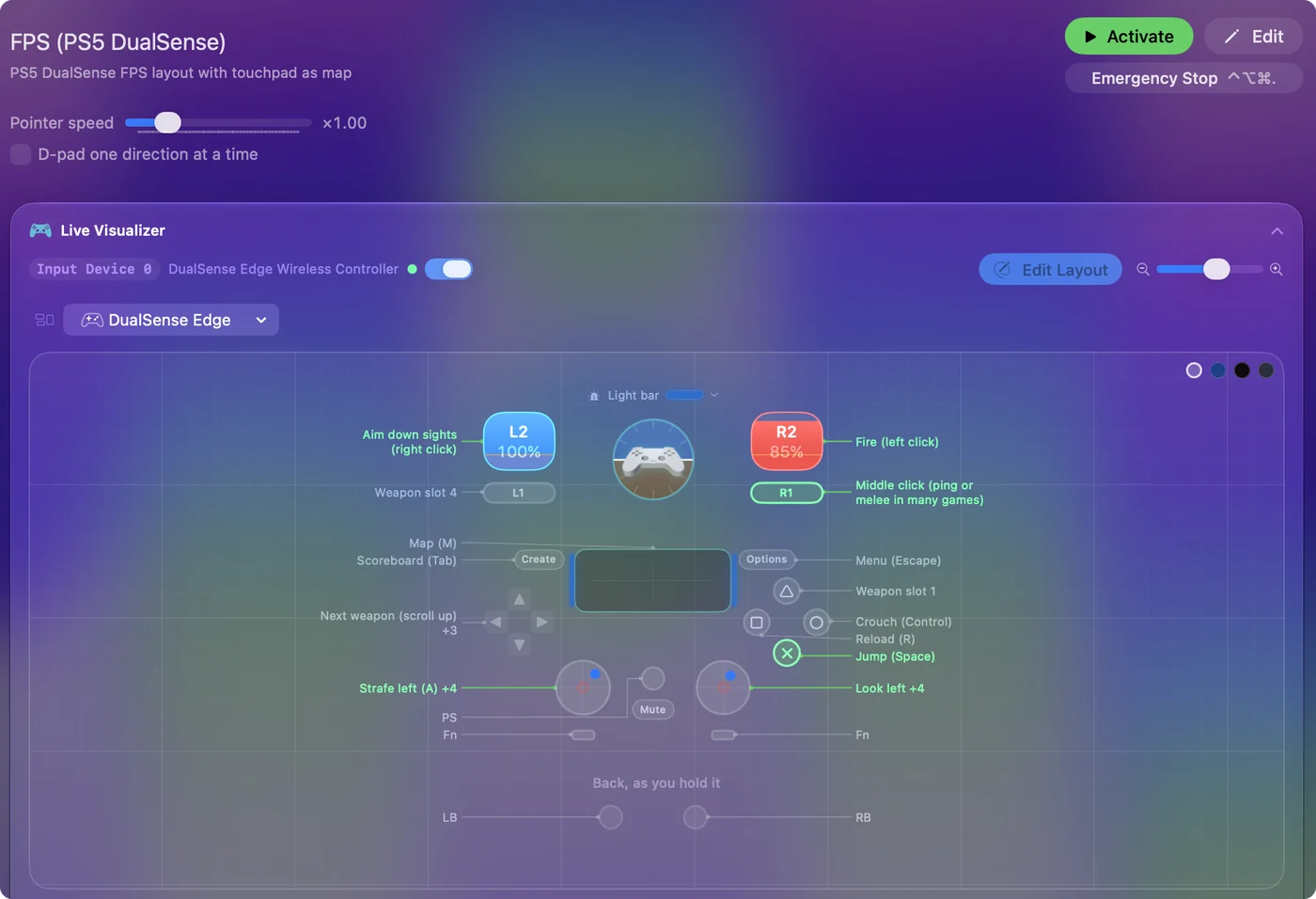
Use a controller as a mouse on a Mac shows it step by step.
More controller tests
- Stick drift test
- PS5 controller drift test
- Xbox controller drift test
- Joy-Con drift test
- Controller vibration test
- Controller button test
- Controller trigger test
- Controller polling rate test
- Joystick test
- Racing wheel tester
- Arcade stick tester
- PS5 controller tester
- PS4 controller tester
- Xbox controller tester
- Switch Pro Controller tester
- Joy-Con tester
- 8BitDo controller tester
- Gamepad viewer and controller overlay
- Deadzone test and curve visualizer
- Controller button names and map
- Controller ID lookup
- Controller fix finder
- Mac game controller finder
- Preset chooser
Questions
How do I test my controller online?
Connect it by cable or Bluetooth, open this page, and press any button on the controller. The drawing lights each button as you press it, the plots follow the sticks, and the bars fill with the triggers.
Why does the gamepad tester not detect my controller?
A browser hides a controller from a page until a button is pressed with that page in front. Press a button first. If nothing appears, reconnect the controller, then try a second browser.
Does this gamepad tester work on a Mac?
Yes. A browser on a Mac can read a connected controller, so the page works there. For the touchpad and the motion sensors, which a browser does not pass to a page, use the Live Visualizer in InputConfig, which is free.
Is the gamepad tester free and private?
Yes. It's free, there's no account, and it runs in your browser, so whatever it reads from your controller stays on your computer.
Can this page calibrate a controller?
No. It reads what the controller sends and changes nothing on it. The drift recording gives you a deadzone that hides a stick resting off center, which is what calibration is usually wanted for.
Does the gamepad tester measure input delay?
No. A web page cannot see the moment you press, only the moment the press arrives. The controller polling rate test counts how often new readings arrive, and the reaction time test compares a controller with a mouse or a key.
Related
This page in other languages: Deutsch, Español, Italiano, 日本語, 한국어, Русский, Polski, Tiếng Việt, Bahasa Indonesia, Türkçe, ไทย, Magyar, العربية, עברית, Slovenčina, Suomi, Українська
Updated