PS4 controller tester
 InputConfig is completely free on the Mac App Store.
Connect a PS4 DualShock 4 by micro USB cable or Bluetooth and press any button on it. Every control lights up under its PlayStation name: Cross, Circle, Square, Triangle, L1, R1, L2, R2, L3, R3, Share, Options, the PS button and the touchpad click. You can also measure stick drift, the trigger range and both rumble motors.
Check a DualShock 4 in this order
- Connect it. A micro USB cable is the quickest start. To pair instead, hold the PS button and Share until the light bar flashes, then pick Wireless Controller in the computer's Bluetooth list.
- Press any button, so the browser shows the controller to this page.
- Press every button once and watch the checklist turn green.
- Let go of both sticks and press Record 5 seconds at rest, then run the circle test.
- Pull L2 and R2 slowly. Each should climb from 0 to 1 without a jump.
- Press Both motors, then each motor on its own.
A DualShock 4 is often years old by the time it gets tested. The rest test and the trigger range are the two that show wear first.
If the controller does not show up
Climb this ladder, smallest step first:
- Press a button. A browser hides every controller from a page until a button is pressed while that page is in front.
- Click the page, then press again. The tab has to be the active one when you press.
- Reconnect it. Unplug the cable and plug it back in, or turn the controller off and on so it pairs again.
- Check that the computer sees it. On a Mac, a connected PlayStation, Xbox or Switch controller is listed in System Settings under Game Controllers. If it is missing there, the fix is pairing: controller connected but not working on a Mac has every step.
- Try a second browser. Browsers read controllers in different ways, so one that is missing in one browser can show up in another.
What is different on a DualShock 4
- Share, not Create. The left system button is Share on a PS4 pad. The drawing uses that name when it recognizes a DualShock 4.
- Micro USB. A DualShock 4 charges and connects through micro USB, and some cables only charge. If nothing appears over a cable, try another one.
- The touchpad. Its click is a button here. Finger position is not something a browser passes to a page.
- The light bar and motion. Out of reach of the Gamepad API, so not tested here. On a Mac, the PlayStation tester on Mac covers them with InputConfig, and the same steps work for a PS4 pad.
It works. Now give it a job
A tester tells you the controller is fine. On a Mac, InputConfig is the app I make for the next step: it turns the buttons and sticks you just tested into keys, the mouse pointer, clicks and scrolling, in any app or game. It is free, and its Live Visualizer draws the same live picture inside the app, with the touchpad and motion sensors a browser does not pass to a page. Test it here, then put it to work there.
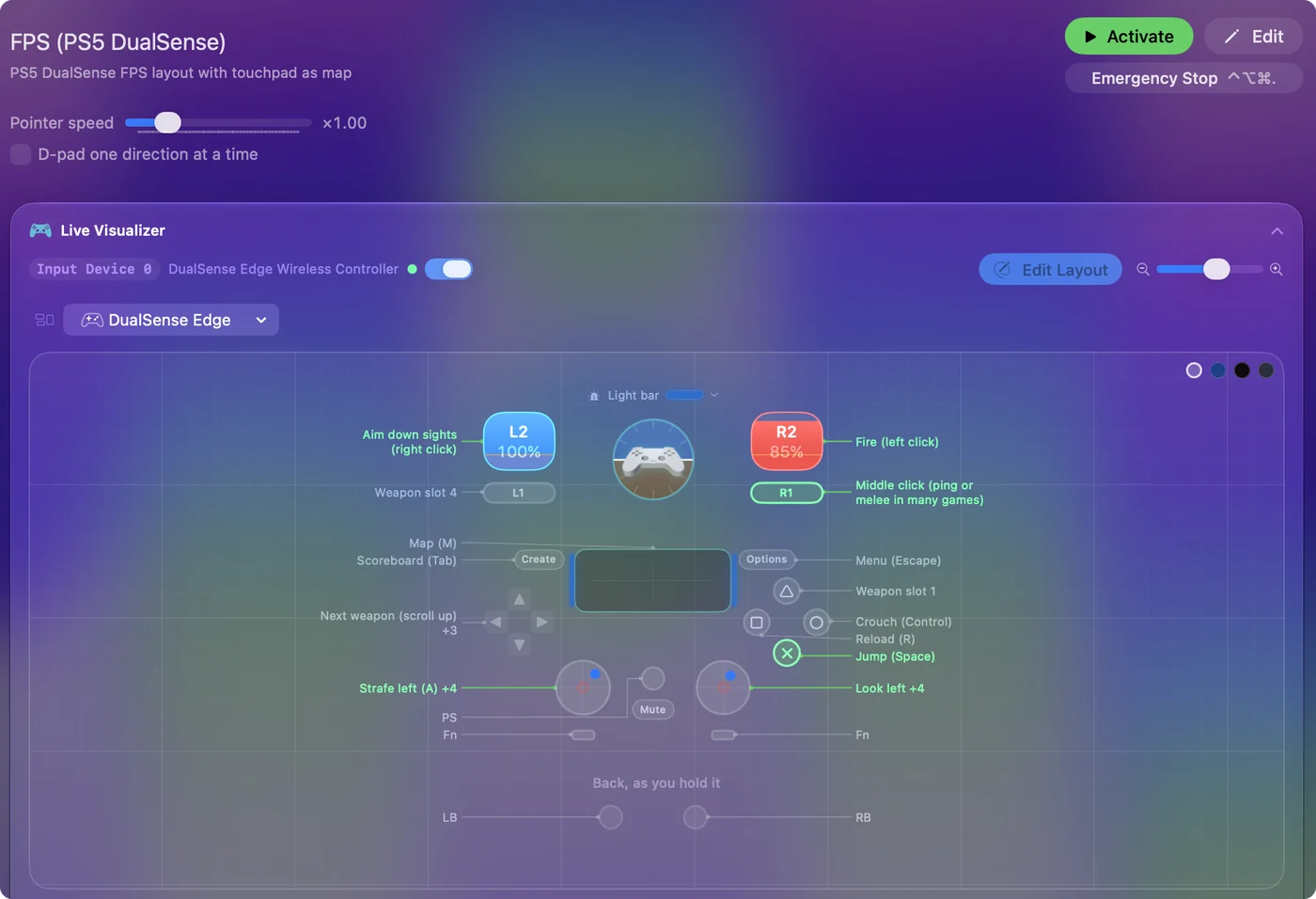
Use a controller as a mouse on a Mac shows it step by step.
More controller tests
- Gamepad tester
- Stick drift test
- PS5 controller drift test
- Xbox controller drift test
- Joy-Con drift test
- Controller vibration test
- Controller button test
- Controller trigger test
- Controller polling rate test
- Joystick test
- Racing wheel tester
- Arcade stick tester
- PS5 controller tester
- Xbox controller tester
- Switch Pro Controller tester
- Joy-Con tester
- 8BitDo controller tester
- Gamepad viewer and controller overlay
- Deadzone test and curve visualizer
- Controller button names and map
- Controller ID lookup
- Controller fix finder
- Mac game controller finder
- Preset chooser
Questions
How do I test a PS4 controller on a PC or a Mac?
Connect it with a micro USB cable or pair it over Bluetooth, open this page and press any button. Every button, stick and trigger then shows live under its PlayStation name.
How do I pair a DualShock 4 for this test?
Hold the PS button and Share together until the light bar flashes, then pick Wireless Controller in the computer's Bluetooth list.
How do I check a PS4 controller for stick drift?
Let go of both sticks and press Record 5 seconds at rest. A healthy stick reads close to 0, and the result comes with a deadzone that would hide any drift.
Can I test the PS4 touchpad and light bar here?
The touchpad click shows as a button. The touchpad surface, the motion sensors and the light bar are not part of what a browser passes to a page.
Can I test the DualShock 4 speaker and microphone here?
No. This page reads the buttons, sticks and triggers and runs the vibration. The speaker and the headset jack are sound devices, and the page does not open them.
Can I check the PS4 controller's battery here?
No. A browser does not pass a controller's battery level to a page. On a Mac, InputConfig, which is free, lists each connected controller at the top of its sidebar with its battery level.
Related
Updated