CPS test: clicks per second
 InputConfig is completely free on the Mac App Store.
Click the box as fast as you can. The timer starts on your first click. When it ends you get your clicks per second, your best for that length, your fastest gap between two clicks, how steady your clicking was, and a chart of every second. Pick a length first. Most people use 5 or 10 seconds.
Take the test
- Pick a length. Short tests show your top speed; 30 and 60 seconds show how long you can hold it.
- Click the box with the left button as fast as you can. The first click starts the timer.
- Keep going until the timer stops, then read the numbers under the box.
- Click again to start over. Your best for each length stays in this browser.
- For a count with no clock, pick No timer and press Stop when you are done. The rate is taken from your first click to your last.
Read your result
- Clicks a second. Every click divided by the length of the test.
- Your best at this length. Kept in this browser only, never uploaded, and separate for each length.
- Fastest gap. The shortest time between two clicks.
- Steadiness. How much the gaps between clicks vary. A smaller number is a steadier rhythm.
- Gaps under 30 ms. Pairs of clicks closer than a finger presses twice on purpose.
- The chart. One bar per second, so a strong start that fades shows up at once.
Most people click 6 to 8 times a second with one finger, which is my rule of thumb rather than a standard. The chart tells you more than the number: a flat row of bars is a pace you can keep.
How people click faster
- Regular clicking. One finger, one click per press. It is the steadiest and the easiest on the mouse.
- Jitter clicking. Tensing the arm so the finger shakes on the button. It is faster, and tiring.
- Butterfly clicking. Two fingers taking turns on one button.
- Drag clicking. Sliding a finger across the button so it bounces. It depends on the switch bouncing, which is also how a mouse wears out.
Some games and servers limit these techniques, and auto clickers. That is caution worth reading in the rules where you play.
If the count looks wrong
Climb this ladder, smallest step first:
- Use the left button. Only the left button counts, inside the box.
- Check for a worn switch. Many gaps under 30 ms with ordinary clicking point to a switch that double clicks. The double click test confirms it.
- Close heavy tabs. A busy browser can delay clicks, and then several arrive at once.
When you need the clicks, not the score
For a job that needs steady clicking, an auto clicker is kinder to your hand than any technique. The CPS calculator turns a speed into the milliseconds an auto clicker asks for and shows what a Mac really sends at each rate. On a Mac, InputConfig, the free app I make, can put clicking on any button or key. Test your speed here, then let a button do the repetitive part.
How this fits with InputConfig
This page measures clicks and pointer movement. InputConfig is the free auto clicker and button mapper for the same jobs on a Mac: its Auto Clicker preset clicks on a timer and starts and stops with fn F6, and any mouse button up to 32 can do something else.
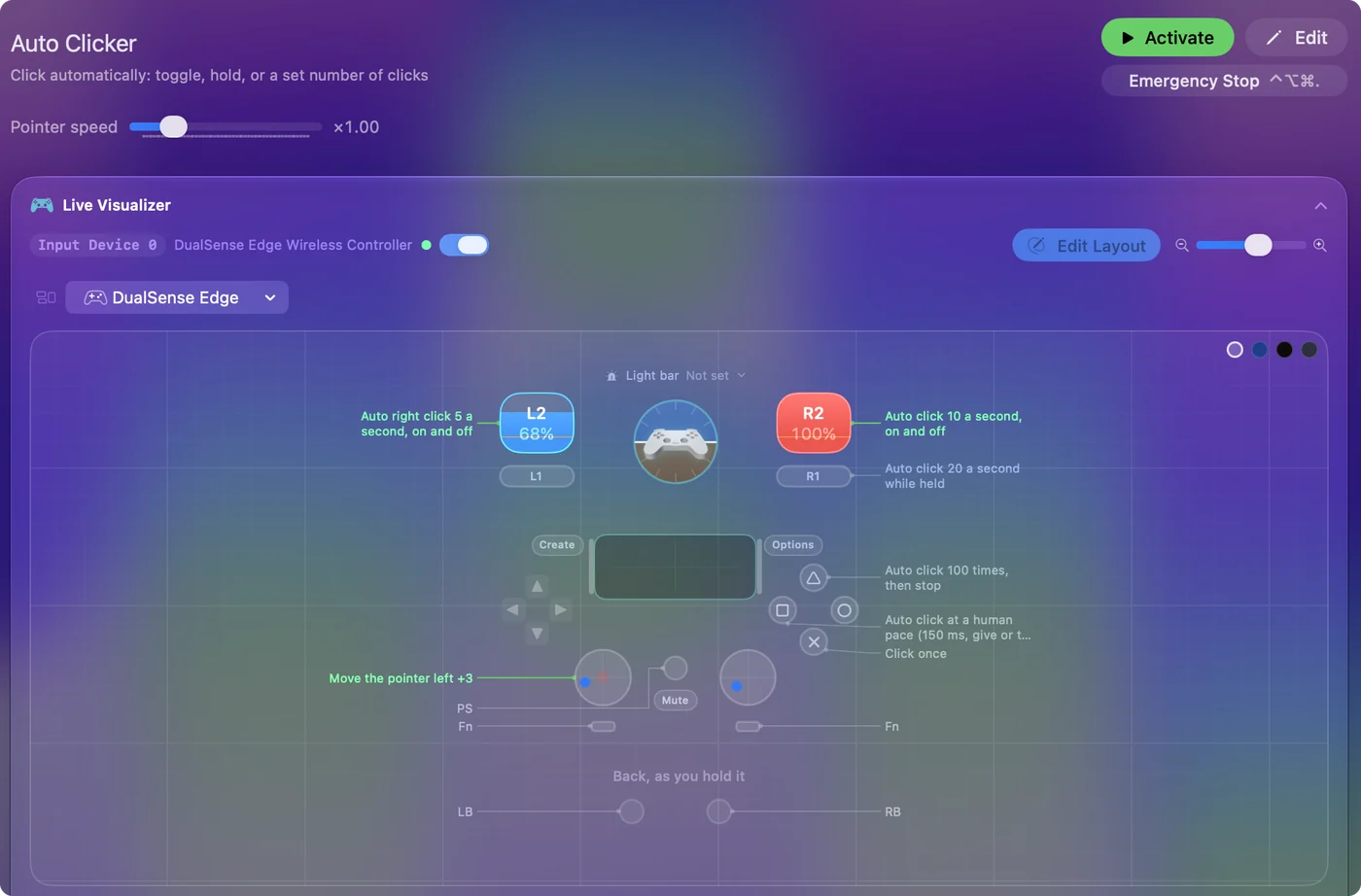
The free auto clicker for Mac shows it step by step.
More mouse and clicking tests
Questions
What is a good CPS?
Most people click 6 to 8 times a second with one finger. Jitter clicking reaches about 10 to 14, and butterfly or drag clicking goes higher, because those techniques count more than one click per finger movement. That range is a rule of thumb, not a standard.
How do I do a CPS test?
Pick a length, then click the box as fast as you can. The timer starts on your first click, and when it ends the page shows your clicks per second, your best for that length and a chart of every second.
Why does my CPS show clicks under 30 ms apart?
Butterfly and drag clicking make pairs of clicks that close on purpose. With ordinary clicking, it usually means the mouse switch is counting one press twice.
Is there a click test with no timer?
Yes. Pick No timer, click for as long as you like, and press Stop. The rate is taken from your first click to your last, and no best score is kept for an untimed run.
Related
Updated