How to use a PS5 or PS4 controller as a MIDI controller on a Mac
 InputConfig is completely free on the Mac App Store. You don't have to make an account, there are no subscriptions, and nothing is locked. Optimized for Apple silicon.
Pair the DualSense or DualShock 4 with the Mac, open InputConfig, and turn on one of its built-in MIDI presets. Cross, Circle, Square and Triangle then play notes, L2, R2 and the sticks send Control Change and pitch bend, and music apps see a MIDI input named InputConfig. The touchpad can be split into regions that each play a note, which no other pad offers.
I make InputConfig. It is free on the Mac App Store, with no account and nothing to buy inside it.
On this page
Steps
- Pair the PS5 or PS4 controller with the Mac by Bluetooth, or connect it by USB.
- Open InputConfig and activate the built-in preset MIDI: DAW Performance.
- In the music app, enable the InputConfig MIDI input and arm an instrument track.
- Press Cross to play a note.
Set it up
- You: Connect the controller, open InputConfig, and activate MIDI: DAW Performance from the built-in presets. Arm a software instrument track in the music app and press Cross.
- InputConfig: Publishes a MIDI source named InputConfig while it runs, and sends a note for as long as the button is held.
- Check: The track's meter moves and you hear middle C.
- Logic Pro and GarageBand. Nothing to switch on. They listen to every MIDI source, InputConfig included.
- Ableton Live. In Settings, Link, Tempo and MIDI, switch on Track for the InputConfig input to play notes, and Remote to map controls.
- FL Studio, Reaper, Bitwig and others. Enable the InputConfig input in the app's MIDI settings.
You do not need the IAC Driver or a virtual MIDI cable for any of this. How to connect a PS5 controller to a Mac and a PS4 controller have the pairing steps.
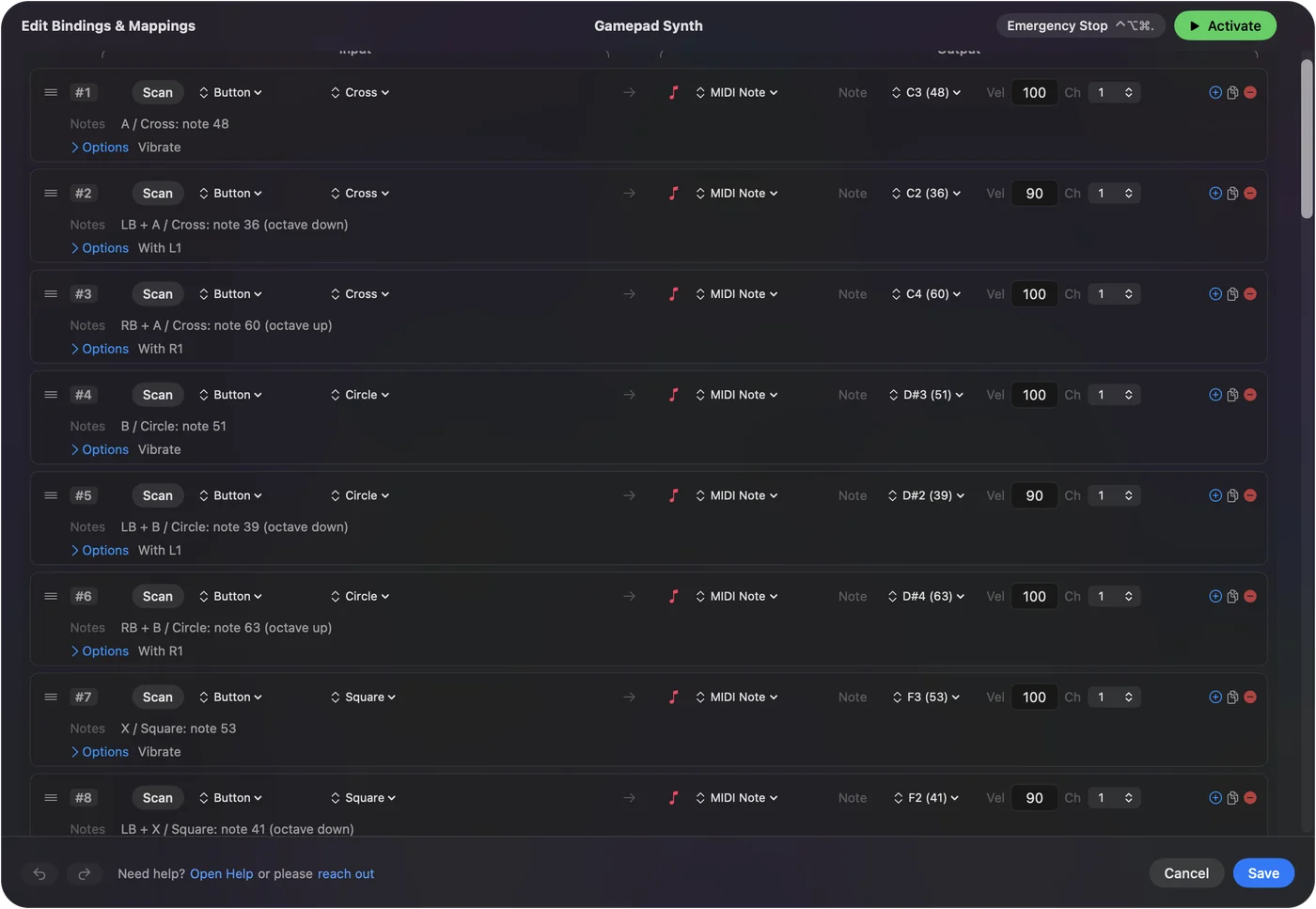
Know what each control sends
| PlayStation control | Sends, in MIDI: DAW Performance |
|---|---|
| Cross | Note C4 (60) |
| Circle | Note E4 (64) |
| Square | Note G4 (67) |
| Triangle | Note C5 (72) |
| Right stick, left and right | Pitch bend, down and up |
| Right stick, down | CC 1, modulation |
| L2 | CC 11, expression |
| R2 | CC 7, volume |
| D-pad up, down, right | MIDI Start, Stop, Continue |
Every row can be changed: another note, another CC number, another channel. The buttons play notes, and anything you can move gradually sends a value that follows it.
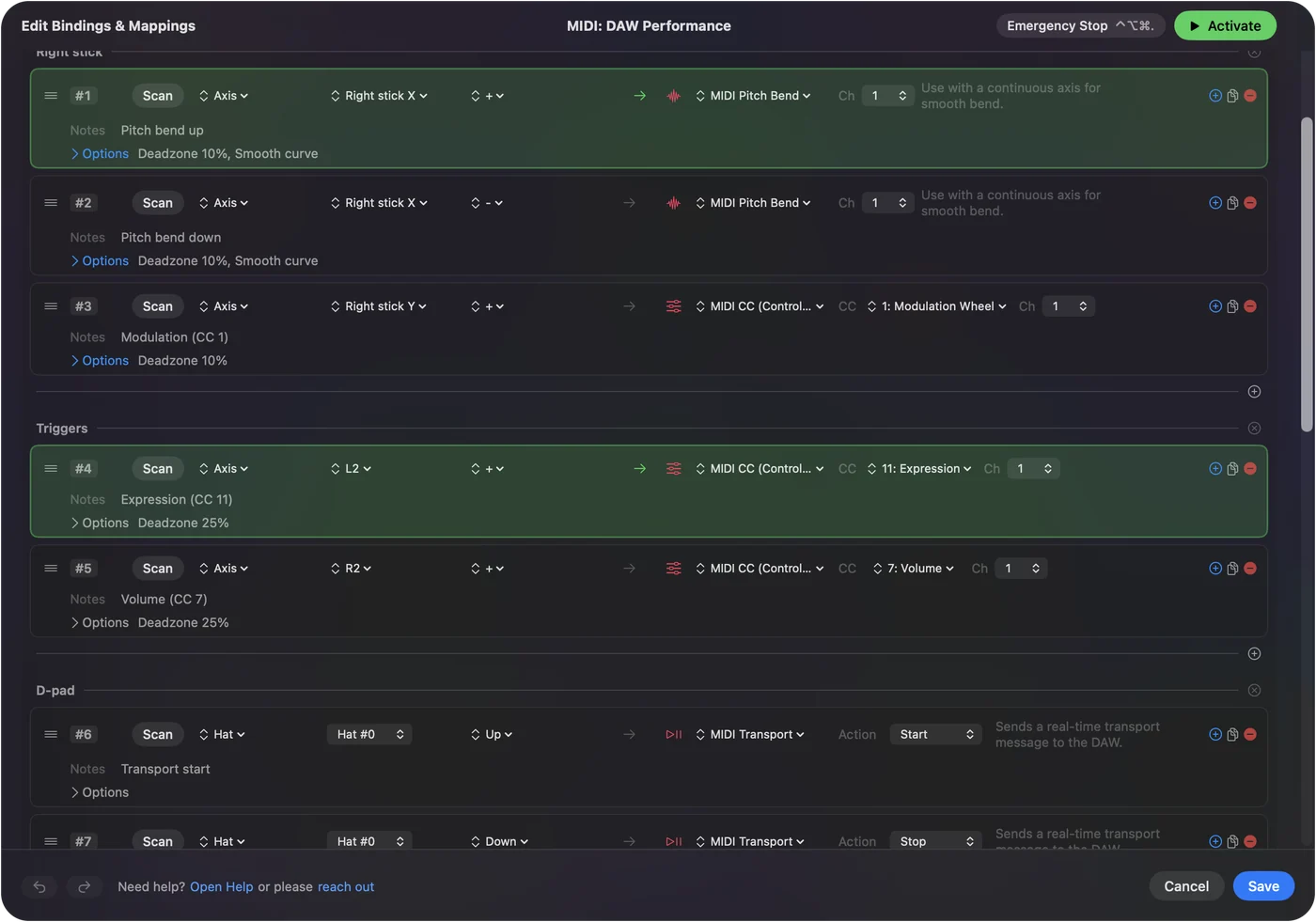
Pick the preset for the job
- Playing and recording. MIDI: DAW Performance gives you four notes, pitch bend, modulation, expression, volume and transport.
- Drums. MIDI: Drum Pad: kick on Cross, snare on Circle, closed hat on Square, open hat on Triangle, a tom on L2 and a crash on R2, all on channel 10. Hold a button and it rolls.
- Knobs. MIDI: CC Dials: both sticks and both triggers become six controllers, CC 1, 11, 74, 71, 7 and 10.
I would start from the preset closest to what you want and change rows as you go. Gamepad to MIDI on a Mac builds a fuller instrument with a pentatonic scale across eight buttons.
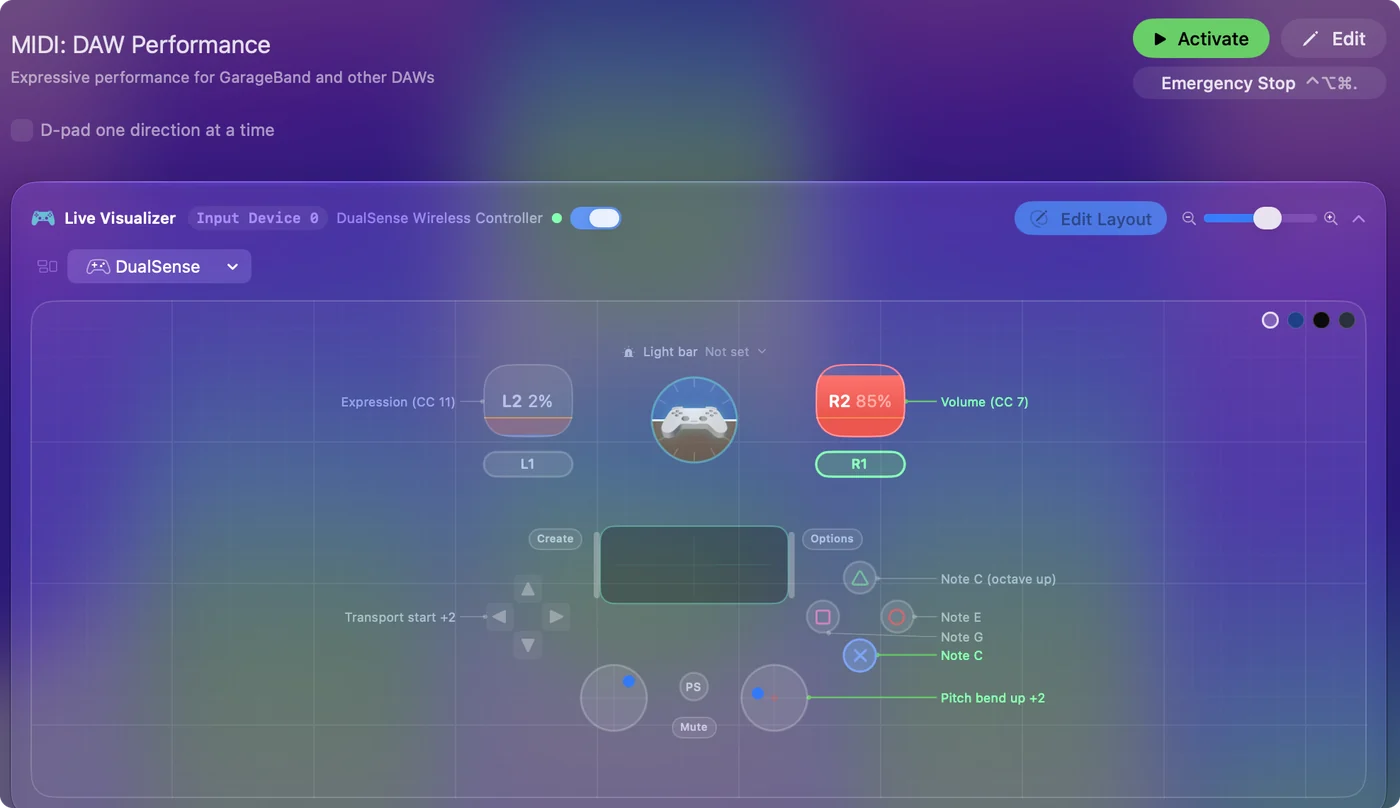
Use the PlayStation extras
- Touchpad regions. Draw regions on the touchpad and each one is an input of its own, with every option a button has. Four regions are four more drum pads. Touchpad tap regions has the steps.
- Analog triggers. L2 and R2 report how far they are pulled, so a CC on one swells and fades under a finger.
- Gyro. A Gyro row can send a CC, but it acts as a switch: the value you set while the controller is turning, and 0 when it stops. Good for kicking an effect on with a flick, not for a smooth sweep.
- Light bar. A preset can carry its own light bar color, so the pad shows when the MIDI layout is the active one.
- DualSense Edge. The back paddles and FN buttons are inputs too, which adds notes.
The touchpad is the part of this controller that an Xbox pad has no answer to.
Map a trigger to a knob in the music app
The music app sees InputConfig as one more MIDI keyboard, so its own MIDI learn does the mapping.
- Logic Pro. Click the control, choose Logic Pro, Control Surfaces, Learn Assignment, move the trigger or stick, then choose it again to finish.
- Ableton Live. Press Command M for MIDI Map Mode, click the control, move the trigger or stick, and press Command M again.
- GarageBand. There is no MIDI learn. It plays the notes and follows pitch bend and the modulation wheel, CC 1.
Move one control at a time while the app is learning, because it takes whichever one moved last. MIDI learn explains the idea.
If the music app hears nothing
- Check InputConfig is running and the preset is active. The MIDI port exists only while the app runs.
- Open the Live Visualizer and press a button. If nothing lights, the Mac is not reading the controller.
- Enable the InputConfig input in the music app, and arm the track.
- Match the channel. MIDI: Drum Pad sends on channel 10, and a track that listens to one channel must be set to the same number.
When nothing sounds, it is usually a track that is not armed or an input that is not switched on. The PS5 controller tester and the PS4 controller tester show whether the browser can read the pad at all.
What it cannot do
- Velocity from the buttons. A button is on or off. Each note plays at the velocity set in its row, from 1 to 127.
- A smooth gyro sweep. The gyro is a switch for MIDI. Use a stick or a trigger for a sweep.
- Follow the beat with the light bar. The color is set for a whole preset, not for each note.
For dynamics, set the velocity in the row and ride expression on L2.
The short version
- Connect. Use Bluetooth or USB.
- Activate. Pick MIDI: DAW Performance, MIDI: Drum Pad or MIDI: CC Dials.
- Enable. Turn on the InputConfig input in the music app, then arm a track.
A DualSense is four pads, two faders, two joysticks and a touch strip that already sits on the desk.
Questions
Can a PS5 controller be used as a MIDI controller on a Mac?
Yes. InputConfig, a free Mac app, sends MIDI notes from the DualSense's buttons and touchpad regions, and Control Change and pitch bend from L2, R2 and the sticks.
Does a PS4 controller work as a MIDI controller too?
Yes. The DualShock 4 works the same way, touchpad regions and analog triggers included.
Can the DualSense touchpad send MIDI?
Yes, as pads. Split the touchpad into regions and each region can play its own note or send its own message when a finger lands in it.
Can the DualSense gyro control a MIDI CC?
As a switch. A Gyro row sends the CC value you set while the controller is turning and 0 when it stops. For a smooth sweep use a stick or a trigger.
Do I need the IAC Driver or a virtual MIDI cable?
No. InputConfig creates its own MIDI source, named InputConfig, whenever it runs.
Does it work with Logic Pro and GarageBand?
Yes. Both listen to every MIDI source, so there is nothing to enable. Arm a software instrument track and press a button.
Related
This page in other languages: Français, 日本語
Updated