What is MIDI learn?
 InputConfig is completely free on the Mac App Store. You don't have to make an account, there are no subscriptions, and nothing is locked. Optimized for Apple silicon.
MIDI learn is the feature that lets you link a hardware control to a control on screen without knowing any numbers. You put the app in learn mode, click the knob or fader you want to control, and move a control on your MIDI device. The app notes which message arrived and ties the two together. From then on, the hardware moves the control on screen.
I make InputConfig, a free Mac app whose Scan button is the same idea pointed at the whole Mac: it learns a control and gives it a shortcut. Logic Pro and Ableton Live each have their own learn mode, and the steps for both are below.
On this page
Steps
- Turn the MIDI device's input on in the music app.
- Put the app in its learn or mapping mode.
- Click the control on screen that you want to move.
- Move one knob, fader or pad on the MIDI device.
- Leave learn mode and try it.
Know what the app is learning
When you move the hardware control, it sends a message: most often a Control Change with a controller number, sometimes a note. The app stores that number and the channel next to the on-screen control. Nothing changes on the hardware. MIDI learn is the app remembering which message goes with which control. The MIDI CC list names the controller numbers, though with learn you never have to look one up.
Use it in Logic Pro
- You: Click the plugin or mixer control. Choose Logic Pro, Control Surfaces, Learn Assignment, then move the knob or fader on your device. Choose Learn Assignment again to finish.
- Logic Pro: Ties that control to the message it received.
- Check: Move the hardware control and the one on screen follows.
In Logic the order is the control on screen first, then the hardware.
Use it in Ableton Live
- You: Switch Remote on for the device's input in Settings, Link, Tempo and MIDI. Press Command M for MIDI Map Mode, click the control, move the knob, and press Command M again.
- Ableton Live: Shows the mapping while the mode is on and keeps it when you leave.
- Check: The hardware moves the control on screen.
If the MIDI comes from InputConfig, switch on Track and Remote for the InputConfig input in Settings, Link, Tempo and MIDI. Track sends the notes to your tracks, and Remote lets the mapping hear the input.
Without Remote switched on for the input, Live hears the notes and ignores the mapping.
Find it in Cubase, Reaper, FL Studio and Pro Tools
Each of these has a way to link a hardware control to a parameter, and the names and places differ from Logic Pro and Ableton Live. I checked the Ableton steps above against Ableton's manual on October 27, 2026. I have not checked the current menus of the other four, so I will not give you a path from memory.
- Search the manual. Look for learn, MIDI mapping, controller assignment or remote control.
- Turn the input on first. Learn only hears a device whose input is switched on in the app's MIDI settings.
- Learn one control, then test it. Move the hardware and watch the on-screen control follow.
The menus change from app to app, but the order almost never does: control on screen first, hardware second.
Know where it is missing
Not every app has it. GarageBand has no MIDI learn: it plays the notes and follows pitch bend and the modulation wheel like any keyboard, and that is all. Most other music apps have a learn or mapping mode under their MIDI settings, and the names differ.
If an app has no learn mode, its controls can still be reached through keyboard shortcuts, and a mapper turns MIDI into those.
Learn one control at a time
- One at a time. If two hardware controls send the same message, the app learns whichever moved last.
- Keep still. A wheel or a pedal that is moving while you learn another control gets learned in its place.
- Check the input. If nothing is learned, the device's input is not switched on in the app.
When a mapping goes to the wrong control, something else was moving during the learn.
Learn a control for the whole Mac
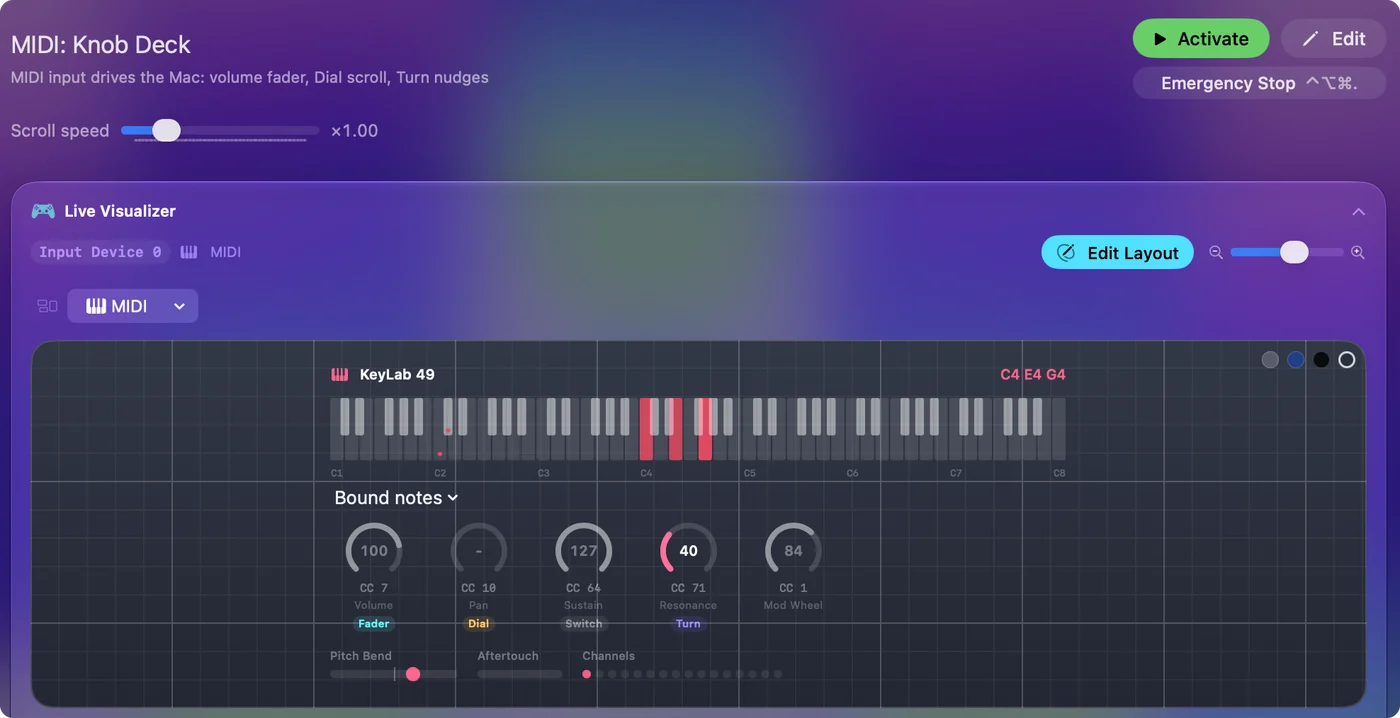
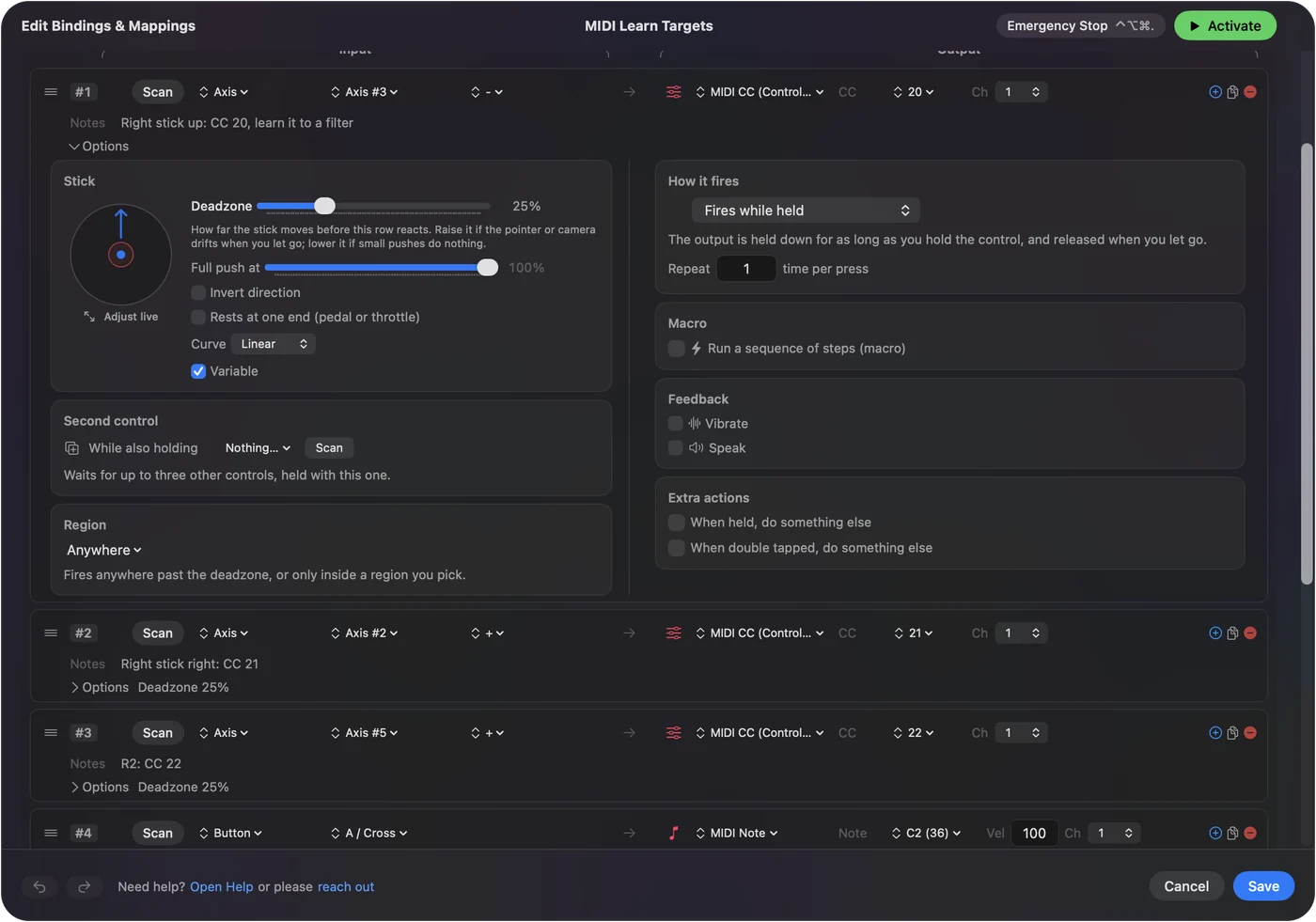
MIDI learn stops at the edge of the music app. InputConfig does the same thing for everything else: add a row, press Scan, move a knob or hit a pad, and the row is bound to it. Then choose what it sends, such as a keyboard shortcut, a click, the system volume, or an app to open. It works in the other direction too: give a game controller's stick a CC number, and any music app's MIDI learn picks it up as if it were a knob.
Scan is MIDI learn for apps that never had it. MIDI to keystroke on a Mac and gamepad to MIDI on a Mac have the steps.
The short version
- What. The app links a hardware control to an on-screen one by listening to what you move.
- How. Learn mode, click the control, move the hardware, leave learn mode.
- Limits. One control at a time, and only in apps that have it.
You show the app the control, and it remembers the number for you.
Questions
What does MIDI learn mean?
A mode where an app assigns a hardware control to an on-screen control by listening: you click the control on screen, move a knob or pad, and the app links the two.
How do I use MIDI learn in Logic Pro?
Click the control you want to move, choose Logic Pro, Control Surfaces, Learn Assignment, move the knob or fader on your device, then choose Learn Assignment again to finish.
Can I MIDI learn a game controller in Ableton Live?
Yes, once its MIDI comes from InputConfig. Give a stick a CC number, switch on Track and Remote for the InputConfig input in Live's settings, press Command M, click the control, move the stick, and press Command M again.
How do I MIDI map in Ableton Live?
Switch Remote on for the device's input in Settings, Link, Tempo and MIDI. Press Command M, click the control, move the knob, and press Command M again.
How do I use MIDI learn in Cubase, Reaper or FL Studio?
Each has its own learn or mapping feature and I have not checked their current menus. Search the manual for learn, MIDI mapping or controller assignment, and switch the device's input on first.
Does GarageBand have MIDI learn?
No. GarageBand plays notes and follows pitch bend and the modulation wheel, but it has no mode for assigning a knob to a control.
Related
This page in other languages: 日本語, Português, Русский
Updated