Auto clicker script for Mac
 InputConfig is completely free on the Mac App Store. You don't have to make an account, there are no subscriptions, and nothing is locked. Optimized for Apple silicon.
AppleScript can click a button it can name, but not any spot on the screen. For clicks at a point from Terminal, the free cliclick tool does it in one line. If you only want clicks on a timer with no code, InputConfig, free on the Mac App Store, does it from a key or a button.
On this page
Steps
- Install cliclick with Homebrew: brew install cliclick.
- Allow Terminal in System Settings, Privacy & Security, Accessibility.
- Run cliclick c:. to click where the pointer is.
- Put it in a loop with a sleep to click on a timer.
- Press Control C to stop the loop.
Know what AppleScript can click
AppleScript talks to apps through System Events, which can click a button or a menu item by its name. It has no plain way to click a point on the screen. For a button with a name, AppleScript works. For a spot on the screen, use cliclick.
Click from Terminal with cliclick
cliclick is a free, open-source command-line tool by Carsten Blüm that clicks, moves the pointer and types from Terminal.
Terminal: Install it.
brew install cliclickWhat happens: Homebrew installs it, and cliclick -h lists every command.
Terminal: Click at x 500, y 300.
cliclick c:500,300What happens: One click lands at that point. A dot instead of numbers clicks where the pointer is.
Terminal: Click where the pointer is, ten times a second, until you press Control C.
while true; do cliclick c:.; sleep 0.1; doneWhat happens: Clicks repeat until you press Control C in that Terminal window.
Terminal needs Accessibility access for the clicks to land, in System Settings, Privacy & Security, Accessibility.
Use the cliclick cheat sheet
These commands are from the cliclick README, which I read on October 27, 2026. Coordinates are x,y. A + or - in front of a number moves relative to the pointer, and a dot means where the pointer is now. Terminal needs Accessibility access first.
| Command | What it does | Example |
|---|---|---|
| c:x,y | Click | cliclick c:500,300 |
| dc:x,y | Double click | cliclick dc:500,300 |
| tc:x,y | Triple click | cliclick tc:500,300 |
| rc:x,y | Right click | cliclick rc:500,300 |
| m:x,y | Move the pointer | cliclick m:+50,+0 |
| dd:, dm:, du: | Drag: press down, move, then release | cliclick dd:100,100 dm:200,200 du:300,300 |
| t:text | Type text into the front app, in quotes if it has spaces | cliclick t:"Hello there" |
| kp:key | Press and release a key such as return or esc | cliclick kp:return |
| kd: and ku: | Hold and release modifier keys (alt, cmd, ctrl, fn, shift) | cliclick kd:cmd,alt |
| w:ms | Wait, in milliseconds | cliclick w:500 |
| p:. | Print the pointer position | cliclick p:. |
One call takes any number of commands, run in order, so a click at one spot, a wait and a click at another spot is one line.
Terminal: Click two spots a second apart, then put the pointer back where it was.
cliclick -r c:500,300 w:1000 c:700,300What happens: The -r option restores the pointer to where it started when the commands finish.
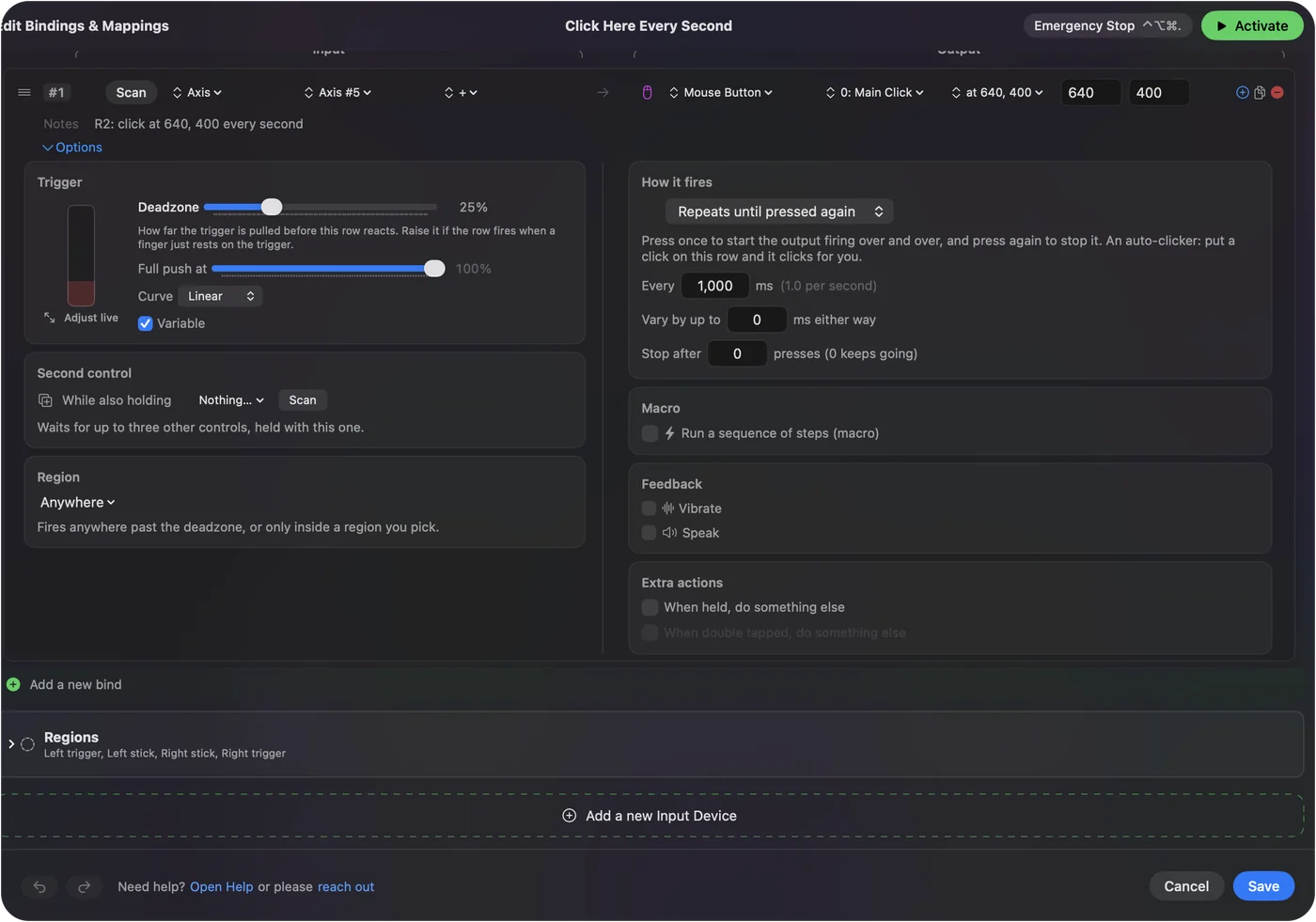
Several spots in order is the one thing a script does that a single InputConfig row does not.
Decide when a script beats an app
- A script wins for several spots. One cliclick call can visit as many points as you list, while each InputConfig row clicks one spot.
- A script wins inside bigger scripts. A shell script can run cliclick as one step among others.
- An app wins for starting and stopping. A hotkey or a controller button starts it, the gap is a number in milliseconds, and the emergency stop ends it from any app.
Skip the script
A loop in Terminal stops only from that window. In InputConfig, the built-in Auto Clicker preset starts and stops with fn F6, the gap is set in milliseconds, and the emergency stop, Control Option Command period, ends it from anywhere. The free auto clicker for Mac has the setup.
The short version
- A named button. AppleScript and System Events.
- A spot on screen. cliclick c: with the coordinates.
- Clicks on a timer, no code. InputConfig's Auto Clicker preset.
Questions
Can AppleScript click the mouse at a point?
Not in a plain way. AppleScript clicks buttons and menu items by name through System Events. For a point on the screen, use cliclick.
How do I auto click from Terminal on a Mac?
Install cliclick with brew install cliclick, allow Terminal in Accessibility, and run cliclick c:. in a loop with a short sleep.
What commands does cliclick have?
The README lists click (c:), double click (dc:), triple click (tc:), right click (rc:), move (m:), drag (dd:, dm:, du:), type (t:), key press (kp:), modifier down and up (kd:, ku:), wait (w:), print position (p:) and the color at a point (cp:).
Related
This page in other languages: 日本語, Türkçe, 简体中文
Updated