Is there AutoHotkey for Mac? The alternatives, job by job
 InputConfig is completely free on the Mac App Store. You don't have to make an account, there are no subscriptions, and nothing is locked. Optimized for Apple silicon.
No. AutoHotkey's own project page describes it as a macro-creation and automation-oriented scripting utility for Windows. Nothing on a Mac is the same tool, but each thing people use it for has a Mac answer, and most of them are free. This page sorts them by job, because on a Mac the jobs belong to different tools.
I make InputConfig, a free, open-source Mac app that covers three of those jobs: hotkeys on spare keys and mouse buttons, macros, and auto clicking. It is not a scripting language, and the page says what it leaves out.
On this page
Steps
- Write down what each of your AutoHotkey scripts does: expand text, remap a key, run a hotkey, play a macro or click repeatedly.
- For text expansion and menu shortcuts, open System Settings, Keyboard.
- For key-to-key remaps beyond the modifier keys, use Karabiner-Elements.
- For hotkeys on spare keys or mouse buttons, macros and auto clicking, install InputConfig and add a row for each.
- Press Scan on a row, press the key or button, and choose what it sends.
Find the Mac tool for each job
| You use AutoHotkey to | On a Mac |
|---|---|
| Expand an abbreviation into text | Text Replacements, in the Keyboard section of System Settings |
| Change what a modifier key does | macOS: System Settings, Keyboard, Keyboard Shortcuts, Modifier Keys |
| Turn any key into any other key | Karabiner-Elements, free and open source |
| Change the shortcut for a menu command | macOS: Keyboard Shortcuts, App Shortcuts |
| Run a chain of actions from a key combination | The Shortcuts app, where a shortcut can have its own key combination |
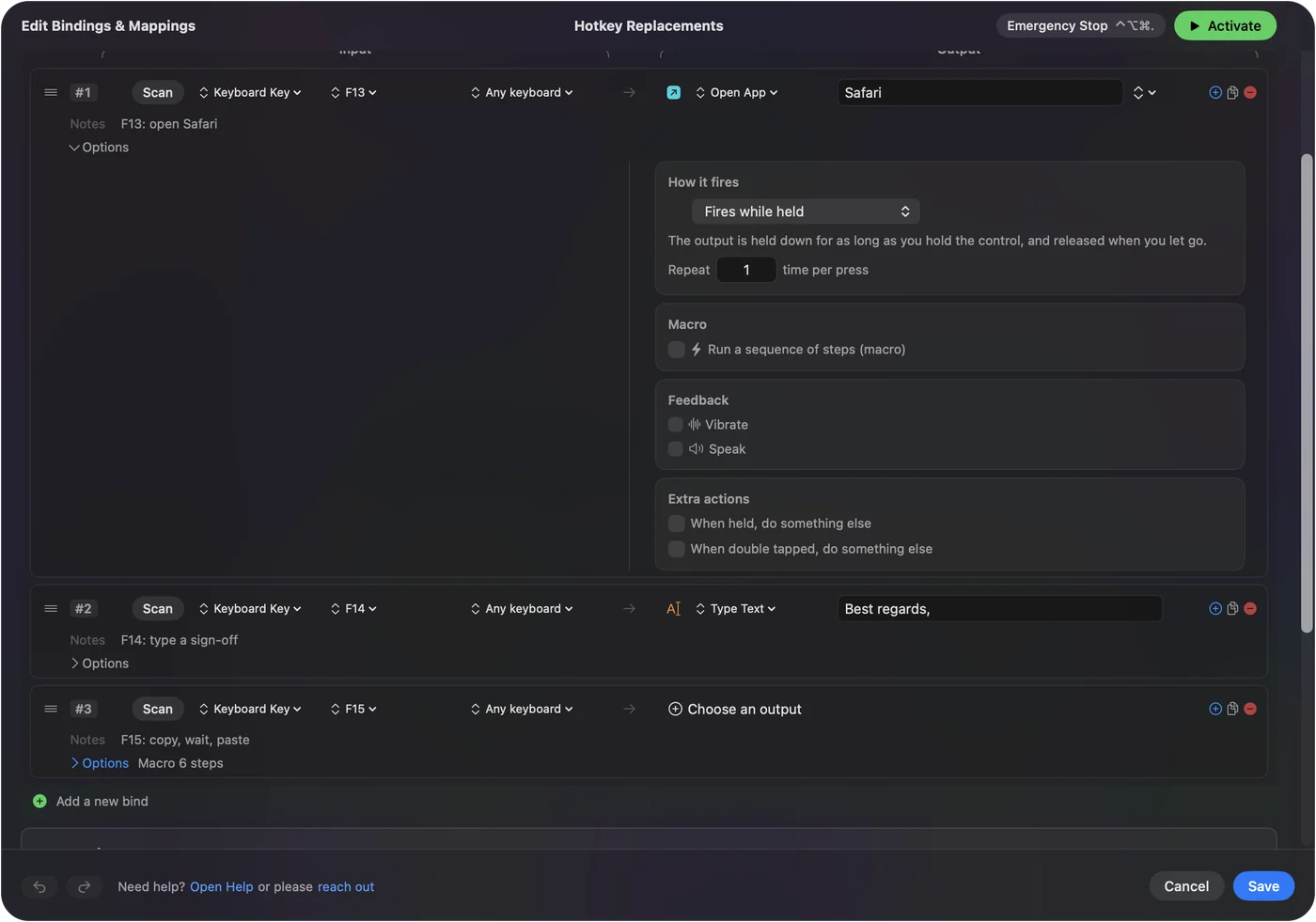
| Give a spare key or a mouse button a job | InputConfig: F13 to F19, the right-hand modifiers, side buttons |
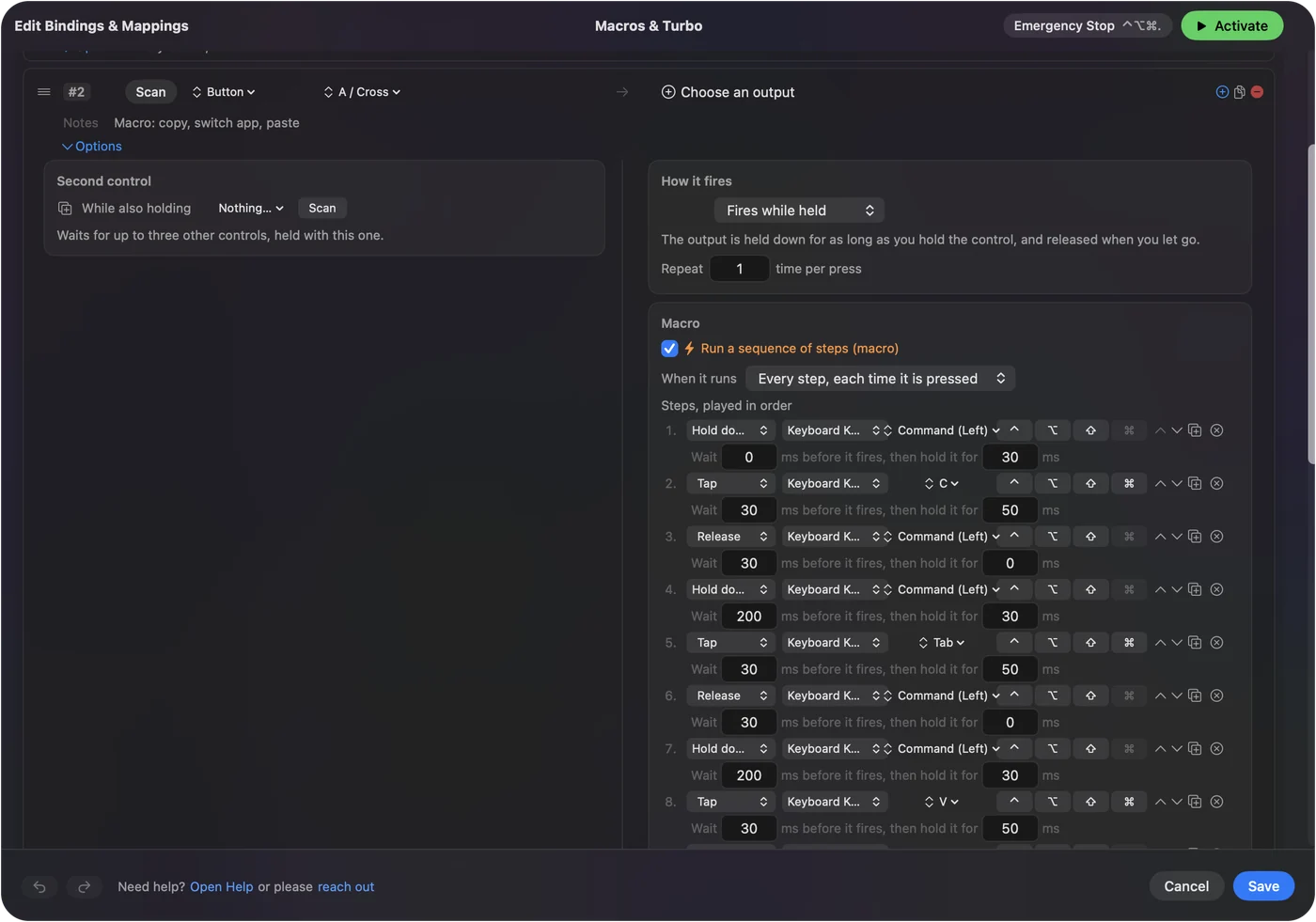
| Play a timed sequence of keys and clicks | An InputConfig macro |
| Click or press a key over and over | InputConfig's repeat settings: turbo while held, or until pressed again |
AutoHotkey is one tool on Windows, and on a Mac its jobs belong to four.
Translate each AutoHotkey command
If you know AutoHotkey, this table maps its common commands to the Mac tool that does the same job. Rows that say InputConfig are rows you build in the editor, with no script.
| In AutoHotkey | On a Mac |
|---|---|
| Send | InputConfig: a Keyboard Key output for a key or a shortcut, or Type Text for a whole phrase |
| Click | InputConfig: a Mouse Button output, which clicks wherever the pointer is or always at one spot with At a fixed point |
| A SetTimer or a Loop that repeats | InputConfig: the row option Repeats until pressed again, with Every set in milliseconds |
| Sleep between steps | InputConfig: the wait before each step of a macro, in milliseconds |
| #HotIf WinActive (#IfWinActive in version 1) | InputConfig: per-app auto-switch, where a preset takes over when its app comes to the front |
| Hotstring | macOS: Text Replacements, in the Keyboard section of System Settings |
| Remap one key to another (a::b) | Karabiner-Elements, because InputConfig adds a job to a key and does not swap it |
The per-app auto-switch page and how to make a macro on a Mac cover the two rows people ask about most. Every AutoHotkey line has a home on a Mac, though not always in the same app.
Use what macOS already does
- Typing a phrase. Text Replacements expand a short abbreviation into any text you like, in most apps.
- A new shortcut for a menu command. App Shortcuts gives any menu item the key combination you want.
- Swapping modifiers. Modifier Keys changes what Caps Lock, Control, Option, Command and Globe do. Caps Lock to Escape is in that list.
- Multi-step automations. The Shortcuts app chains actions such as opening apps, resizing windows and working with files.
Key remapper for Mac goes through the three settings panes. Check System Settings first, because several AutoHotkey jobs need nothing installed on a Mac.
Add hotkeys, macros and auto clicking
- You: In InputConfig, make a preset and add a row. Press Scan, then press the key or click the mouse button. Choose the output: a key combination, a macro, Type Text, Open App, Run Siri Shortcut, or a system function.
- InputConfig: Runs the output whenever you press that input, in every app, while the preset runs. A preset with only keyboard rows needs no controller.
- Check: Activate the preset and press the key.
- Macros. A timed chain of keys, shortcuts and clicks. See how to make a macro on a Mac.
- Auto clicking. Clicks that repeat while held, or until you press again. See the auto clicker guide.
- A different set per app. One preset per app, with auto-switch.
A key that types nothing, such as F13, makes the cleanest hotkey.
Pick a scripting tool if you want to keep writing code
Three Mac tools come up beside InputConfig for people who miss a script file. Each fact below is from the tool's own page, which I read on October 27, 2026, and I have not tested these three myself.
- Hammerspoon. Its page calls it a bridge between macOS and a Lua scripting engine, and you write your setup in a file named init.lua. If you want a script file again, I would look at this one first.
- Keyboard Maestro. Its page calls it Mac automation software that can automate apps, websites, text or images, on command or on a schedule. It is a one-time purchase with a free trial, according to the page.
- BetterTouchTool. Its page says it customizes trackpad gestures, the mouse, keyboard shortcuts, the menu bar and Stream Deck. It lists a 45 day free trial before you buy a license.
InputConfig does not script anything. It is a better fit when the job is a key, a button, a controller or a pad starting something, and a scripting tool is a better fit when the job is logic. Choose by whether you want to write code or just give a key a job.
What a Mac does not give you
- A scripting language inside InputConfig. It has rows and macros and no script. A scripting tool such as Hammerspoon is closer to AutoHotkey, and otherwise each job goes to its own tool.
- Your .ahk files. They are Windows scripts. Nothing on this page runs them, so each job is rebuilt.
- Key blocking in InputConfig. It listens to the keyboard beside macOS, so a bound key still does its normal job as well. Swapping or silencing a key is Karabiner-Elements' work.
- Recorded macros in InputConfig. A macro is built step by step and is not recorded by watching you.
InputConfig adds jobs to keys and buttons, and it does not replace a programming language.
Avoid "AutoHotkey for Mac" downloads
AutoHotkey's project builds for Windows only, so a Mac download under that name did not come from its makers. Use the settings macOS already has, and for anything added, an app from the Mac App Store or a project whose source you can read. A file offered as AutoHotkey for macOS is not from the AutoHotkey project.
The short version
- Text expansion and menu shortcuts. These are in System Settings, Keyboard.
- Any key into any other key. Use Karabiner-Elements.
- Hotkeys on spare keys and buttons, macros, auto clicking. Use InputConfig.
- A script file. Look at Hammerspoon, Keyboard Maestro or BetterTouchTool.
Sort your scripts by job, and each one has a home on a Mac.
Questions
Is there AutoHotkey for Mac?
No. AutoHotkey's project page describes it as a scripting utility for Windows, and it has no Mac version. On a Mac its jobs are split between macOS settings, the Shortcuts app, Karabiner-Elements and a mapper such as InputConfig.
What is the best AutoHotkey alternative for Mac?
There is no single best one, because the jobs split. Text Replacements and App Shortcuts are built into macOS, Karabiner-Elements remaps keys, InputConfig adds hotkeys on spare keys and mouse buttons, macros and auto clicking, and Hammerspoon is the closest to a script file.
How do I do text expansion on a Mac?
Use Text Replacements, in the Keyboard section of System Settings. A short abbreviation expands into any text you like, in most apps, with nothing to install.
How do I turn an AutoHotkey script into a Mac setup?
You cannot run the .ahk file, so rebuild it one job at a time. Use the table on this page: a Send becomes a Keyboard Key or Type Text output, a Click becomes a Mouse Button output, a timer becomes Repeats until pressed again, and a Hotstring becomes a Text Replacement.
Can I make a hotkey that runs a macro on a Mac?
Yes. In InputConfig, bind a key such as F13, a mouse side button or a controller button to a macro: a timed chain of keys, shortcuts and clicks.
Does AutoHotkey run on Apple silicon?
No. AutoHotkey's project describes it as a scripting utility for Windows, so there is no build for Apple silicon Macs. I have not tested running it inside Windows on a Mac, and a script there would only see that copy of Windows, not your Mac apps.
Related
This page in other languages: 日本語
Updated