MMOs, MOBAs and strategy games on a Mac with a controller
 InputConfig is completely free on the Mac App Store. You don't have to make an account, there are no subscriptions, and nothing is locked. Optimized for Apple silicon.
Some do: Baldur's Gate 3, Civilization VII, Path of Exile and Final Fantasy XIV have their own controller support, and World of Warcraft has a basic gamepad mode. The rest read only a keyboard and mouse, and a mapper such as InputConfig gives them a pad. These are the genres built around a mouse, and the ones where a controller helps most when a wrist or a hand has had enough. The table says which is which, checked in September 2026.
On this page
Look up the game
| Game | On a Mac | Its own controller support | Layout |
|---|---|---|---|
| World of Warcraft | Native | A gamepad mode, off by default. The ConsolePort addon builds on it | WoW, and the three ways |
| Final Fantasy XIV | Mac client; Rosetta on Apple silicon | A full gamepad mode, the cross hotbar, when it sees your pad | FFXIV |
| League of Legends | Native, Riot client | Since April 2026, WASD mode accepts a controller, as an accessibility feature; not confirmed on Mac | League, and the full answer |
| Dota 2 | Native, Steam | None listed by Steam; Steam Input can map a pad | Dota 2 |
| Baldur's Gate 3 | Native, Steam | Full, per Steam | BG3 |
| Civilization VI | Native, Steam | None listed by Steam | Civ VI |
| Civilization VII | Native, Steam | Full, per Steam | Civ VII |
| Path of Exile | Native, Steam | Full, per Steam | Path of Exile |
| Stellaris | Native, Steam | None listed by Steam | Stellaris |
| Crusader Kings III | Native, Steam | None listed by Steam | CK3 |
| Hearts of Iron IV | Native, Steam | None listed by Steam | HoI4 |
| Total War: Warhammer III | Native, Steam | None listed by Steam | Warhammer III |
| StarCraft II | Native, Battle.net | None | StarCraft II |
"Per Steam" means the game's Steam store page, which lists controller support per game rather than per platform.
If the game has its own support, use it
Baldur's Gate 3, Civilization VII, Path of Exile and Final Fantasy XIV all have interfaces designed for a pad, and a mapper will not beat them. When one of them ignores your controller, climb this ladder, smallest step first:
- Check the Mac. The pad should be under Game Controllers in the System Settings sidebar, with its buttons lighting up.
- Flip Steam Input. Try the game with Steam Input on and then off (works in Steam but not in the game).
- Use the keyboard layout. A layout for the keyboard game is the fallback that always works.
If it does not, use a layout
Every layout in the table is in the app's Smart Preset Maker, which has ready layouts for more than 450 games and apps, and loads in two clicks. They come in two shapes:
- MOBAs and grand strategy. Pointer games: the pointer on the left stick, the map or camera on the right, left and right click on the triggers, and the game's most used keys on the face buttons and bumpers.
- MMOs. Movement on the left stick as W, A, S and D, action bar slots on the buttons, and the mouse on the right stick for the camera.
Three settings make pointer games comfortable on a pad:
- A slower pointer behind a held bumper. For small targets, with chords.
- Variable Sensitivity with the Smooth curve. A small push is a small move (variable sensitivity).
- Gyro pointing. On a DualSense or DualShock 4, tilting the pad moves the cursor (gyro aim).
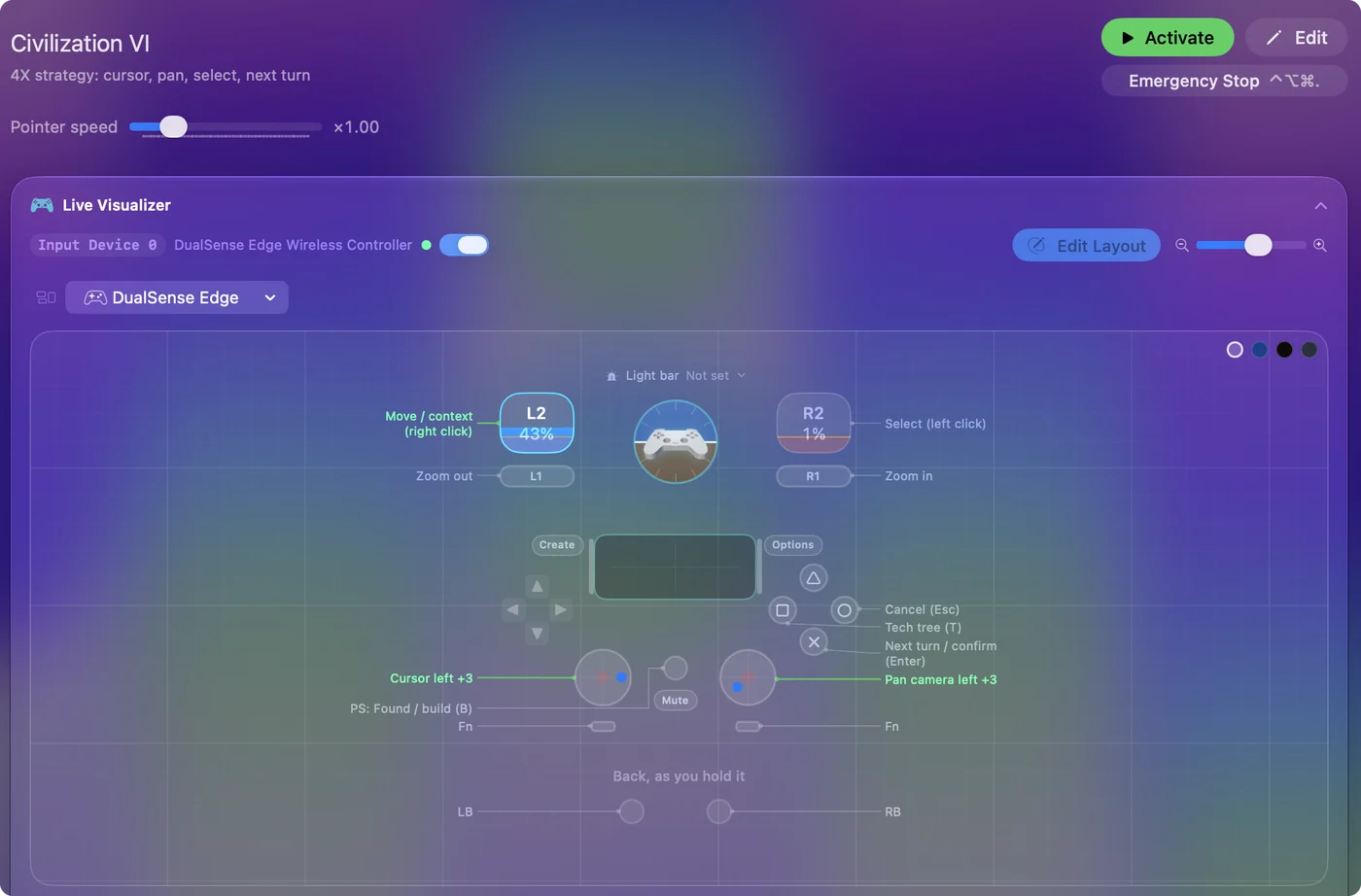
What a mapper does not do
It sends keyboard and mouse input and nothing else. It does not add aim assist, does not change the game's files, and does not make a game that is not on the Mac run on the Mac. A stick is slower than a mouse for precise clicks, and in competitive modes that shows. For someone who cannot use a mouse for long, that trade is the point. The tremor and limited range guide goes further.
The short version
- Own support. BG3, Civ VII, Path of Exile and FFXIV: use the game's pad mode.
- Keyboard and mouse only. Start with a layout from the Smart Preset Maker.
- Precision. Use a slow pointer on a held bumper, the Smooth curve, or gyro.
Use the game's own pad mode when it has one, and a layout when it does not.
Questions
Which MMOs on Mac support a controller?
Final Fantasy XIV has a full gamepad mode when it sees your pad. World of Warcraft has a basic one you turn on with a console command, plus the ConsolePort addon. Any MMO that reads a keyboard and mouse can be played from a pad with a mapper.
Are there MOBAs on Mac with controller support?
League of Legends' WASD mode has accepted a controller since April 2026, as an accessibility feature. Dota 2 has none in the game. Steam Input or a mapper supplies it.
Can I play strategy games on a MacBook with a controller?
Yes. Civilization VII has its own support. Civilization VI, Stellaris, Crusader Kings III, Hearts of Iron IV and StarCraft II do not, and a mapper plays them from a pad through the pointer and keys.
Related
Updated