Baldur's Gate 3 on a Mac with a controller
 The Baldur's Gate 3 layout is built into InputConfig, free on the Mac App Store. You don't have to make an account, there are no subscriptions, and nothing is locked. Optimized for Apple silicon.
On a Mac: Native on macOS with a full controller interface built in, the same radial menus as the console version. Use that first. This layout is the mouse-and-keyboard game from a pad, for controllers the game does not detect or people who prefer the PC interface.
Yes, Baldur's Gate 3 runs natively on the Mac with full controller support, and if your pad shows up, use the game's controller interface. Its radial menus are a nice way to play. Larian built two complete interfaces, one for a mouse and one for a pad, and both are good.
This layout gives a pad the other one, the mouse interface. Some people learned the game with the hotbar and free cursor and want that from the sofa. Some controllers, such as a Steam Controller or an adaptive controller, never appear in the game. And the mouse interface does things the pad interface finds awkward, like clicking a specific tile for a jump or dragging a body out of the way.
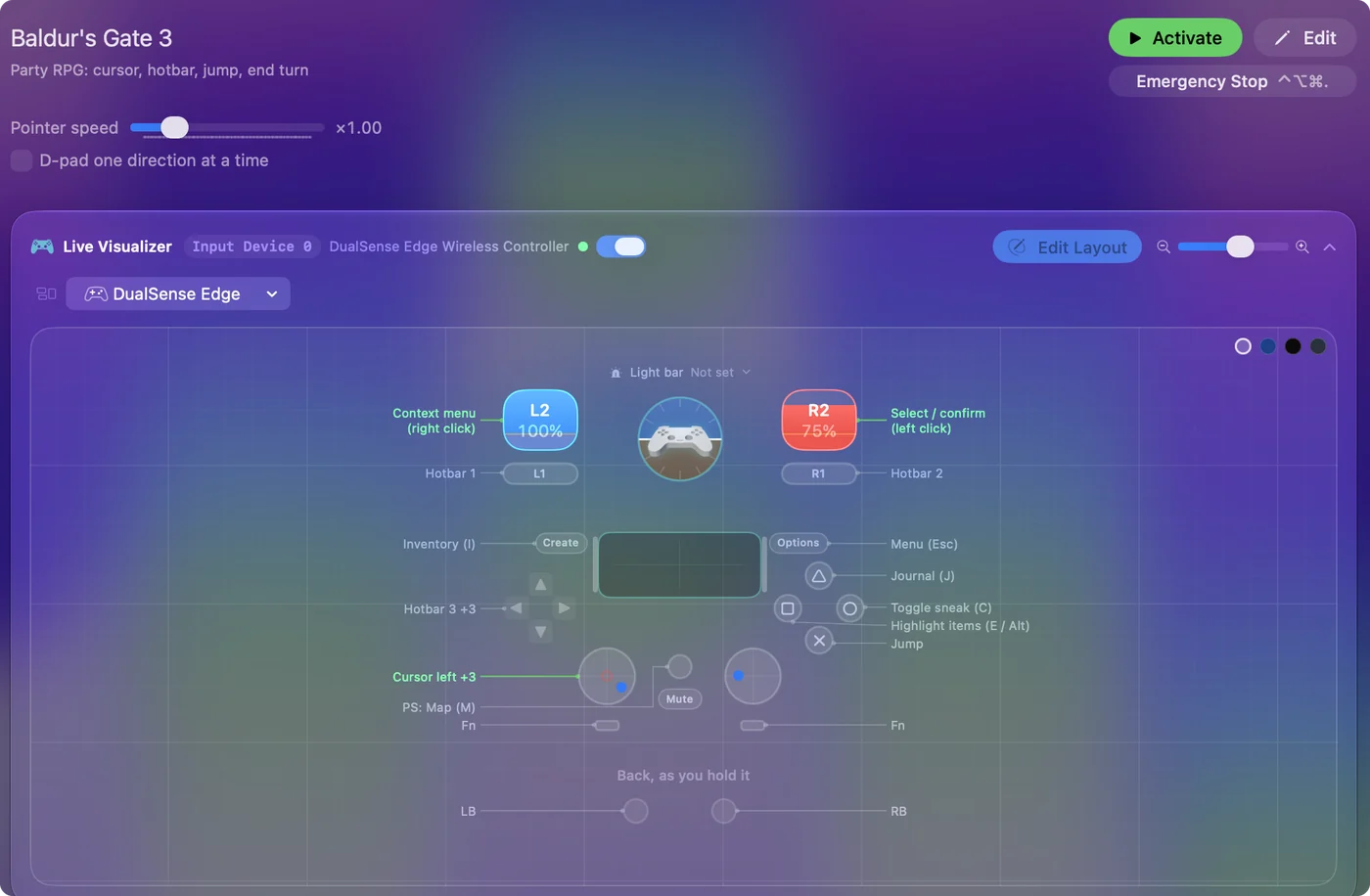
The layout, control by control
How the layout thinks
- Cursor. The left stick.
- Clicks. The right trigger is left click, which in BG3 is select, move, confirm and attack. The left trigger is right click, the context menu.
- Face buttons. Jump on the bottom, toggle sneak (C) on the right, highlight items on the left, and the journal (J) on the top.
- Hotbar. The bumpers are slots 1 and 2 and the D-pad is slots 3 to 6, so six actions are a button away.
- Menus. Inventory (I) on Create, map (M) on the Home button, Escape on Options.
Six hotbar slots without a menu is what the mouse interface gives a pad.
Tune it to how you play
- More hotbar. Put slots 7 to 12 behind a chord on the same buttons, with While also holding set to L1. A sorcerer needs it.
- End turn. Space is end turn, and pause in exploration. It is worth its own button: the touchpad press or the right stick click.
- Camera. The mouse interface pans at the screen edges and rotates with the middle mouse button. Add right-stick Mouse Motion rows that only fire while a held Middle click is down (a chord with the right stick click), and the stick rotates the camera. Plain, it does nothing, which is what you want most of the time.
- Party. F1 to F4 select companions. Put them on a chord on the face buttons.
- Cursor speed. 16 is right for the map. For dialogue and the inventory, a slower speed behind a bumper helps, or use the game's pad interface for inventory work and this layout for combat, switching the preset off and on.
Many people use both interfaces: the pad one for menus, the mouse one for precise fights.
If BG3 does not see your controller on a Mac
The game's controller interface should appear as soon as you press a button on a pad it sees. If it does not, climb this ladder, smallest step first:
- Check the Mac. Open Game Controllers in the System Settings sidebar and check the Mac lists the pad and lights its buttons (how to test a controller).
- Press a button with the game in front. BG3 switches between its two interfaces on the device you used last.
- Change Steam Input. On the Steam version, turn Steam Input off for Baldur's Gate 3 and try, then on and try again. One of the two often passes the pad through (works in Steam but not in the game).
- Use this layout. If the game stays in the mouse interface, this layout plays that interface from the same pad.
The game itself is untouched, so you can switch at any time: deactivate the preset and the controller interface takes over. Run one at a time, so a press does one thing.
Baldur's Gate 3 controller support: controller or keyboard
Steam's store page lists full controller support for Baldur's Gate 3, so the game was made to be played on a controller, menus included. A keyboard and mouse work as well, and the choice is yours.
From Steam's listing, checked in October 2026. Every game's listing is in Mac games with controller support.
If your controller is not working in Baldur's Gate 3
When Baldur's Gate 3 does not react to your controller on a Mac, check these in order:
- Check that the Mac sees the controller. Open the gamepad tester and press a button. If nothing lights up there, the problem is the connection, and a controller that is connected but not working covers that first.
- Play it from keys. If Baldur's Gate 3 still ignores the pad, activate this layout. It sends the keyboard and mouse controls Baldur's Gate 3 already reads. The layout works whether or not Baldur's Gate 3 ever sees the controller.
Get it in two clicks
- Open InputConfig and click Smart Preset Maker on the welcome screen.
- Search for Baldur's Gate 3 and pick it. The layout is created as a preset in your sidebar, named and ready.
- Press Activate. Every row can be changed afterwards: the editor's Scan button rebinds any control the moment you touch it.
Baldur's Gate 3 controls: every button and the key it sends
The Sends column is Baldur's Gate 3's default keyboard and mouse controls, as this layout expects them. If you changed a key in the game's settings, change the same row in InputConfig.
| Controller | Sends | What it does |
|---|---|---|
| Left stick left | Mouse motion left (speed 16) | Cursor left |
| Left stick right | Mouse motion right (speed 16) | Cursor right |
| Left stick up | Mouse motion up (speed 16) | Cursor up |
| Left stick down | Mouse motion down (speed 16) | Cursor down |
| Right trigger | Left click | Select / confirm (left click) |
| Left trigger | Right click | Context menu (right click) |
| A / Cross | Space | Jump |
| B / Circle | C | Toggle sneak (C) |
| X / Square | E | Highlight items (E / Alt) |
| Y / Triangle | J | Journal (J) |
| LB / L1 | 1 | Hotbar 1 |
| RB / R1 | 2 | Hotbar 2 |
| D-pad up | 3 | Hotbar 3 |
| D-pad down | 4 | Hotbar 4 |
| D-pad left | 5 | Hotbar 5 |
| D-pad right | 6 | Hotbar 6 |
| Back / Share / Select | I | Inventory (I) |
| Home / PS / Guide | M | Map (M) |
| Start / Options | Escape | Menu (Esc) |
Names follow the editor's Xbox / PlayStation pair, and a Switch pad fires by position.
Questions
Does Baldur's Gate 3 on Mac support controllers?
Yes, natively and completely, with its own controller interface. Use it if your pad appears. This layout gives you the mouse interface from a pad instead, and works with controllers the game does not see.
Is the mouse interface better than the controller interface?
For precision, jumps to a tile, dragging things and a visible hotbar, yes. For browsing menus, the pad interface is nicer. Many people use both.
Related
Updated