Dota 2 on a Mac with a controller
 The Dota 2 layout is built into InputConfig, free on the Mac App Store. You don't have to make an account, there are no subscriptions, and nothing is locked. Optimized for Apple silicon.
On a Mac: Native on macOS through Steam, with no in-game controller support. Steam Input can fake a mouse. This layout does the same job with InputConfig's chords, toggles, and speeds, and works outside Steam too.
Yes, Dota 2 plays on a Mac with a controller through this layout: the game runs natively through Steam but has no controller mode of its own. It covers the core of the game, cursor, right click, Q W E R D F and items, and expects you to add the rest behind chords, because that is the only way six items, six abilities and the shop fit on a pad.
The people who play Dota this way are usually not new. They have a hand injury, or a wrist that has done ten years of last-hitting, and they know the game well enough to build the layout they need. This is a starting point built by someone who has been there.
The layout, control by control
How the layout thinks
- Cursor and clicks. The left stick moves the cursor at 16. The right trigger right-clicks to move and attack. The left trigger left-clicks to select and to confirm targeted spells.
- Abilities. Q, W, E and R on the face buttons (bottom, right, left, top), D and F on the bumpers.
- Items and glyph. Items 1 to 3 on D-pad up, left and right (Z, X and C on Dota's default binds), glyph (G) on down.
- Menu. Escape on Options.
- Camera. Not bound. Turn on camera follow in the game, or bind the center-camera key to the touchpad press. On a pad, camera follow is the sane choice.
This is the core, and the chords below are where your hero's extra buttons go.
Tune it to how you play
- Quick cast. Turn it on for abilities and items in Dota's options, so a face button casts at the cursor with one press.
- Items 4 to 6 and the neutral slot. Add D-pad rows with While also holding set to L1 that send V, B, N and the neutral item key. The same chord on the face buttons can hold the TP scroll and the courier.
- Attack-move and stop. A on the left stick click is attack-move, S (stop) on the right stick click. Both matter more on a pad, because a misclick is easier.
- Two cursor speeds. Cursor rows with While also holding set to R1 that send mouse motion at half speed, for last hits and skillshots.
- Gyro for last hits. On a DualSense or DualShock 4, tilt to fine-tune the cursor while the stick does the long moves. Gyro aim covers it.
- The shop. Open it with the shop key on a chord and use quick-buy. Browsing the shop with a stick stays slow, so do it between fights.
A slow cursor behind R1 is what makes last hitting possible with a stick.
Steam Input, or this layout
Dota 2 is a Steam game, so Steam Input is worth trying first: it can turn a controller into a mouse and keyboard while Steam is running. Steam's store page lists no controller support for the game itself. This layout does the same job with chords, toggles and a slow-pointer layer, and the same app follows you to other Mac games through per-app auto-switch.
A stick will always be slower than a mouse, and Valve's rules are Valve's to interpret. The software produces ordinary input events and nothing else. Use Steam Input or this layout, not both: two mappers on one pad send every press twice.
Dota 2 controller support: controller or keyboard
Steam's store page lists no controller support for Dota 2, so it was made for a keyboard and mouse, and that is how it expects to be played. A controller still works: this layout sends the game's keys and mouse movement from the pad, so to the game you are simply typing and pointing.
From Steam's listing, checked in October 2026. Every game's listing is in Mac games with controller support.
If your controller is not working in Dota 2
When Dota 2 does not react to your controller on a Mac, check these in order:
- Check that the Mac sees the controller. Open the gamepad tester and press a button. If nothing lights up there, the problem is the connection, and a controller that is connected but not working covers that first.
- Check the Steam Input setting for Dota 2. In Steam, open Dota 2, Properties, Controller, and change the Steam Input override. A controller that works in Steam but not in the game goes through each choice.
- Stop looking for a setting. Dota 2 reads the keyboard and mouse here, so no option makes it see a pad. Activate this layout, and the controller sends the keys and mouse movement Dota 2 already reads. The layout works without Dota 2 ever seeing the controller.
Get it in two clicks
- Open InputConfig and click Smart Preset Maker on the welcome screen.
- Search for Dota 2 and pick it. The layout is created as a preset in your sidebar, named and ready.
- Press Activate. Every row can be changed afterwards: the editor's Scan button rebinds any control the moment you touch it.
Dota 2 controls: every button and the key it sends
The Sends column is Dota 2's default keyboard and mouse controls, as this layout expects them. If you changed a key in the game's settings, change the same row in InputConfig.
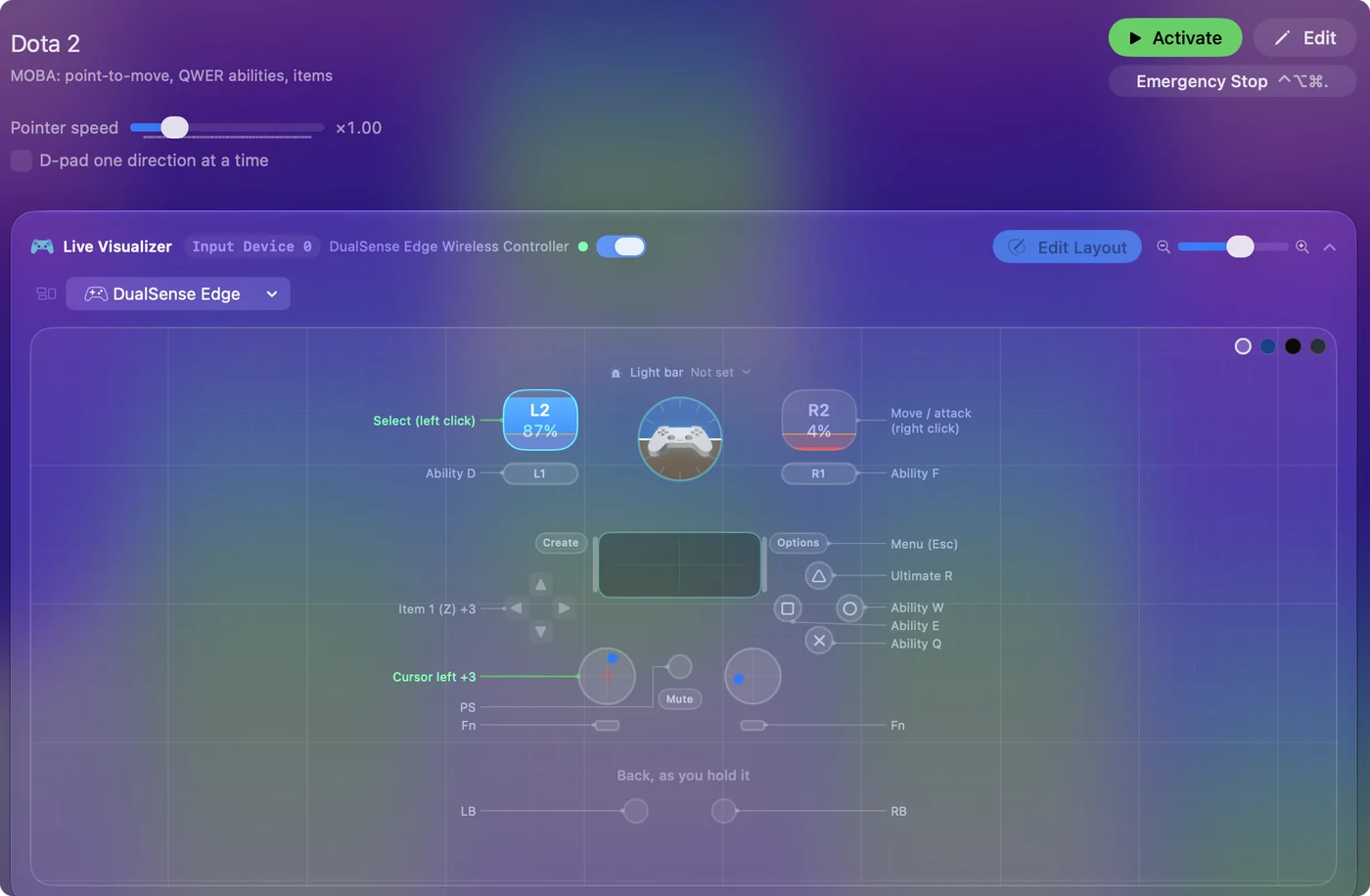
| Controller | Sends | What it does |
|---|---|---|
| Left stick left | Mouse motion left (speed 16) | Cursor left |
| Left stick right | Mouse motion right (speed 16) | Cursor right |
| Left stick up | Mouse motion up (speed 16) | Cursor up |
| Left stick down | Mouse motion down (speed 16) | Cursor down |
| Right trigger | Right click | Move / attack (right click) |
| Left trigger | Left click | Select (left click) |
| A / Cross | Q | Ability Q |
| B / Circle | W | Ability W |
| X / Square | E | Ability E |
| Y / Triangle | R | Ultimate R |
| LB / L1 | D | Ability D |
| RB / R1 | F | Ability F |
| D-pad up | Z | Item 1 (Z) |
| D-pad left | X | Item 2 (X) |
| D-pad right | C | Item 3 (C) |
| D-pad down | G | Glyph (G) |
| Start / Options | Escape | Menu (Esc) |
Names follow the editor's Xbox / PlayStation pair, and a Switch pad fires by position.
Questions
Can I play Dota 2 on a Mac with a PS5 or Xbox controller?
Yes, with this layout. Any controller macOS sees, such as a DualSense, a DualShock 4 or an Xbox pad, moves the cursor, clicks and casts through keyboard and mouse input. The game itself has no controller mode. Steam Input can emulate a mouse, and this layout does the same with more control over speeds, chords and toggles.
Is a stick fast enough for last hitting?
With two speeds, a slow one behind a bumper for the precise click, most people manage. It is slower than a mouse and always will be.
Related
Updated