MIDI tester and monitor
 InputConfig is completely free on the Mac App Store.
Connect a MIDI keyboard, pad controller or knob box and press Start listening. Every message it sends shows up live: notes with their velocity, knobs and faders as CC numbers, the sustain pedal, pitch bend and clock. The keyboard drawing lights each note you play and keeps it green, so a dead key really stands out. If you press Sound, each note also plays a plain tone, so you can hear a key as well as see it. It runs in Chrome, Edge and Firefox. Safari doesn't give web pages MIDI.
Test a MIDI device in this order
- Connect the device by USB, or pair it over Bluetooth MIDI first.
- Press Start listening and allow MIDI when the browser asks.
- Play every key once, from the lowest to the highest. Each turns green.
- Play one key softly and then hard, and read the velocity range.
- Turn every knob, move every fader, press the sustain pedal and the pitch wheel.
Read the result
- The keyboard drawing. All 88 piano notes, middle C marked C4. A note lights blue while held and stays green once seen.
- Sound. Off until you press the Sound button. Each note then plays a tone at its own pitch, louder for a harder strike, and the sustain pedal holds it the way it holds a note on the instrument. A drum pad plays the pitch of its note number, not a drum.
- Velocity. How hard each note was struck, from 1 to 127. A key stuck at one value, or one that never goes past a low number, points to a worn sensor.
- Knobs, faders and pedals. Each control shows as a CC number with its standard name where it has one: CC 64 is the sustain pedal, CC 1 the mod wheel.
- Pitch bend. From -8192 to 8191, and 0 at rest. A wheel that rests away from 0 drifts like a worn stick.
- Tempo from MIDI clock. When the device sends clock, the page works out the tempo from it.
The list under the numbers shows every message with its channel. Every key green and every control in the list means the device sends everything it should.
If nothing shows up
Climb this ladder, smallest step first:
- Connect first, then press Start. A device plugged in later appears too, but some need the page reloaded.
- Allow MIDI. The browser asks once. If you said no, allow it in the browser's site settings.
- Use Chrome, Edge or Firefox. Safari does not offer MIDI to web pages.
- Check that the Mac sees it. Open Audio MIDI Setup, then Window, Show MIDI Studio. A device missing there is a cable, hub or power problem, not a page one.
What this tester does not do
It listens and never sends, so it cannot test a device's lights, motorized faders or its own sounds. The tone from the Sound button is made in the browser and arrives with the browser's audio delay, so it does not show how the instrument feels to play. It does not ask for SysEx, the manufacturer messages that can change a device's settings, so those do not show either. Active sensing, the keep-alive message many keyboards send every few hundred milliseconds, is left out of the list on purpose.
Turn the device into shortcuts on a Mac
A MIDI keyboard types nothing on a Mac by itself. InputConfig, the free app I make, turns each key, pad, knob and pedal you just tested into a keyboard shortcut, a click, a phrase or an app launch, in every app. MIDI to keystroke on a Mac has the setup, and the MIDI CC list names every control number. Test it here, then give every pad a job there.
How this fits with InputConfig
These pages read and send MIDI in the browser. In InputConfig, MIDI is also an input: a note, a pad or a knob becomes a key, a shortcut, a click or the volume, in any app on the Mac.
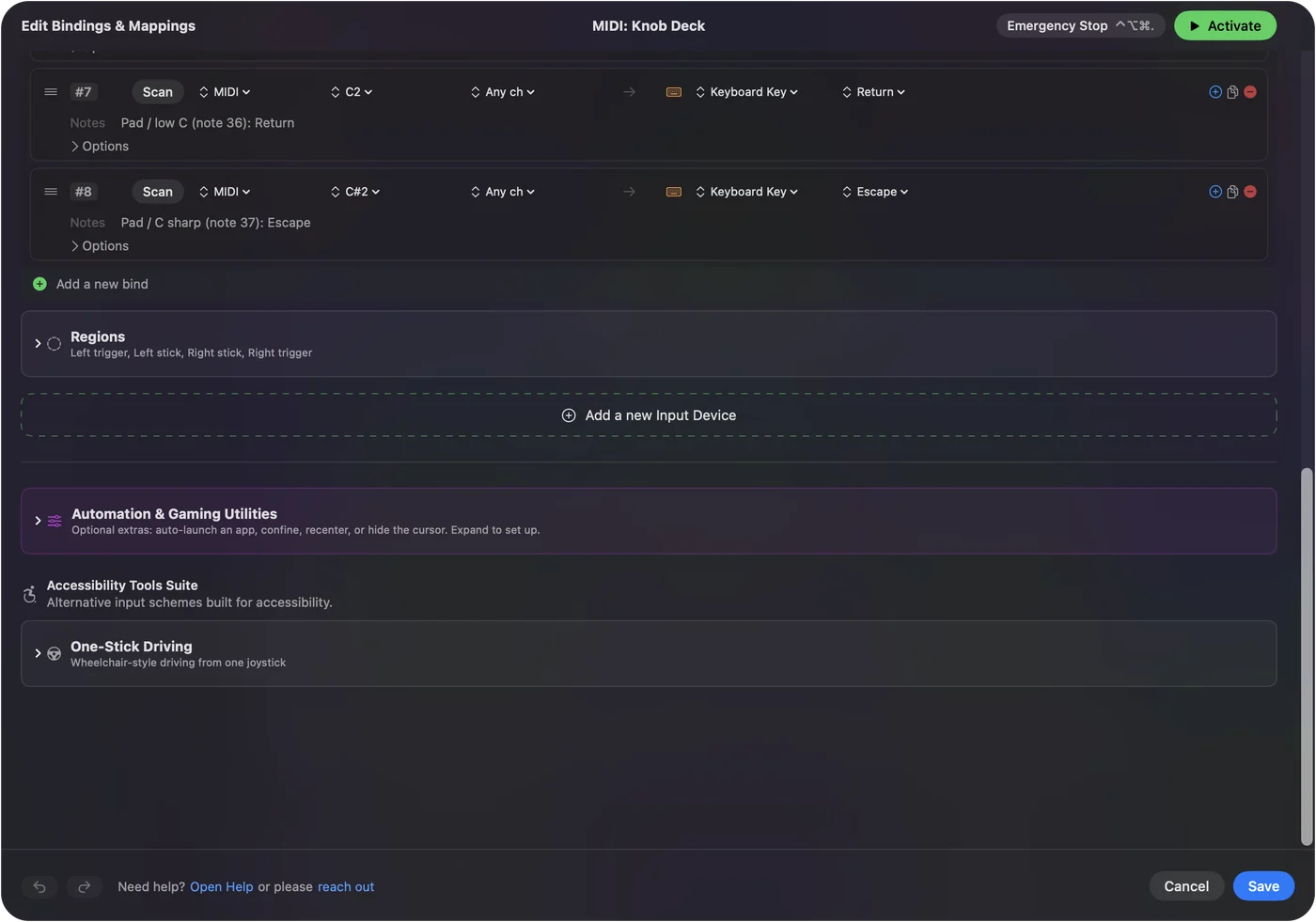
MIDI devices as input shows it step by step.
More midi tools
Questions
How do I test my MIDI keyboard online?
Connect it, open this page in Chrome, Edge or Firefox, press Start listening and allow MIDI. Every key you play lights on the drawing, with its note name and velocity in the list.
Why does my MIDI keyboard not show up?
Connect it before you press Start, and allow MIDI when the browser asks. On a Mac, Audio MIDI Setup's MIDI Studio window shows whether macOS sees the device at all.
Does the MIDI tester work in Safari?
No. Safari does not offer MIDI to web pages. On a Mac, open the page in Chrome, Edge or Firefox instead.
Is there a MIDI tester with sound?
Yes. Press the Sound button on this page and every note plays a plain tone at its pitch, louder for a harder strike, and the sustain pedal holds it. It is a test tone made in the browser, not a piano, so use it to confirm notes and velocity.
Can I test MIDI drum pads and a pad controller here?
Yes. Each pad sends a note, so hitting it lights that note on the drawing and lists its number and velocity. Hit every pad once, softly and then hard, to find a dead pad or one that only sends one velocity.
How do I test the knobs and faders on a MIDI controller?
Turn each knob and move each fader after pressing Start listening. Every one appears as a chip with its CC number and current value, and a control that never appears is not sending.
How do I test a sustain pedal?
Press it. A chip for CC 64 Sustain appears, with a high value while the pedal is down and a low value when it is up. If the two are reversed, the pedal's polarity does not match the keyboard.
Related
Updated