Is there XInput on a Mac?
 InputConfig is completely free on the Mac App Store. You don't have to make an account, there are no subscriptions, and nothing is locked. Optimized for Apple silicon.
No, and there is nothing to download. XInput is the part of Windows that talks to Xbox controllers, and macOS has no copy of it, on Apple silicon or on Intel. A Mac reads controllers through Apple's own controller support, which already knows current PlayStation, Xbox and Switch pads. The trouble starts with a pad that only speaks XInput on a cable, and that has a fix: change its mode.
I make InputConfig, a free Mac app that reads many pads macOS ignores and tells you when one is in a mode no Mac can read.
On this page
Steps
- Look for a mode switch or a button held at power-on, and move the pad off X or XInput to D, DInput, PC or Switch mode.
- Or pair the pad over Bluetooth, where XInput is not used.
- Check System Settings, Game Controllers, where a listed pad works in games with controller support.
- If it is not listed, open InputConfig and tick the pad under InputConfig, Devices.
- Press Scan on a row and press a button to give it a key.
Know what a Mac uses instead of XInput
Mac games that support controllers read them through Apple's Game Controller framework. It knows these with no setup:
- PlayStation. DualSense, DualSense Edge and DualShock 4.
- Xbox. Xbox One and Series pads over Bluetooth, and over USB on macOS 15 Sequoia or later.
- Nintendo. The Switch Pro Controller and Joy-Cons on macOS 13 and later.
- MFi gamepads. Any of them.
An Xbox controller works on a Mac because Apple supports it, not because the Mac has XInput.
Move a pad out of XInput mode
Many third-party pads have two or more modes, and on a cable their X or XInput mode speaks the wired Xbox 360 protocol. macOS does not read that protocol, and a sandboxed app cannot read it either.
- D, DInput or PC mode. The pad becomes a plain USB controller. Games built on Apple's controller support ignore it, and InputConfig reads it and maps it to keys.
- Switch mode over Bluetooth. The pad presents itself as a Switch Pro Controller, which macOS supports.
- Bluetooth in general. XInput is a cable and receiver protocol on these pads, so pairing over Bluetooth sidesteps it.
Model by model: 8BitDo, GameSir, Logitech, and generic USB gamepads. On a Mac, XInput is the mode to leave.
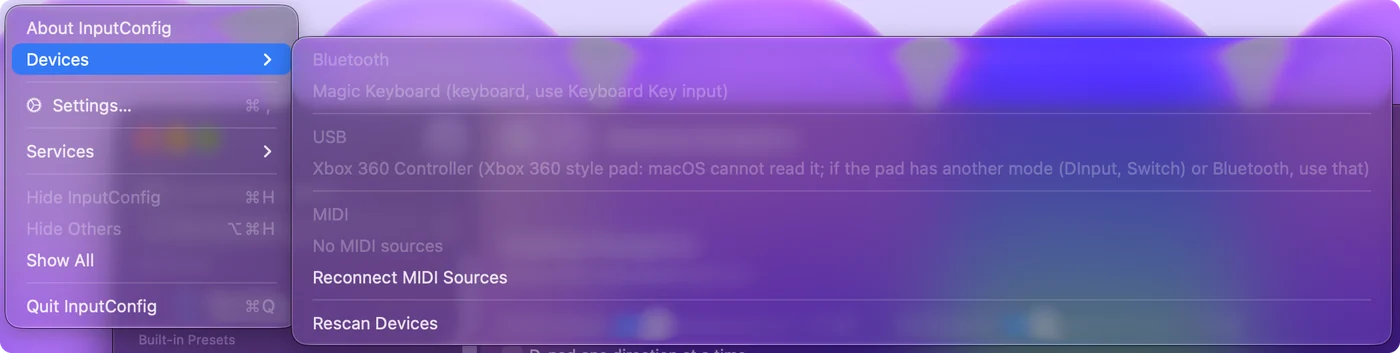
See which mode the pad is in
- You: Plug the pad in and open InputConfig, Devices in the menu bar.
- InputConfig: Lists a pad it can read, ready to tick. A pad speaking the wired Xbox 360 protocol is listed grayed out, with the reason.
- Check: Change the mode, plug it in again, and the entry changes.
The exceptions InputConfig reads in X mode over a USB cable are 8BitDo pads, which it has its own support for. A grayed-out entry is the app telling you the mode is the problem, not the pad.
The other xinput: the X11 command line tool
If you searched for xinput on a Mac and did not mean the Xbox controller system, you may mean a different thing with the same name. Homebrew lists a package called xinput, described as a utility to configure and test X input devices, with binaries for macOS on Apple silicon and Intel (read October 27, 2026). It belongs to the X11 world, it has nothing to do with Microsoft's XInput, and it does not make a game controller work in a Mac game. I have not run it, so I cannot tell you what it does on a Mac without an X server. If you wanted controller support, you want a pad macOS supports or a mode change, not this tool.
Look for an Xbox 360 controller driver
People who find XInput are often looking for a driver for an Xbox 360 controller. The wired one speaks a USB protocol macOS does not read, and no driver fixes that on a current Mac. Controller drivers for Mac explains when a driver is the answer, and Xbox 360 controllers on a Mac has the details for that pad.
If the game is a Windows game
Windows games running in CrossOver, Whisky or Apple's Game Porting Toolkit bring their own copy of XInput with them, and that layer decides which controller the game sees. The details are on using a controller with CrossOver games on a Mac. When that layer will not cooperate, keys from InputConfig still get through, because the game receives ordinary key presses.
What does not exist on a Mac
- An XInput download. Files offered under that name for a Mac did not come from Microsoft.
- An XInput wrapper. Tools such as x360ce are Windows programs. See x360ce for Mac.
- A virtual Xbox controller from InputConfig. It sends keyboard and mouse events only, so a game that only accepts a controller needs one macOS supports.
The Mac route is a supported pad, another mode, or keys, because there is no emulator in between.
The short version
- No XInput. macOS has its own controller support and needs none.
- XInput-only on a cable. Switch the pad to D, PC or Switch mode, or use Bluetooth.
- Still ignored by a game. Map the pad to the game's keys.
Change the mode first, and most XInput problems on a Mac end there.
Questions
Can I download XInput for Mac?
No. XInput is part of Windows, and Microsoft offers no Mac version. macOS reads controllers through Apple's own controller support.
Is there an Xbox 360 controller driver for Mac?
Not one that makes the wired controller work on a current Mac, because it speaks a protocol macOS does not read. Controller drivers for Mac and Xbox 360 controllers on a Mac both explain what to use instead, such as a newer Xbox controller over Bluetooth.
Does XInput work on an M1 or other Apple silicon Mac?
No, and it does not on Intel Macs either. The answer is the same on both: use a controller macOS supports, or switch the pad to a mode other than XInput.
Why does my XInput controller not work on a Mac over USB?
On a cable, most third-party XInput pads speak the wired Xbox 360 protocol, which macOS does not read. Switch the pad to D, DInput, PC or Switch mode, or pair it over Bluetooth.
Do Xbox controllers use XInput on a Mac?
No. Xbox One and Series controllers work on a Mac through Apple's controller support: over Bluetooth, or over USB on macOS 15 Sequoia or later.
Related
This page in other languages: 日本語
Updated