How to play Mad Max on a Mac with a controller
 InputConfig is completely free on the Mac App Store. You don't have to make an account, there are no subscriptions, and nothing is locked. Optimized for Apple silicon.
Feral's Mac version of Mad Max supports gamepads. Its FAQ lists the pads Feral tested, with the PS4 and PS3 DualShock, the Xbox One controller on a USB cable and Logitech's F310, F510 and F710 among them. Feral's manual gives a menu for the keyboard only: Settings, Keymapping.
The facts and the default keys below are from Feral's FAQ and manual for Mad Max, which I read on October 7, 2026, because I have not tested the game myself. If your pad does nothing in it, InputConfig, the free mapper I make, sends the game's keyboard and mouse controls from the pad.
On this page
Steps
- Connect the controller and check it under System Settings, Game Controllers.
- Quit the game, wake the controller, and open the game again.
- In Steam, try the game's Steam Input override both ways.
- If the game still ignores the pad, send its keyboard and mouse controls from the pad with a mapper.
Start with the game's own gamepad support
Connect the pad before you start Mad Max. Feral's FAQ lists the gamepads it tested, the PS4 and PS3 DualShock, Xbox 360 controllers, the Xbox One controller on a USB cable, and Logitech's F310, F510 and F710 among them. It says to write to its pad support address about a gamepad that is not on the list. Newer pads such as the PS5 DualSense are not listed. A PS4 DualShock is the pad I would reach for first, because Feral tested it and a Mac needs nothing extra to pair with it. How to connect a PS4 controller to a Mac has the steps.
If the pad does nothing
- The Mac sees the pad. Open System Settings, click Game Controllers, and press a button on the pad.
- Relaunch with the pad awake. Quit Mad Max, press a button on the controller, and open it again.
- Flip the Steam Input override. In the Steam library, right-click Mad Max, open Properties, then Controller, and try the other setting.
- Set a Logitech pad to D. Feral's FAQ says the game needs DirectInput mode, the D position on an F310, F510 or F710.
If nothing lights up there, Mad Max has no chance of seeing the pad either. Controller works in Steam but not in the game has more on the Steam layer.
Send the game its keys instead
Mad Max plays fully on a keyboard and mouse, and a keyboard is never undetected. InputConfig reads your controller and sends those keys and mouse moves, so Mad Max sees a keyboard while you hold the pad. These are the default keys from Feral's manual:
| Action | Key |
|---|---|
| Move | W A S D |
| Camera | Mouse |
| Sprint | Left Shift |
| Jump | Left Control |
| Attack or fire | Left mouse button |
| Parry or aim | Right mouse button |
| Evade | Space |
| Action | E, held |
| Driving: accelerate, brake, steer | W, S, A and D |
| Driving: boost | Space |
| Driving: handbrake | Left Shift |
| Driving: quickfire | Left mouse button |
| Driving: ram | Middle mouse button |
| Driving: leave the car | R |
On foot and in the car the keys overlap, so one layout covers both.
Build the layout
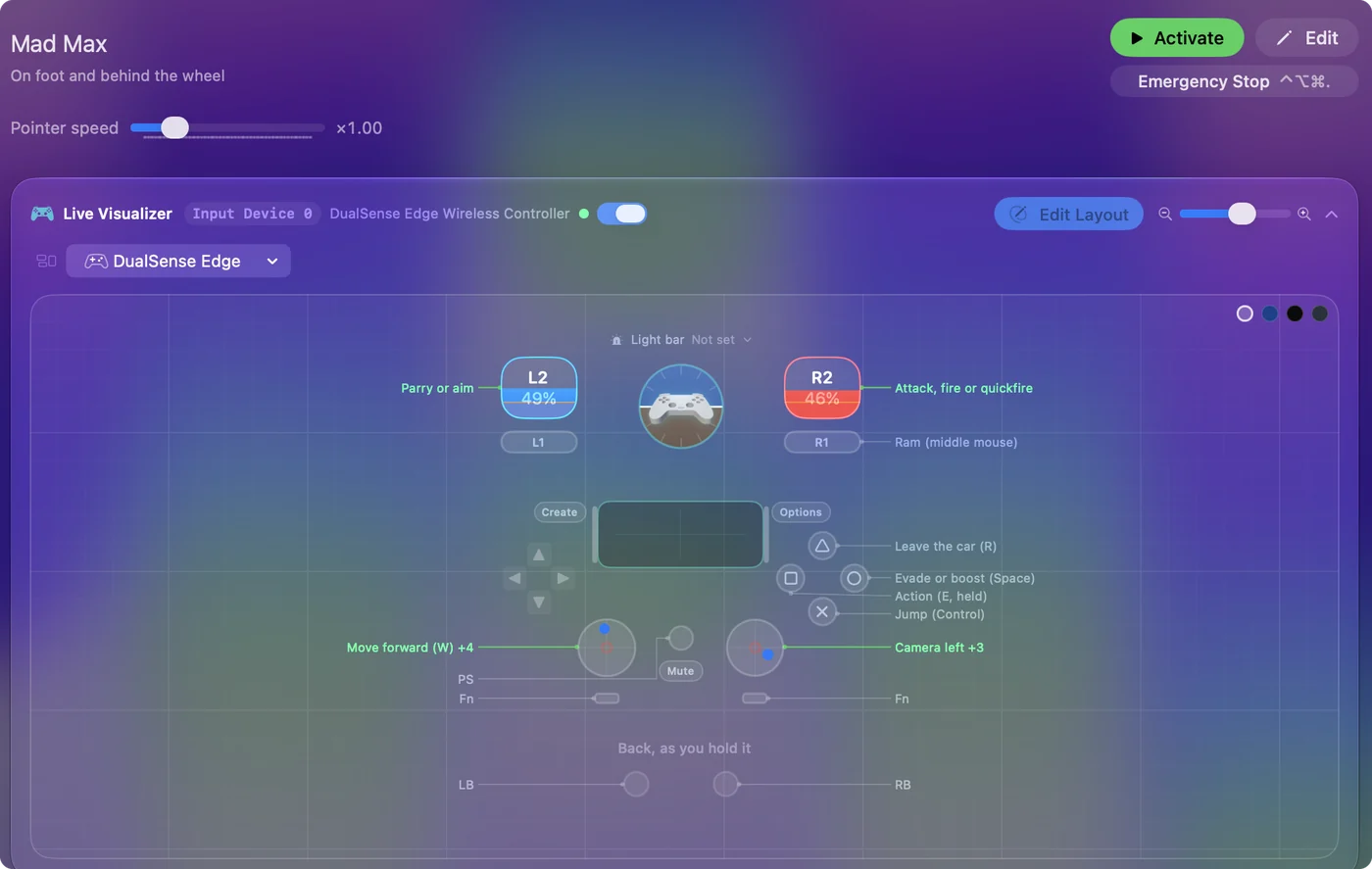
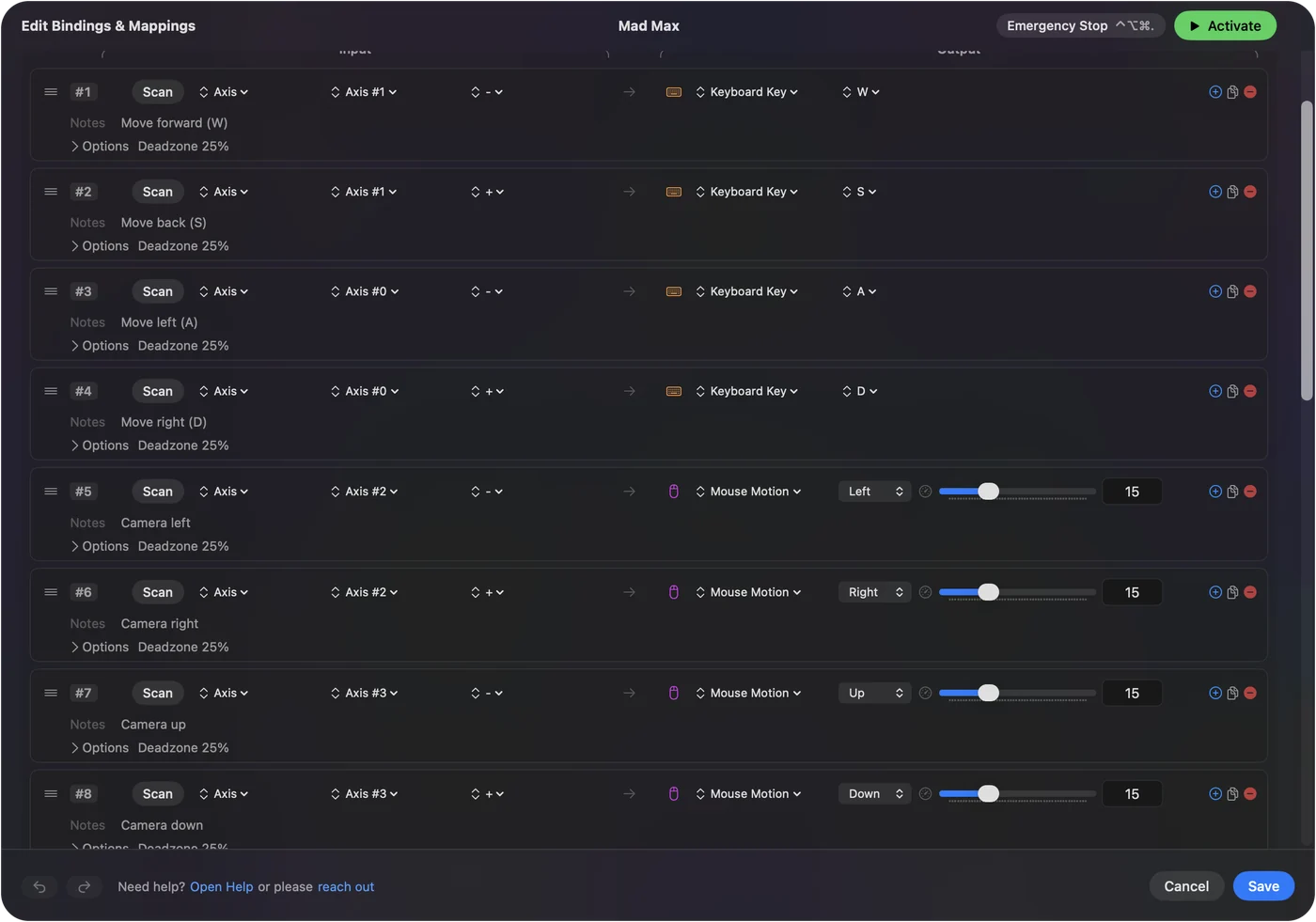
- You: In InputConfig, make a new preset. Set the left stick to WASD and the right stick to mouse movement.
- InputConfig: Sends those keys and mouse moves while the preset is active.
- Check: In Mad Max, the left stick walks and the right stick turns the camera.
- Face buttons. The left mouse button to attack, the right to parry, Space to evade and E for actions.
- Shoulders. Left Shift, which sprints on foot and is the handbrake in the car, and Left Control to jump.
- D-pad. Give it 1, 3 and 4 for the binoculars, the flashlight and the canteen.
- A spare button. The middle mouse button to ram, and R to leave the car.
With Space on a face button, the same press evades on foot and boosts at the wheel, so one button covers both. Play any Mac game with a controller walks through a layout like this, and your first preset has the basics.
Change the layout
Feral's manual gives a menu for the keyboard only: Settings, Keymapping. A layout sent from a mapper is yours to edit: move a button, swap the triggers, or put a second action on a hold. Feral's manual only describes remapping for the keyboard, so a keyboard layout sent from the pad is the one you can count on being able to edit. Hold and double tap covers the second action.
Use one route, not both
If Mad Max does read your controller, a mapper sending keys at the same time makes every press arrive twice. So pick one route. In InputConfig, a preset tied to the game only runs while that game is in front. If Mad Max already reads your pad, you do not need a mapper at all. Per-app switching can tie the preset to Mad Max.
The short version
- Tested pads. The PS4 and PS3 DualShock, the Xbox One controller on USB, and Logitech pads are on Feral's list.
- Not working. Start with Game Controllers, then relaunch Mad Max, then flip the Steam Input override.
- Fallback. Let the pad send Mad Max its keys and mouse moves.
Try your pad first, and if Mad Max will not listen, send it keys instead.
Questions
Does Mad Max on Mac support controllers?
Yes. Feral's FAQ for the Mac version of Mad Max lists the gamepads it tested, including the PS4 and PS3 DualShock, Xbox 360 controllers, the Xbox One controller over USB and Logitech pads.
Does a PS5 controller work with Mad Max on a Mac?
The DualSense is not on Feral's tested list for Mad Max, and I have not tested it. If the game ignores it, a mapper can send the game's keyboard and mouse controls from it.
Can I remap the controller in Mad Max on a Mac?
Feral's manual describes remapping for the keyboard only, under Settings, Keymapping. A mapper that sends keys from the pad gives you a pad layout you can change.
Why is my controller not working in Mad Max on a Mac?
Check it under System Settings, Game Controllers, relaunch Mad Max with the pad awake, and try the Steam Input override both ways. If it still does nothing, send the game's keys from the pad.
Which keys does Mad Max use on a Mac?
By Feral's manual: W A S D to move, Left Shift to sprint, the left mouse button to attack, the right to parry or aim, Space to evade, and in the car Space to boost and Left Shift for the handbrake.
Related
Updated