Do DualSense adaptive triggers work on a Mac?
 InputConfig is completely free on the Mac App Store. You don't have to make an account, there are no subscriptions, and nothing is locked. Optimized for Apple silicon.
Yes. Since version 1.8, InputConfig sets the resistance of the DualSense adaptive triggers on a Mac. Click L2 or R2 in the Live Visualizer and pick Off, Light, Medium or Firm for that trigger. The setting belongs to the preset, so each preset can give each trigger its own feel, and it works over USB and Bluetooth on the DualSense and the DualSense Edge.
What it sets is a steady resistance across the whole pull, for as long as that preset runs. It is not the effects a PS5 game plays through the triggers, like a bow that tightens, a gun's click point or a pulse for each weapon. Those come only from games that program them, and Apple's game controller framework lets a Mac game do that too, so it is up to the game. I make InputConfig, a free Mac app that maps a controller to keys and mouse, and this page says exactly what each of the two does.
On this page
Set light, medium or firm resistance
- You: Open a preset, connect a DualSense or DualSense Edge, and click L2 or R2 on the controller in the Live Visualizer. Under Trigger feel, pick Off, Light, Medium or Firm. Do the same for the other trigger if you want it to feel different.
- InputConfig: Stores the feel in the preset, writes it to the controller when the preset starts, and lets the trigger go when the preset stops. The line under the drawing names the feel next to what the trigger is bound to, such as a firm feel.
- Check: Activate the preset and pull the trigger. Firm is the easiest to feel the first time, so I would start there and come down.
- Per trigger. L2 and R2 each have their own setting, so aim can be light and fire firm.
- Per preset. A racing preset can have firm triggers and a desktop preset none, and the feel follows whichever preset is running.
- Over USB and Bluetooth. No cable is needed.
- DualSense and DualSense Edge only. The DualShock 4 has no adaptive triggers, so it has no trigger feel.
If the trigger still feels the same, climb this ladder, smallest step first:
- Activate the preset. The feel is applied while the preset runs, not while you only look at it.
- Check the setting. Click the trigger in the Live Visualizer again and make sure it is not on Off.
- Check the controller. Trigger feel appears only when the drawing is a DualSense or DualSense Edge that is connected.
Trigger feel is a setting of the preset, so the controller's triggers change feel when the preset changes.
Add rumble on a press as well
- You: Expand Options on a row and tick Vibrate in the Feedback box. Set Strength and Duration.
- InputConfig: Buzzes the controller each time that row fires.
- Check: Press the button. You feel a short buzz.
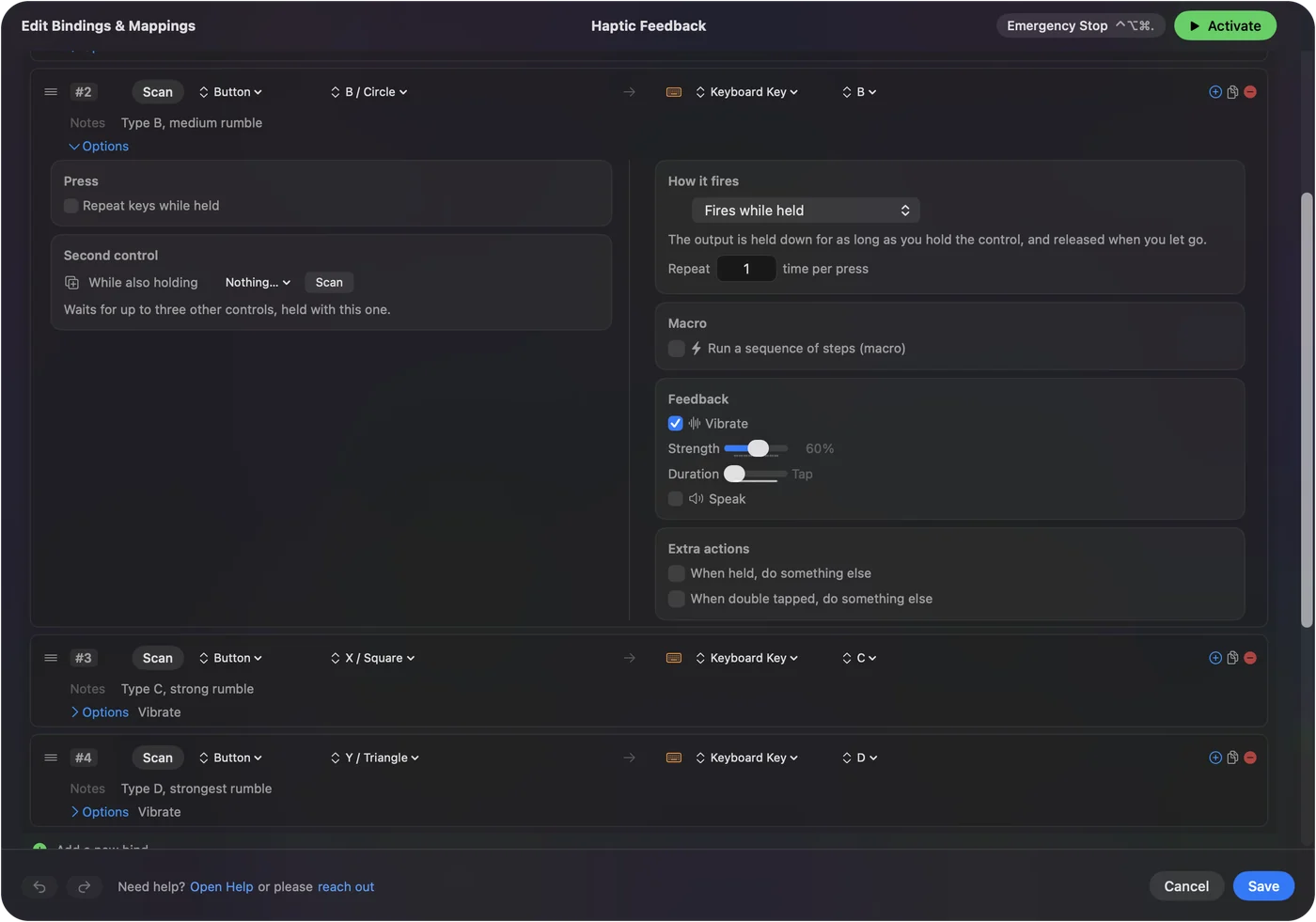
Rumble and trigger feel are separate settings and work together. Rumble is the motors, set on each row. Sony's finer HD haptic effects are not part of it. A firm trigger tells your finger how far it is pulling, and a buzz tells you the row fired.
Know the difference from a PS5 game's trigger effects
| Trigger feel | InputConfig | A game that programs the triggers |
|---|---|---|
| Steady resistance across the pull | Yes: Off, Light, Medium or Firm | Yes |
| Set per trigger | Yes, L2 and R2 apart | Yes |
| Changes with what happens in the game, like a bow drawing tighter | No | Yes, if the game programs it |
| A click point, or a pulse for each weapon | No | Yes, if the game programs it |
| Where it applies | Everywhere, while the preset runs | Inside that game only |
| Controllers | DualSense and DualSense Edge, over USB and Bluetooth | Whatever the game supports |
A Mac game can set the triggers through Apple's game controller framework, and on a PS5 most games do. If a Mac game should use them and does not, try the controller on a USB-C cable and check the game's own controller settings for a trigger effect switch. I have not tested which Mac games use the triggers, or how a game's own effect and InputConfig's trigger feel behave together, so I will not claim either here. InputConfig gives the triggers a weight you choose, and a game gives them effects it scripts.
The short version
- In InputConfig. Click L2 or R2 in the Live Visualizer and pick Light, Medium or Firm, per trigger and per preset, since 1.8.
- In games. Bow tension, click points and weapon pulses come only from games that program them.
- On the controller. DualSense and DualSense Edge, over USB or Bluetooth.
Give a preset firm triggers, activate it, and pull.
Questions
Can I set DualSense trigger resistance on a Mac?
Yes. In InputConfig, click L2 or R2 in the Live Visualizer of a DualSense or DualSense Edge and pick Off, Light, Medium or Firm. It is a steady resistance across the pull while that preset runs, and the trigger is let go when the preset stops.
Can a Mac game use adaptive triggers?
Yes, if the game adds support through Apple's game controller framework. Effects such as bow tension, a gun's click point or weapon pulses come only from games that program them, so whether a given game has them is up to that game.
Does trigger feel work over Bluetooth?
Yes, over Bluetooth and over USB, on the DualSense and the DualSense Edge. The DualShock 4 has no adaptive triggers, so it has no trigger feel.
Related
This page in other languages: Русский
Updated