DSX for Mac: doing the DualSenseX jobs on a Mac
 InputConfig is completely free on the Mac App Store. You don't have to make an account, there are no subscriptions, and nothing is locked. Optimized for Apple silicon.
If you used DSX, also known as DualSenseX, on a Windows PC, InputConfig is the Mac app I make for the same jobs: adaptive trigger resistance, the light bar, the touchpad as a mouse, gyro aim and buttons as keys and macros. It also covers every other controller, mice and MIDI devices, and it is free and open source.
On this page
Steps
- Install InputConfig from the Mac App Store and grant the Accessibility permission when it asks.
- Pair the DualSense in System Settings, Bluetooth, holding Create and PS until the light bar flashes.
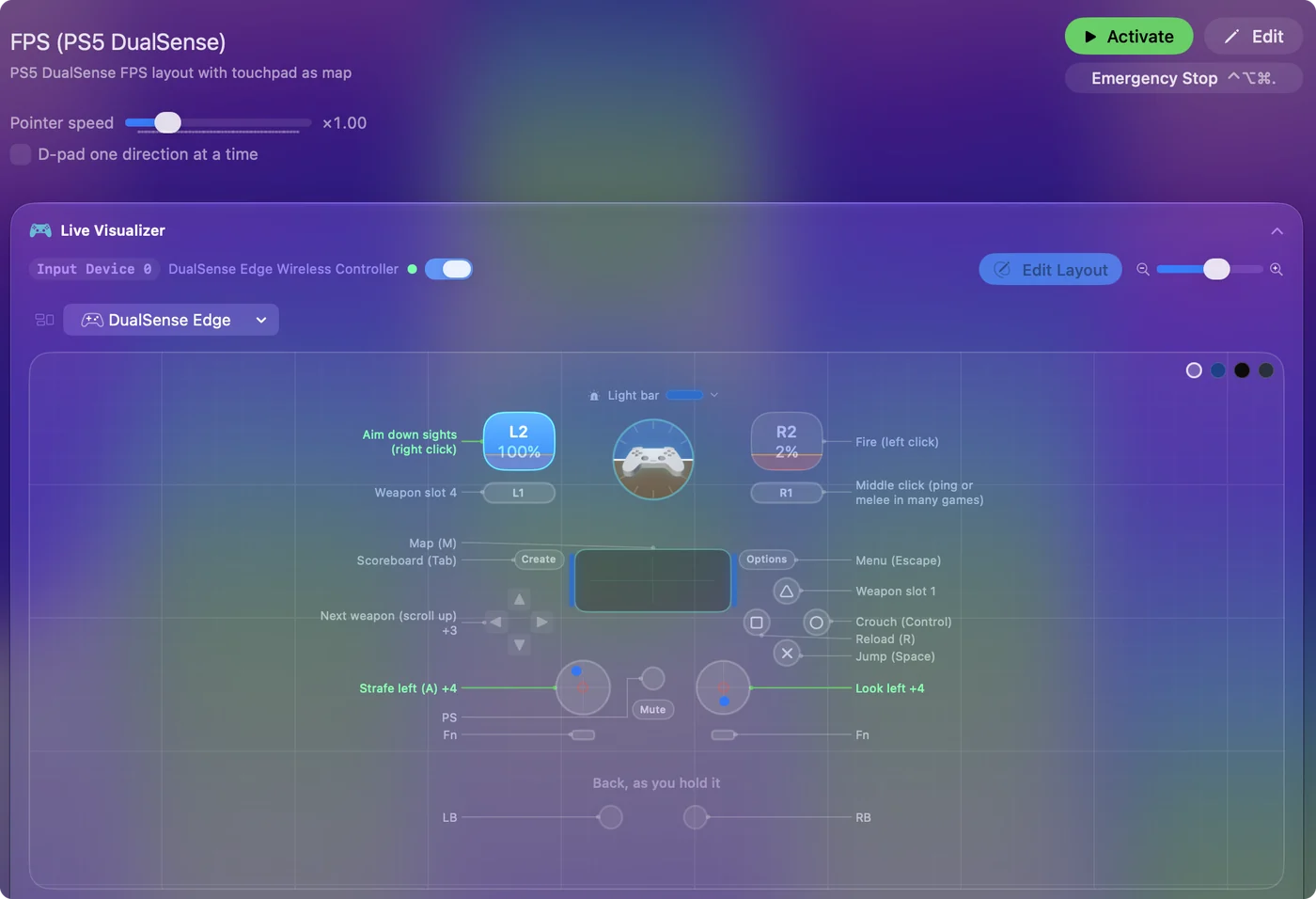
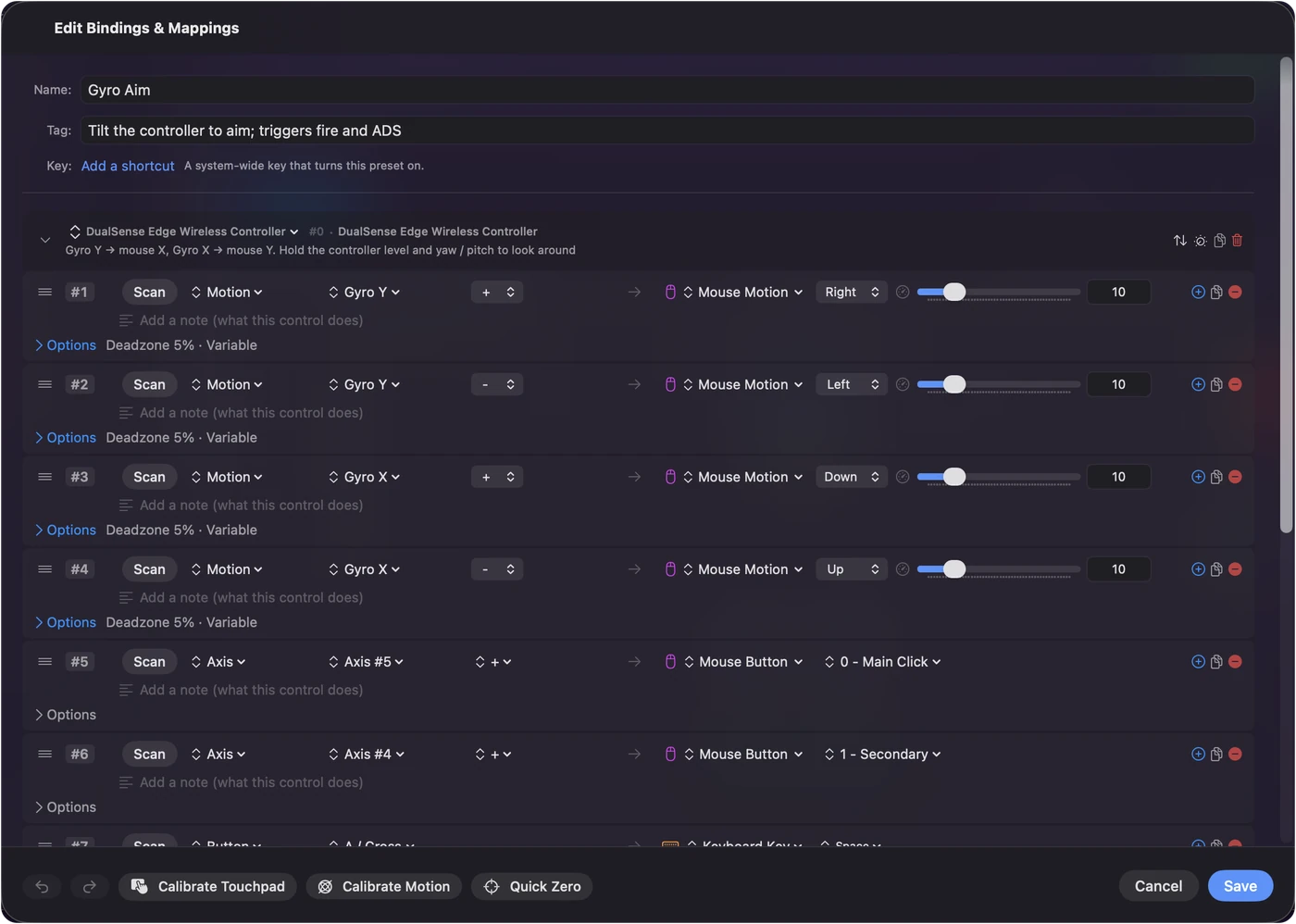
- Pick a built-in preset, such as Mouse + Scroll or Gyro Aim, and press Activate.
- Click L2 or R2 in the Live Visualizer to give each trigger a Light, Medium or Firm feel.
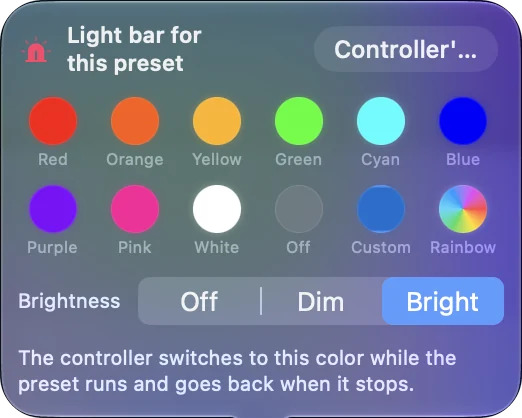
- Set the light bar color for the preset, and bind any other button to the key or shortcut you want.
Find each DSX job on a Mac
DSX is a Windows app built around the DualSense. Here is what people use it for, and how the same thing works on a Mac with InputConfig.
| What people use DSX for | On a Mac with InputConfig |
|---|---|
| Adaptive trigger resistance | Trigger feel: Light, Medium or Firm per trigger, a steady resistance while a preset runs |
| Light bar color | A color per preset, over Bluetooth or USB |
| Touchpad as a mouse | Yes, plus touchpad regions, taps and swipes as buttons |
| Motion and gyro | Gyro aim moves the pointer, and motion rows can press keys |
| Buttons to keys and macros | Yes, with chords, hold, double and triple tap, and multi-step macros |
| A profile for each game | A preset per app that switches on its own when the front app changes |
| Making the DualSense look like an Xbox controller to games | Not needed: macOS supports the DualSense directly, and Mac games read it as it is |
| DualSense Edge paddles and Fn buttons | Bindable like any button, and the Edge's four stored profiles are listed over USB-C |
Most of what DSX does on Windows has a direct match in InputConfig on a Mac.
Know why a Mac needs less than Windows
On Windows, many games only understand Xbox controllers, which is why tools there make a DualSense pretend to be one. A Mac does not need that step. macOS pairs the DualSense over Bluetooth or USB with no driver, and Mac games that support controllers read it as a PlayStation pad, with the right button names.
What a Mac does not do on its own is everything else: turning buttons into keys, the touchpad into a mouse, the gyro into aiming, or giving the triggers a feel. That is the part InputConfig adds, in every app and every game that takes a keyboard and mouse.
Go beyond the DualSense
- Other controllers. Xbox, Switch Pro, Joy-Con, Switch 2 pads, 8BitDo, the DualShock 4, wheels and flight sticks all map the same way.
- The PlayStation Access controller. InputConfig reads every socket by name, and over USB-C it lists, switches and edits the controller's three stored profiles.
- Mice, MIDI devices and more. Side buttons, MIDI pads and knobs, pen tablets, a SpaceMouse and a ShuttlePRO can all send keys, clicks and shortcuts.
- The whole Mac. Built-in layouts turn the stick into the pointer and the buttons into clicks, Mission Control, dictation and Siri Shortcuts.
Set up a DualSense in InputConfig
- You: Pair the DualSense in System Settings, Bluetooth, holding Create and PS until the light bar flashes. Open InputConfig and grant Accessibility when it asks.
- InputConfig: Shows the controller at the top of the sidebar with its battery level, and draws it in the Live Visualizer.
- Check: Press a button and watch it light up.
- You: Pick a built-in preset, such as Mouse + Scroll or Gyro Aim, and press Activate. Click L2 or R2 in the Live Visualizer to give each trigger a feel.
- InputConfig: Runs the layout in every app and applies the trigger feel and the light bar color while it runs.
- Check: Move the stick and the pointer moves. Pull a trigger and feel the resistance.
What InputConfig cannot do
- Shaped trigger effects. Trigger feel is a steady resistance, not a game's bow tension, click point or weapon pulse.
- Audio through the haptics. It sends rumble on a press, not system audio or Sony's fine haptic patterns.
- Firmware. It never touches the controller's firmware. Sony updates the DualSense on a PS5 or a Windows PC.
- A virtual controller. It sends keys, clicks and pointer movement, not a pretend gamepad, which a Mac rarely needs anyway.
The short version
- Coming from DSX on Windows? InputConfig covers the DualSense jobs on a Mac: trigger feel, the light bar, the touchpad, gyro aim and buttons as keys.
- No Xbox disguise needed. macOS reads the DualSense directly.
- More than the DualSense. Every other controller, mice and MIDI devices map the same way, free and open source.
Questions
What is the Mac alternative to DSX?
InputConfig. It sets the DualSense's trigger resistance and light bar, turns the touchpad into a mouse, aims with the gyro and maps every button to keys and macros, on any Mac with macOS 14 or later.
Does InputConfig do adaptive triggers like DSX?
It gives each trigger a Light, Medium or Firm resistance while a preset runs, over USB or Bluetooth. It does not play shaped effects such as a bow's tension.
Do I need DSX to make a DualSense work in Mac games?
No. macOS supports the DualSense directly, so Mac games with controller support read it without any extra app. InputConfig adds keys, mouse control and trigger feel on top.
Can InputConfig update DualSense firmware?
No. InputConfig never touches firmware. Sony updates the DualSense on a PS5 console or on a Windows PC with its PlayStation Accessories app.
Is InputConfig free?
Yes. It is free on the Mac App Store and open source on GitHub, with no account and no tracking.