JetBrains Fleet from a game controller
 The JetBrains Fleet layout is built into InputConfig, free on the Mac App Store. You don't have to make an account, there are no subscriptions, and nothing is locked. Optimized for Apple silicon.
On a Mac: Fleet takes most of the JetBrains macOS keymap from this layout. JetBrains has stopped offering Fleet for download, so this page is for copies already installed.
Yes, if you still have JetBrains Fleet installed on a Mac, the JetBrains layout mostly fits it: go to file, go to declaration, comment, run. JetBrains has stopped offering Fleet for download, so this page is for copies already installed. If you are moving on, the IntelliJ IDEA, PyCharm and Zed layouts are here too.
The layout, control by control
How the layout thinks
- Navigate. Go to file on the bottom face button, go to declaration on the right, a line up and down on the D-pad.
- Edit and run. Comment line on the left face button, Run on the top, Debug on Start, Save All on Back, Share or View.
- Search. Find on the left bumper, Find in Path on the right.
- Point and scroll. The left stick is the pointer, the right stick scrolls, the right trigger clicks.
Fix the rows that differ in Fleet
- You: Change the go to file row's output to Command K, Fleet's Goto. Then press every other row once and check Fleet's keymap in its Help menu for any that do nothing.
- InputConfig: Sends the keys you set from the next press.
- Check: Press the bottom face button and Fleet's Goto opens.
A Start Dictation row helps with comments. Goto is the row that matters most in Fleet, and it is one change.
Get it in two clicks
- Open InputConfig and click Smart Preset Maker on the welcome screen.
- Search for JetBrains Fleet and pick it. The layout is created as a preset in your sidebar, named and ready.
- Press Activate. Every row can be changed afterwards: the editor's Scan button rebinds any control the moment you touch it.
Every binding, as a table
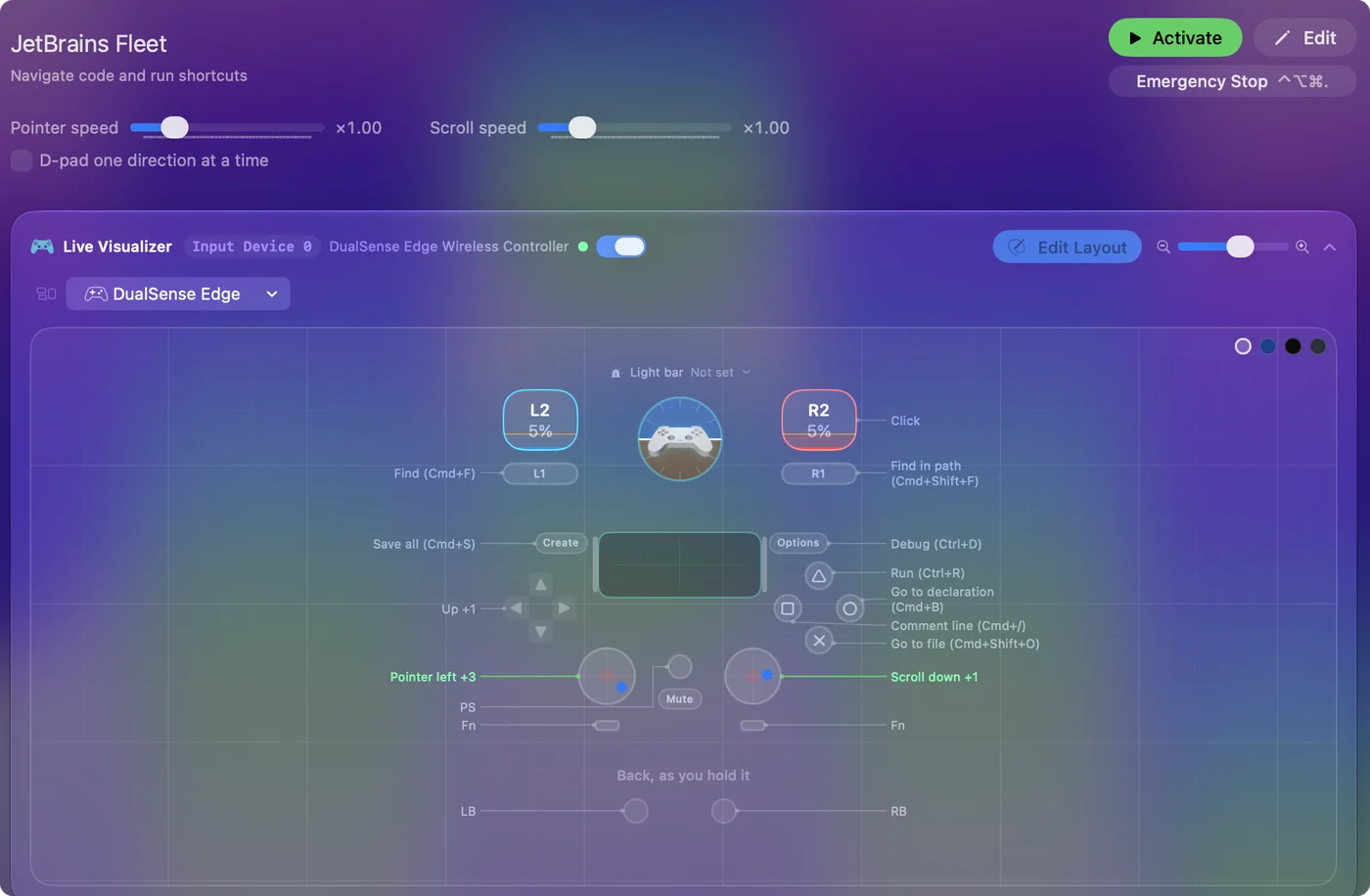
| Controller | Sends | What it does |
|---|---|---|
| Left stick left | Mouse motion left (speed 16) | Pointer left |
| Left stick right | Mouse motion right (speed 16) | Pointer right |
| Left stick up | Mouse motion up (speed 16) | Pointer up |
| Left stick down | Mouse motion down (speed 16) | Pointer down |
| Right stick down | Scroll down | Scroll down |
| Right stick up | Scroll up | Scroll up |
| Right trigger | Left click | Click |
| A / Cross | Command (Left), Shift (Left), O | Go to file (Cmd+Shift+O) |
| B / Circle | Command (Left), B | Go to declaration (Cmd+B) |
| X / Square | Command (Left), / | Comment line (Cmd+/) |
| Y / Triangle | Ctrl (Left), R | Run (Ctrl+R) |
| LB / L1 | Command (Left), F | Find (Cmd+F) |
| RB / R1 | Command (Left), Shift (Left), F | Find in path (Cmd+Shift+F) |
| Back / Share / Select | Command (Left), S | Save all (Cmd+S) |
| Start / Options | Ctrl (Left), D | Debug (Ctrl+D) |
| D-pad up | Up | Up |
| D-pad down | Down | Down |
Names follow the editor's Xbox / PlayStation pair, and a Switch pad fires by position.
Questions
Is this the same as the PyCharm layout?
Nearly. Fleet changed a few keys, so change the output of any row that does nothing.
Is JetBrains Fleet discontinued?
JetBrains stopped offering Fleet for download. A copy that is already installed still takes this layout.
Related
Updated