How to get a Globe key on any keyboard on a Mac
 InputConfig is completely free on the Mac App Store. You don't have to make an account, there are no subscriptions, and nothing is locked. Optimized for Apple silicon.
Many keyboards made for Windows, and older Apple ones, have no Globe key, so Globe shortcuts such as Globe F for full screen are out of reach. macOS can turn one of your modifier keys into Globe. If you would rather not give one up, InputConfig can press Globe, or a whole Globe shortcut, from a spare key, a mouse button or a controller.
I make InputConfig, a free Mac app that turns any input into keys and mouse.
Steps
- Open System Settings, Keyboard, Keyboard Shortcuts, Modifier Keys.
- Set a modifier such as Caps Lock to Globe, if you can spare the key.
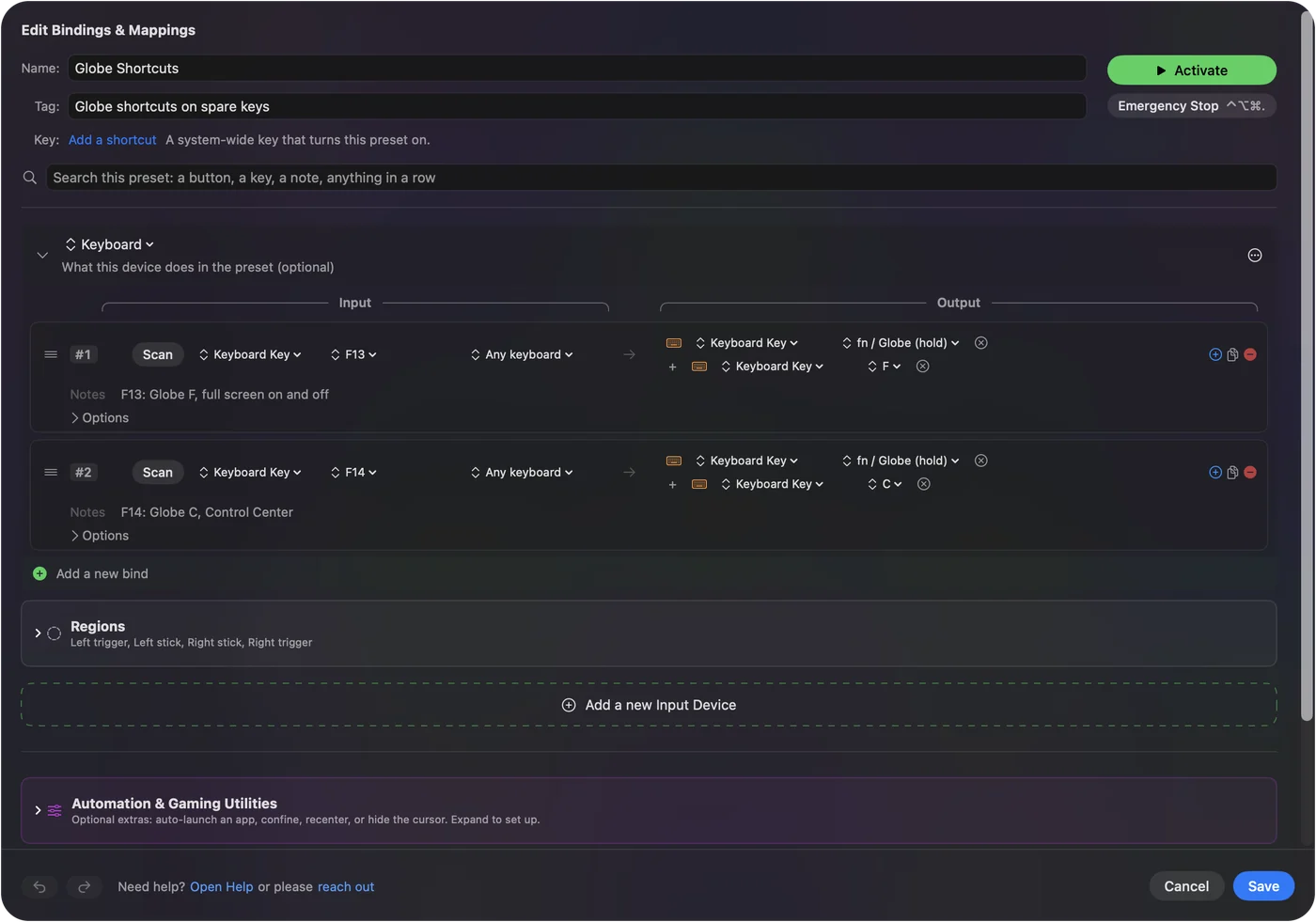
- Or, in InputConfig, add a row and scan a spare key or button.
- Set the output to fn / Globe (hold), click Add another output, and add the key the shortcut needs.
- Click Save and Activate.
Turn a modifier key into Globe
- You: Open System Settings, Keyboard, click Keyboard Shortcuts, then Modifier Keys. Pick your keyboard at the top, and set a key such as Caps Lock to Globe.
- macOS: Treats that key as the Globe key.
- Check: Hold it and press F. The front window goes full screen.
This costs you that key's old job. Caps Lock on a Mac has other uses for the same key.
Put a Globe shortcut on one button
- You: In InputConfig, add a row, press Scan and press the key or button to use. Set the output to Keyboard Key and choose fn / Globe (hold) under Modifier Keys. Click Add another output and choose the key the shortcut needs, such as F.
- InputConfig: Presses both together, so one press sends the whole shortcut.
- Check: Click Save and Activate, and press the button.
The output menu has the Globe key in two places, because macOS treats them as two different things:
- fn / Globe (hold). Under Modifier Keys. It adds Globe to another key, which is how Globe shortcuts work.
- Globe Key (Emoji). Under Special Keys. It presses Globe on its own and does whatever you have set a lone press to do in System Settings, Keyboard.
Globe shortcuts worth a button
| Shortcut | What it does |
|---|---|
| Globe F | Full screen on and off |
| Globe C | Control Center |
| Globe N | Notification Center |
| Globe H | Show the desktop |
| Globe A | Show or hide the Dock |
| Globe Q | Quick Note |
| Globe E | Emoji and symbols |
| Globe D | Dictation |
The list can differ between macOS versions. If one does nothing, check it on a keyboard that has a Globe key first.
Pick the key or button
InputConfig listens to the keyboard and does not block a key, so use an input with no job of its own: F13 to F19 on a full-size keyboard, a mouse side button, a controller button, a foot pedal or a MIDI pad. F13 to F19 on a Mac explains those keys. Going the other way, a keyboard that does have a Globe key can use it as an input: Scan binds it tapped on its own or held as fn.
The short version
- Give up a modifier. System Settings, Keyboard, Keyboard Shortcuts, Modifier Keys, and set one to Globe.
- Keep every key. Put Globe shortcuts on spare keys or buttons with InputConfig.
- Two outputs. fn / Globe (hold) for shortcuts, Globe Key (Emoji) for a lone press.
A keyboard without a Globe key can still do everything the Globe key does.
Questions
My keyboard has no Globe key. How do I use Globe shortcuts on a Mac?
Set a modifier such as Caps Lock to Globe in System Settings, Keyboard, Keyboard Shortcuts, Modifier Keys. Or use InputConfig to send a Globe shortcut from a spare key or button.
Is the fn key the same as the Globe key?
On Apple keyboards they are the same physical key. macOS treats holding it with another key differently from pressing it alone, which is why InputConfig lists two outputs.
Can a mouse button or a controller press the Globe key?
Yes. In InputConfig any input can send fn / Globe (hold) with another key, or Globe Key (Emoji) on its own.
Related
This page in other languages: 日本語, 한국어, 简体中文
Updated