Is there eye tracking on a Mac?
 InputConfig is completely free on the Mac App Store. You don't have to make an account, there are no subscriptions, and nothing is locked. Optimized for Apple silicon.
Not as a feature of its own, going by Apple's Mac User Guide for macOS 27. Its mobility features are Voice Control, the Accessibility Keyboard, Full Keyboard Access, Switch Control, head pointer and Dwell. Head pointer follows your head with the camera, and Dwell is described as performing mouse actions using eye or head tracking technology. Controlling the pointer with your eyes takes an eye tracker and the software that comes with it. macOS then supplies the clicking.
I make InputConfig, a free Mac app for switches, pedals and controllers. It does no eye or head tracking, and it adds clicks and keys to whatever moves the pointer.
On this page
Steps
- Open the Apple menu and choose System Settings.
- Click Accessibility, then Pointer Control, and try Head pointer with the Mac's camera.
- For eye control, set up an eye tracker whose own software moves the Mac's pointer.
- Click Accessibility, then Keyboard, turn on Accessibility Keyboard, and turn on Dwell in its options.
- Choose a dwell action such as Left Click, then rest the pointer on a target.
Know what macOS has
- Head pointer. In System Settings, Accessibility, Pointer Control. The built-in or a connected camera follows your head and moves the pointer. It does not click by itself.
- Dwell. Part of the Accessibility Keyboard. Apple's guide says it performs mouse actions using eye or head tracking technology: you pick a dwell action, such as Left Click, and rest the pointer on a target.
- No eye tracking page. Apple's Mac User Guide for macOS 27 has a page for each mobility feature, and none for eye tracking. Eyes come up only in its description of Dwell.
macOS supplies the pointer by head and the click by dwelling, and leaves the eye tracking to hardware.
Eye tracking on iPhone and iPad is not on the Mac
The eye tracking most people have read about is an iPhone and iPad feature. Apple announced Eye Tracking for iPad and iPhone on May 15, 2024. It uses the front camera to set up and calibrate, and Apple says it works across iPadOS and iOS apps with no extra hardware. Apple's Mac User Guide for macOS 27 lists no equivalent, and I have not found a Mac version announced. A MacBook can follow your head with its camera, and it cannot follow your eyes without added hardware.
Use an eye tracker with a Mac
An eye tracker fits into this when its own software moves the Mac's pointer. Once the pointer follows your gaze, Dwell does the clicking, and the Accessibility Keyboard does the typing. Check that the maker supports macOS before you buy one, because the tracking depends entirely on its software. If the tracker's software can move the pointer on a Mac, everything else is already there.
Turn on Dwell
- You: Open System Settings, click Accessibility, then Keyboard. Turn on Accessibility Keyboard, open its options, and turn on the Dwell settings you want.
- macOS: Shows dwell actions in the Accessibility Keyboard and in the menu bar.
- Check: Choose Left Click, move the pointer onto a button and hold still. The click happens after the dwell time.
How to auto click on a Mac goes through Dwell step by step. Dwell is the click for anyone who can move a pointer and cannot press.
Add clicks and keys from a switch
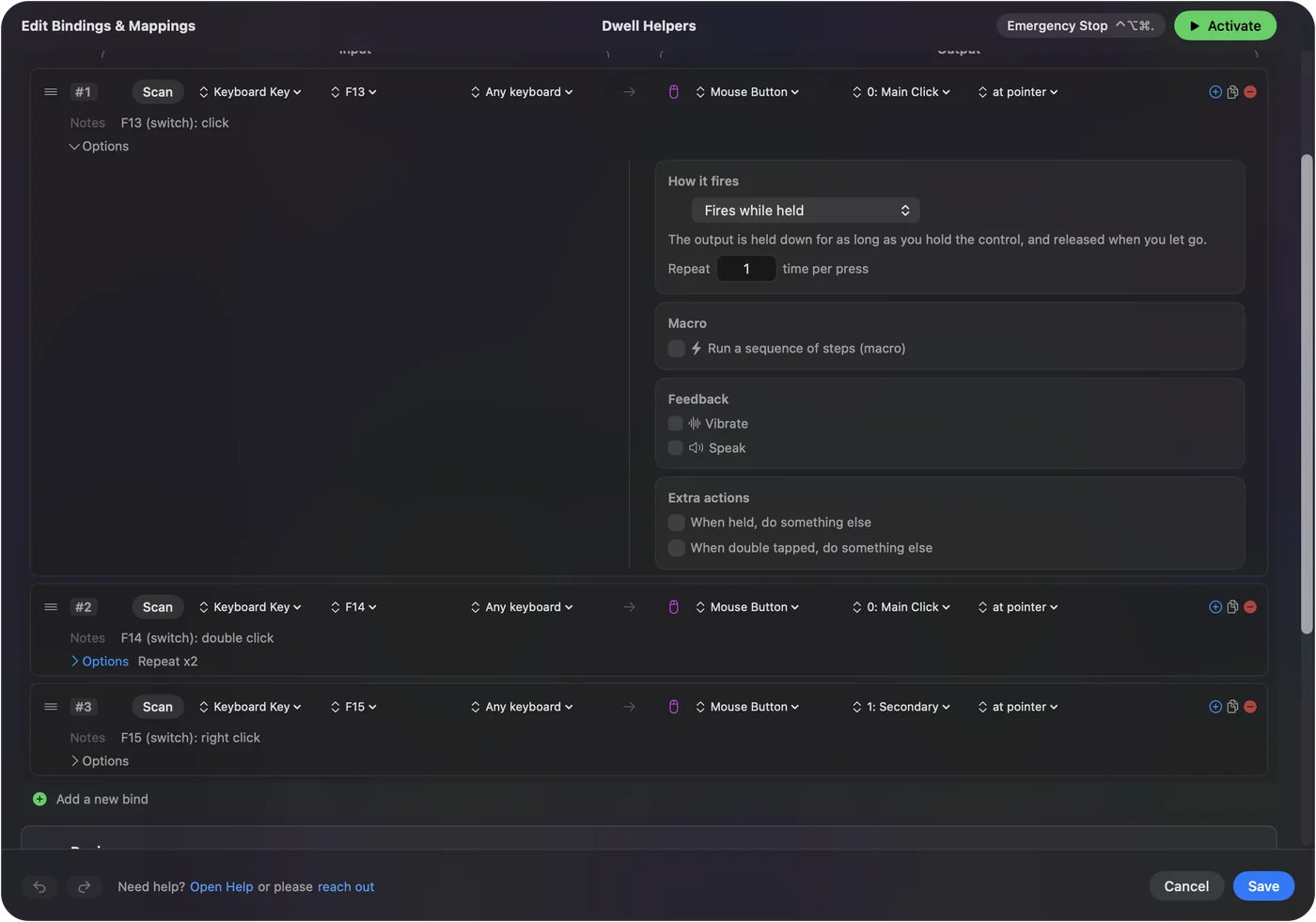
Dwelling on every target takes time, and a switch is the faster click for anyone who can press one. In InputConfig a pedal, a switch or a controller button sends a click wherever the pointer is, and the same control can send a right click on a hold and a key on a double press. Screen regions add commands with no switch at all: the pointer moving into a corner or an edge of the screen runs a shortcut. Using a Mac hands-free puts the pieces together. Anything that moves the pointer can be paired with a switch for the click.
What InputConfig does not do
- Head or eye tracking. Use the head pointer for the head, and an eye tracker with its own software for the eyes.
- An on-screen keyboard. It works with the macOS Accessibility Keyboard, clicked by whatever moves the pointer.
InputConfig starts where the pointer already moves.
The short version
- Built in. macOS has the head pointer and Dwell.
- Not built in. Eye tracking, which needs a tracker and its software.
- Clicks. Dwell, or a switch mapped to a click.
A Mac tracks a head with its camera, and needs added hardware to track eyes.
Questions
Does a MacBook have eye tracking?
Not as a feature of its own in Apple's Mac User Guide for macOS 27. macOS has a head pointer that uses the camera, and Dwell, which works with head or eye tracking technology. Eye control needs an eye tracker and its software.
How do I turn on eye tracking on a Mac?
Apple's Mac User Guide for macOS 27 describes no eye tracking feature to turn on. Set up an eye tracker with its own software, then turn on Dwell under System Settings, Accessibility, Keyboard, Accessibility Keyboard, so that resting the pointer clicks.
Is there webcam eye tracking on a Mac?
Not from Apple. The head pointer uses the camera to follow your head, not your eyes. Apple's Eye Tracking uses the front camera on an iPhone or iPad, and it is not on the Mac. I have not tested any third-party webcam software.
What eye tracking software works on a Mac?
That depends on the maker, so check the eye tracker's own page for macOS support. What matters is that its software moves the Mac's pointer. Dwell then does the clicking. I do not make or test eye trackers.
Can I control a Mac with my eyes?
With an eye tracker whose software moves the Mac's pointer, yes. macOS adds the click through Dwell and the typing through the Accessibility Keyboard.
Does head pointer track my eyes?
No. Head pointer follows your head with the camera. It moves the pointer when you turn or move your head, and it does not click by itself.
Related
This page in other languages: Magyar, 简体中文
Updated