Can you play Hearthstone with a controller on a Mac?
 InputConfig is completely free on the Mac App Store. You don't have to make an account, there are no subscriptions, and nothing is locked. Optimized for Apple silicon.
Hearthstone has no controller support on the Mac that I can find, and I found no Blizzard statement saying otherwise. The Mac game runs natively through the Battle.net app. But Hearthstone is a game of pointing at a card, dragging it to the board, and pointing at a target, and a controller is good at that once InputConfig, the free mapper I make, turns its stick into a mouse.
Card games are some of the most comfortable things to play from a pad, and Hearthstone is one of the gentlest, because nothing in it is timed to the millisecond.
On this page
Steps
- Pair the controller with the Mac.
- In InputConfig, make a new preset and choose Automatically insert available inputs.
- Give the sticks pointer movement, the right trigger the left mouse button, and the left trigger a right click.
- Add Hearthstone to the preset's auto-switch list and press Activate.
Know how it works
InputConfig reads the controller and sends mouse movement, clicks and keys to the Mac. Hearthstone sees an ordinary mouse. Nothing is installed in the game, nothing touches Battle.net, and the same layout works in every mode, because they are all the same mouse.
Build the layout
| Controller | Sends | Why |
|---|---|---|
| Left stick | Pointer, slow | Lands on a card or a minion |
| Right stick | Pointer, fast | Crosses the board, reaches End Turn |
| Right trigger | Left button, held while pulled | Drag a card, attack, target |
| A / Cross | Left click | Quick clicks in menus |
| Left trigger | Right click | Cancel a target |
| B / Circle | Escape | Menu and back |
- You: Make a new preset in InputConfig, choose Automatically insert available inputs, and give these rows their outputs. The sticks are four pointer rows each, slow on the left and fast on the right. Or duplicate the built-in Mouse + Scroll preset and change what you need.
- InputConfig: Holds the left button for as long as the right trigger is pulled.
- Check: Pull and hold the right trigger on a card, steer it with a stick, and let go over the board or the target.
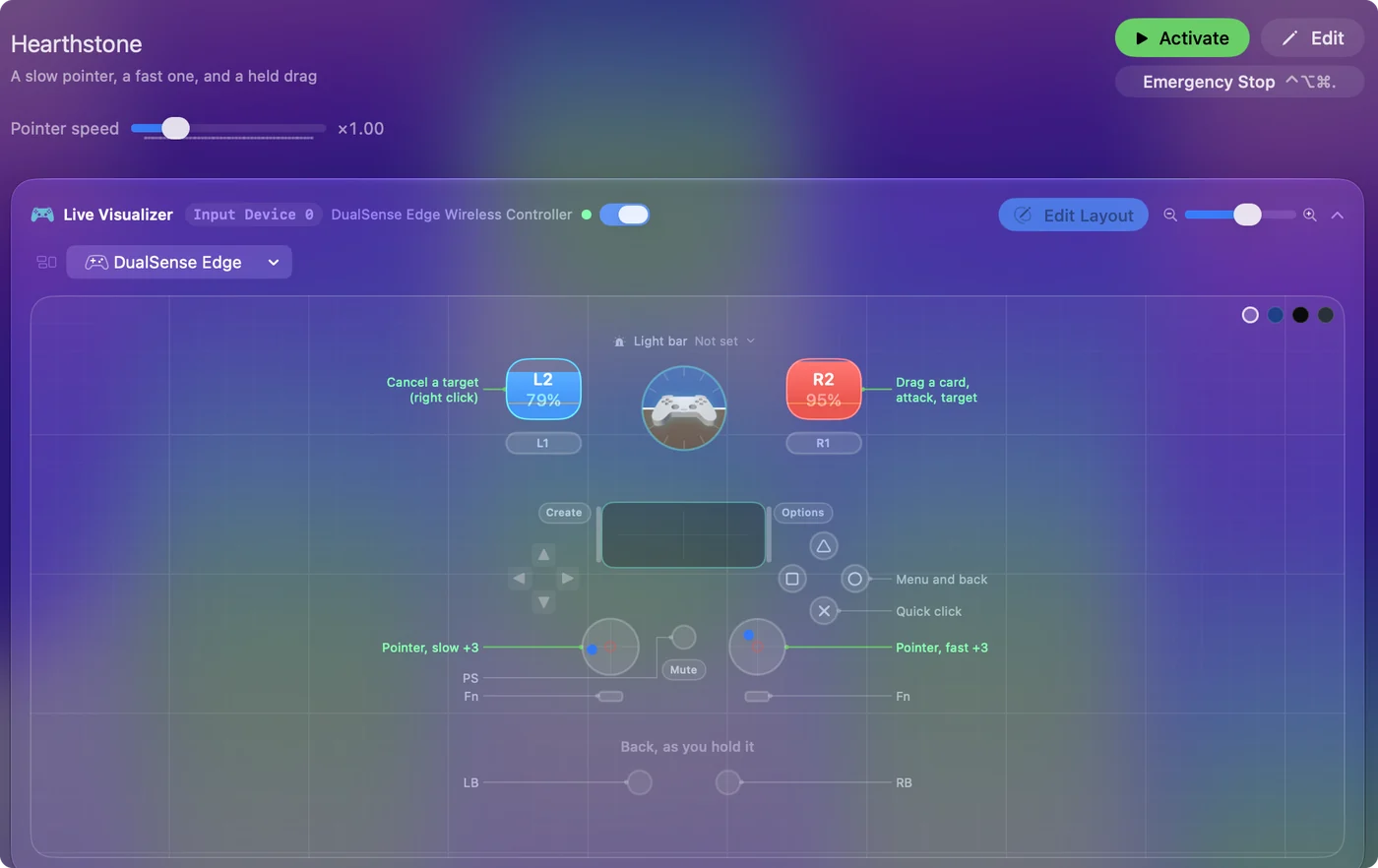
Dragging is a held click while the pointer moves, which is exactly what a held trigger row does.
Make it comfortable
- Ramp-up. Turn it on for the slow stick's rows. A small push creeps onto the edge of a minion, a held push sweeps across.
- End Turn. It is a button on the board, and the fast stick gets you there in a flick. I have not found a keyboard shortcut for it I could confirm, so this layout points and clicks like a mouse would.
- Emotes and chat. Typing needs a keyboard, or macOS's Accessibility Keyboard on screen, driven by the pointer.
- A shaky hand. Raise the Deadzone on the slow stick so a resting thumb does not drift off a card.
Hearthstone never punishes taking your time.
Turn it on with the game
- You: In the preset's Automation & Gaming Utilities section, add Hearthstone under Activate when these apps are in front, and turn on Switch presets when the front app changes in Settings, Advanced.
- InputConfig: Turns the layout on when Hearthstone comes to the front and steps aside when you leave.
- Check: Switch away from the game, and the pad goes back to whatever it did before.
Set it once, and the layout is there every time the game is.
If the pointer misbehaves
Climb this ladder, smallest step first:
- Activate the preset. Nothing moves until it runs.
- Allow Accessibility. InputConfig needs it to move the pointer and click. The menu bar icon turns orange when a running preset needs it.
- Raise the deadzone. If the pointer creeps off a card, open Adjust live on a slow stick row and widen the deadzone.
- Lower the speed. If it overshoots, drag Pointer speed on the preset's page to the left.
A creeping pointer needs a deadzone, not a slower speed.
What it cannot do
InputConfig sends ordinary mouse and keyboard events to macOS, one action per press, and does not touch the game or Battle.net. It does not play for you. Please read Blizzard's terms yourself, because all I can tell you is what the software does.
The short version
- Pointer. It is slow on the left stick and fast on the right.
- Drag. Hold the right trigger, steer, let go.
- Cancel and back. Use the left trigger and B.
A card game you can play lying back, one held trigger at a time.
Questions
Does Hearthstone have controller support?
No. The desktop game is played with a mouse. A mapper such as InputConfig turns a controller into that mouse, so the game never needs to support a pad.
Can you play Hearthstone with a controller on Mac?
Yes, through a mapper. Hearthstone is played with a mouse, and InputConfig turns the stick into that mouse and a trigger into the click.
Is this allowed?
InputConfig sends ordinary mouse and keyboard events to macOS, one action per press, and does not touch the game or Battle.net. It does not play for you. Please read Blizzard's terms yourself, because all I can tell you is what the software does.
Which controller works best?
Any the Mac can connect to. A DualSense adds a touchpad, which can also be a trackpad: using the PS5 touchpad as a trackpad.
Related
Updated