How to play Alien: Isolation on a Mac with a controller
 InputConfig is completely free on the Mac App Store. You don't have to make an account, there are no subscriptions, and nothing is locked. Optimized for Apple silicon.
Feral's Mac version of Alien: Isolation supports gamepads, and its FAQ lists more than sixty it tested, the PS4 and PS3 DualShock, Xbox One and Xbox 360 controllers and Logitech's F310, F510 and F710 among them. Newer pads such as the PS5 DualSense are not on that list. The game offers preset controller layouts, and Feral's manual says individual gamepad controls cannot be reassigned.
I have not tested Alien: Isolation myself. The facts and the default keys here are from Feral's FAQ and manual, which I read on October 7, 2026. If your pad does nothing in the game, or you want a layout the game does not offer, InputConfig, the free mapper I make, sends the game's keyboard and mouse controls from the pad.
On this page
Steps
- Connect the controller and check it under System Settings, Game Controllers.
- Quit the game, wake the controller, and open the game again.
- In the game, choose a layout under Options, Game, Control Scheme.
- If the game ignores the pad, send its keyboard and mouse controls from the pad with a mapper.
Start with the game's own gamepad support
Connect the pad before you start Alien: Isolation. With a tested pad, the game picks it up, and Options, Game, Control Scheme lists the layouts it offers. Feral's FAQ also names fifteen older pads that work only in part, because they have too few buttons. A PS4 or Xbox One controller is on Feral's tested list, so those are the two I would trust.
If the pad does nothing
- The Mac sees the pad. Open System Settings, click Game Controllers, and press a button on the pad.
- Relaunch with the pad awake. Quit Alien: Isolation, press a button on the controller, and open it again.
- Flip the Steam Input override. In the Steam library, right-click Alien: Isolation, open Properties, then Controller, and try the other setting.
- Set a Logitech pad to D. Feral's FAQ says the game needs DirectInput mode, the D position on an F310, F510 or F710.
If nothing lights up there, Alien: Isolation has no chance of seeing the pad either. Controller works in Steam but not in the game has more on the Steam layer.
Send the game its keys instead
The game plays fully on a keyboard and mouse, and the manual says its keys can all be changed under Options, Game, Input Mapping. These are the defaults:
| Action | Key |
|---|---|
| Move | W A S D |
| Look | Mouse |
| Sprint | Shift, held |
| Crouch | C |
| Aim | Right mouse button, held |
| Fire, throw or melee | Left mouse button |
| Use | E |
| Reload or activate | R |
| Radial menu | Q, held |
| Peek | V, held, with a direction |
| Motion tracker | Space, held |
| Flashlight | F |
| Map | Tab |
Thirteen controls cover the whole game, so the layout is a few minutes of work.
Build the layout
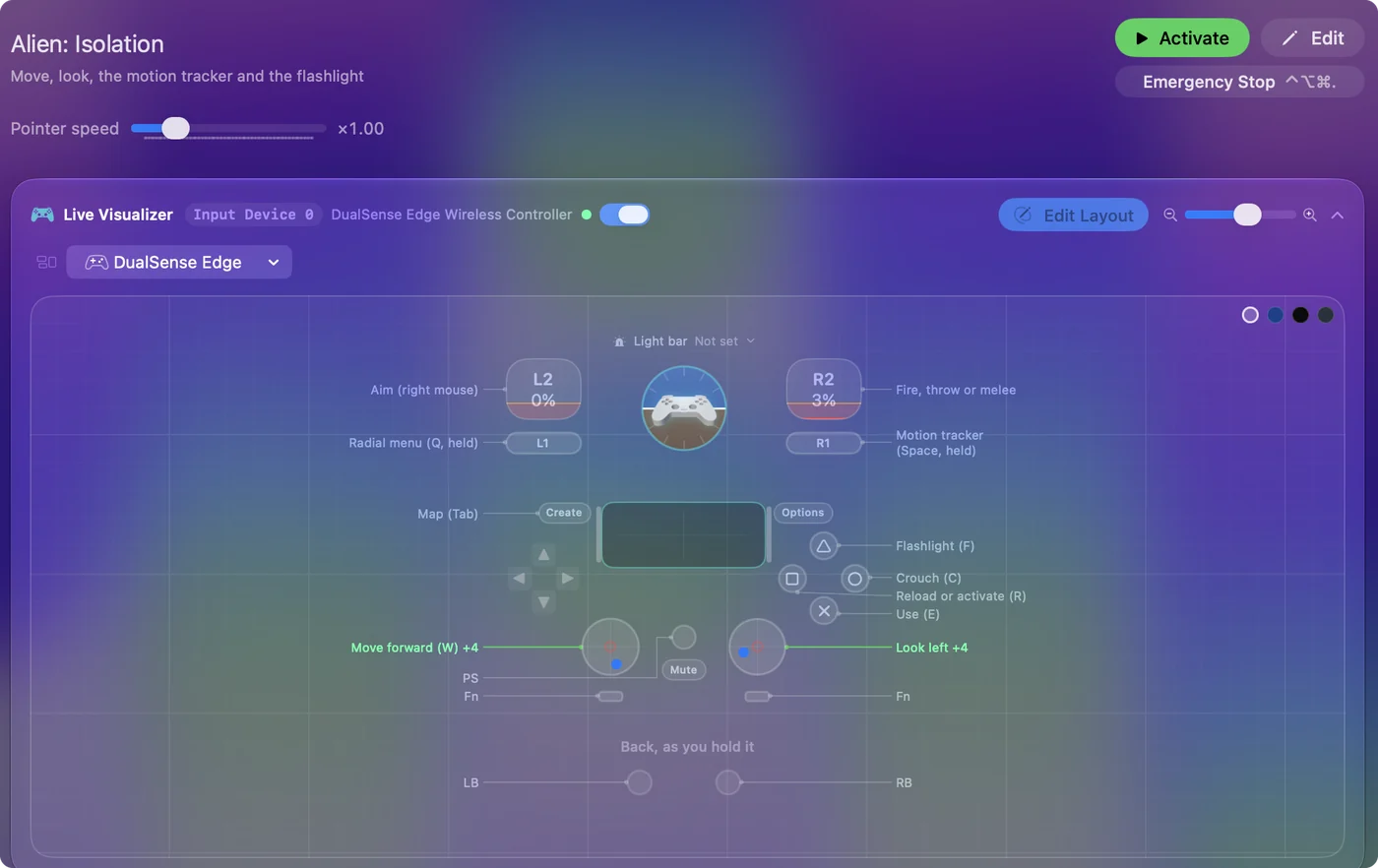
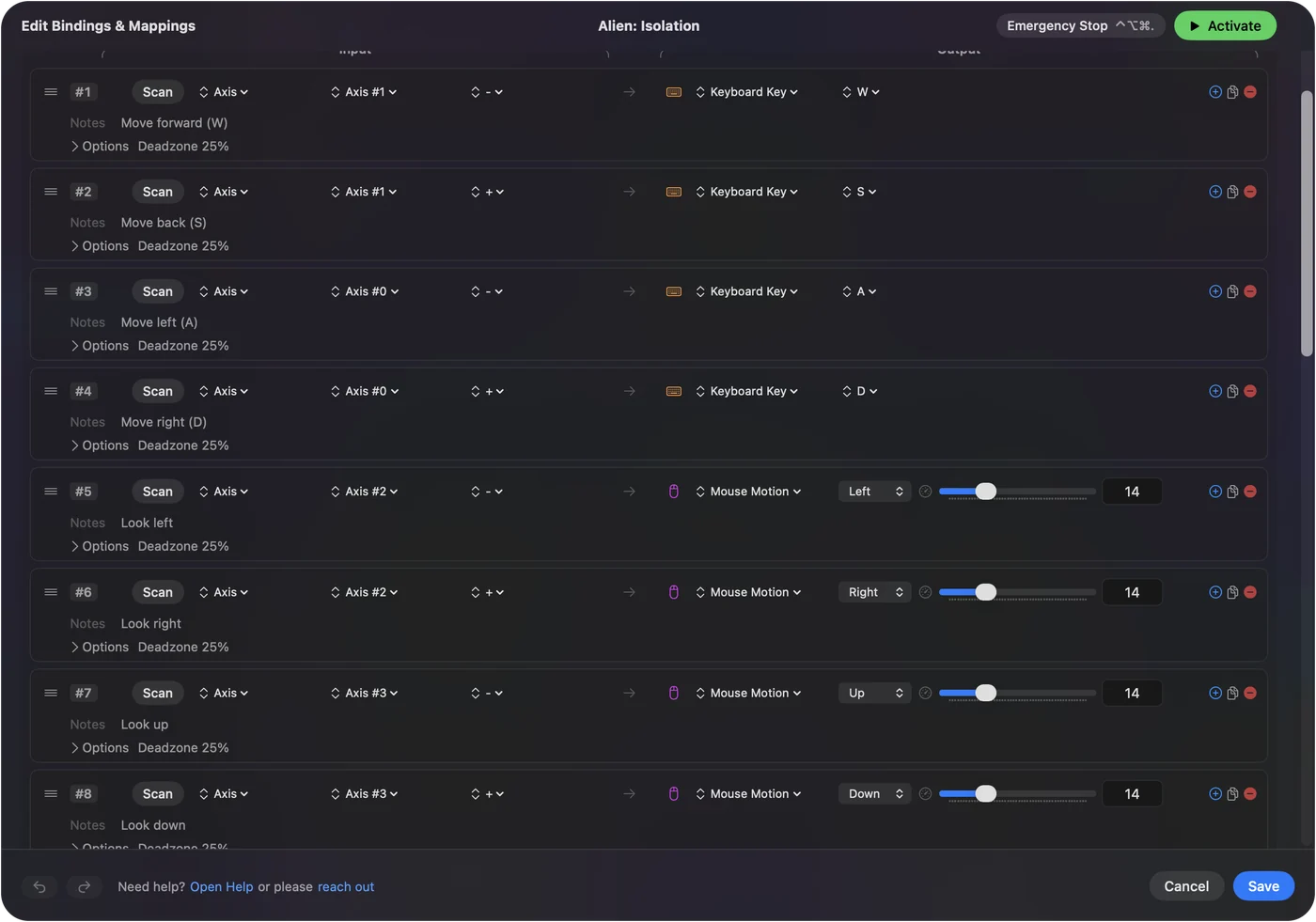
- You: In InputConfig, make a new preset. Set the left stick to WASD and the right stick to mouse movement. Put the right mouse button on the left trigger and the left mouse button on the right trigger.
- InputConfig: Sends those keys and mouse moves while the preset is active.
- Check: In the game, the left stick walks, the right stick looks, and the triggers aim and fire.
- Shoulders. Put Space, held, on one for the motion tracker, and V on the other to peek.
- Face buttons. Give them E, R, C and F.
- Stick click. Use it for Shift, to sprint.
- D-pad. Q for the radial menu, and Tab for the map.
Put the motion tracker on a shoulder button, since you hold it for half the game. Play any Mac game with a controller walks through a layout like this.
Tune the camera stick
Slow, careful looking matters more here than in a shooter. In InputConfig the stick's speed, curve and deadzone are set per row, so the camera can be gentle near the center and still turn quickly at full tilt. A slower look stick suits a game where you spend most of it hiding. Deadzones and sensitivity has the settings.
Use one route, not both
If Alien: Isolation does read your controller, a mapper sending keys at the same time makes every press arrive twice. So pick one route. In InputConfig, a preset tied to the game only runs while that game is in front. If Alien: Isolation already reads your pad, you do not need a mapper at all. Per-app switching can tie the preset to Alien: Isolation.
The short version
- Tested pads. Feral's FAQ lists the PS4 and PS3 DualShock, the Xbox One controller, and Logitech pads in D mode.
- Layouts. The game only offers presets.
- Your own layout. Send keys and mouse moves from the pad, and it is yours to arrange.
Use the game's layouts if they suit you, and send keys when you want your own.
Questions
Does Alien: Isolation on Mac support controllers?
Yes. Feral's FAQ for the Mac version lists more than sixty tested gamepads, including the PS4 and PS3 DualShock, Xbox One and Xbox 360 controllers and Logitech pads in DirectInput mode.
Does a PS5 controller work with Alien: Isolation on a Mac?
The DualSense is not on Feral's tested list for Alien: Isolation, and I have not tested it. If the game ignores it, a mapper can send the game's keyboard and mouse controls from it.
Can I remap the controller in Alien: Isolation on a Mac?
Not button by button. Feral's manual says the game has preset control schemes and individual gamepad controls cannot be reassigned. Its keyboard controls can all be changed.
Why is my controller not working in Alien: Isolation on a Mac?
Connect it before starting the game, check it under System Settings, Game Controllers, try the Steam Input override both ways, and set a Logitech pad's switch to D.
Which keys does Alien: Isolation use on a Mac?
By Feral's manual: W A S D to move, Shift to sprint, C to crouch, E to use, R to reload, Space held for the motion tracker, F for the flashlight, and the mouse buttons to aim and fire.
Related
Updated