Splitgate 2 on a Mac with a controller
 The Splitgate 2 layout is built into InputConfig, free on the Mac App Store. You don't have to make an account, there are no subscriptions, and nothing is locked. Optimized for Apple silicon.
On a Mac: No Mac version. Steam now lists the game as Splitgate: Arena Reloaded, free to play, Windows only. It streams to a Mac from a Windows PC you own. The stream normally passes a controller to the game's native scheme.
Yes, Splitgate 2 plays on a Mac with a controller, streamed from a Windows PC you own. Steam now lists it as Splitgate: Arena Reloaded. This layout is for a stream that misses your pad: fire on the right trigger, jump on the big button, sprint and melee on the stick clicks. An arena shooter on a stream is a handicap. For casual matches it is fine.
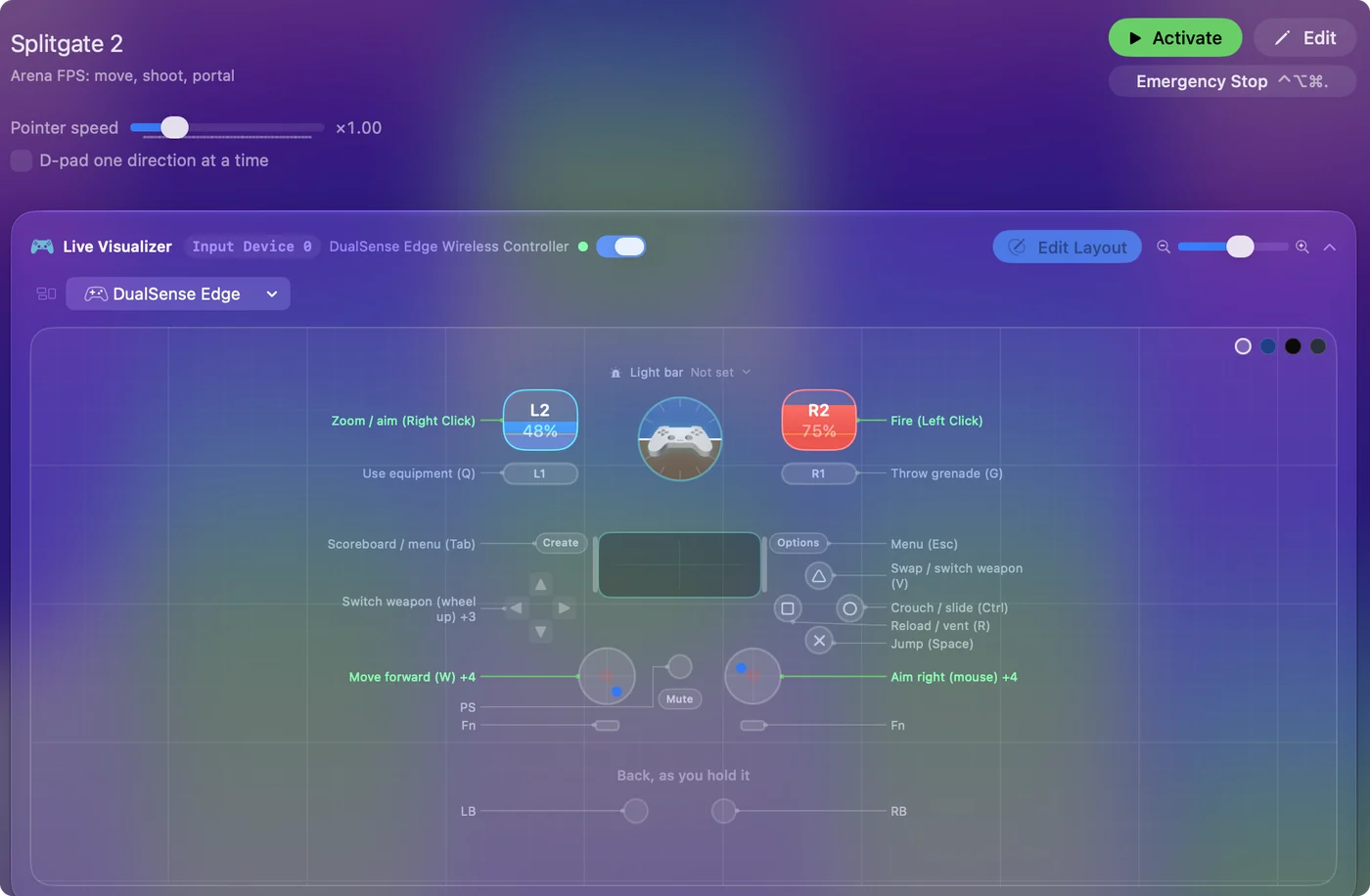
The layout, control by control
How the layout thinks
- Move and aim. The left stick walks on W, A, S and D. The right stick aims with the mouse at speed 18.
- Shoot. The right trigger fires. The left trigger zooms or aims (right click), and the row notes say it places a portal too.
- Face buttons. Jump on the bottom (Space), crouch and slide on the right (Ctrl), reload and vent on the left (R), swap weapons on the top (V).
- Shoulders and clicks. Equipment on the left bumper (Q), grenade on the right (G). Sprint on the left stick click (Shift), melee on the right (F).
- D-pad and menus. Switch weapon on up (wheel up), next grenade type on down (N), mark on right (X), an extra action on left (Z). Scoreboard on Back (Tab), menu on Start (Escape).
Check the portal keys against the game's controls, since the new version may have moved them.
Tune it
- Second portal. Put the second portal key on a chord row with the trigger.
- Moved keys. If a key moved in Arena Reloaded, change that row's output to the game's current key.
Learn the portals first, because everything else is a shooter you already know.
If the game sees the pad
For an arena shooter like Splitgate 2, the pad a stream passes through is worth trying first, with this preset off.
If your controller is not working in Splitgate 2
When Splitgate 2 does not react to your controller on a Mac, check these in order:
- Check that the Mac sees the controller. Open the gamepad tester and press a button. If nothing lights up there, the problem is the connection, and a controller that is connected but not working covers that first.
- Pair the controller with the Mac first. A streaming app such as Steam Link, Moonlight or Parsec passes on only a controller the Mac already sees, so pair it before you start the stream, then press a button once Splitgate 2 is running. Streaming PC games to a Mac with a controller has the checks for each app.
- Play it from keys. If Splitgate 2 still ignores the pad, activate this layout. It sends the keyboard and mouse controls Splitgate 2 already reads. Turn the game's own controller option off while it runs, or a press can arrive twice. The layout works whether or not Splitgate 2 ever sees the controller.
Get it in two clicks
- Open InputConfig and click Smart Preset Maker on the welcome screen.
- Search for Splitgate 2 and pick it. The layout is created as a preset in your sidebar, named and ready.
- Press Activate. Every row can be changed afterwards: the editor's Scan button rebinds any control the moment you touch it.
Splitgate 2 controls: every button and the key it sends
The Sends column is Splitgate 2's default keyboard and mouse controls, as this layout expects them. If you changed a key in the game's settings, change the same row in InputConfig.
| Controller | Sends | What it does |
|---|---|---|
| Left stick up | W | Move forward (W) |
| Left stick down | S | Move back (S) |
| Left stick left | A | Move left (A) |
| Left stick right | D | Move right (D) |
| Right stick right | Mouse motion right (speed 18) | Aim right (mouse) |
| Right stick left | Mouse motion left (speed 18) | Aim left (mouse) |
| Right stick down | Mouse motion down (speed 18) | Aim down (mouse) |
| Right stick up | Mouse motion up (speed 18) | Aim up (mouse) |
| Right trigger | Left click | Fire (Left Click) |
| Left trigger | Right click | Zoom / aim (Right Click) |
| X / Square | R | Reload / vent (R) |
| L3 (left stick click) | Shift (Left) | Sprint (Shift) |
| RB / R1 | G | Throw grenade (G) |
| LB / L1 | Q | Use equipment (Q) |
| A / Cross | Space | Jump (Space) |
| Start / Options | Escape | Menu (Esc) |
| B / Circle | Ctrl (Left) | Crouch / slide (Ctrl) |
| Y / Triangle | V | Swap / switch weapon (V) |
| D-pad up | Scroll up | Switch weapon (wheel up) |
| D-pad down | N | Next grenade type (N) |
| D-pad right | X | Mark (X) |
| Back / Share / Select | Tab | Scoreboard / menu (Tab) |
| R3 (right stick click) | F | Melee (F) |
| D-pad left | Z | Extra action (Z) |
Names follow the editor's Xbox / PlayStation pair, and a Switch pad fires by position.
Questions
Does Splitgate 2 run on a Mac?
Splitgate 2 does not run natively on a Mac. It streams from a Windows PC you own, and the stream usually passes a controller through.
Is Splitgate 2 now Splitgate: Arena Reloaded?
Steam lists it under that name now, free to play, and describes it as combining Splitgate 1 and 2. If a key moved in the new version, change that row's output to the game's current key.
Can I play Splitgate 2 on an M1 Mac or a MacBook Air?
Yes, through a stream. Splitgate 2 runs on the other end, on your own PC, so the Mac only plays the video and sends your input. An M1 MacBook Air streams it like any other Mac.
Related
Updated