Frostpunk on a Mac with a controller
 The Frostpunk layout is built into InputConfig, free on the Mac App Store. You don't have to make an account, there are no subscriptions, and nothing is locked. Optimized for Apple silicon.
On a Mac: Native on macOS through the Mac App Store or GOG. The Steam version is Windows only. The console editions have a pad interface. The Mac version is mouse and keyboard. This layout is the mouse game from a pad.
Yes, Frostpunk runs natively on the Mac from the Mac App Store or GOG, and this layout plays it from a pad, even though the Mac version is mouse only. Frostpunk is a game about pausing at the right moment, so pause is on the big button. The rest is a pointer and the book of laws, which is fine on a stick because nothing in Frostpunk is fast except the cold.
The layout, control by control
How the layout thinks
- Pointer and camera. The left stick is the pointer, the right stick pans.
- Clicks. The right trigger selects, the left trigger cancels.
- Time. Pause on the bottom face button, speeds 1 to 3 on the others.
- Zoom and menu. Zoom on the bumpers, Escape on Options.
The same city-builder shape as Cities and RimWorld: pointer, pan, speeds, zoom.
Tune it to your city
- Rotate the camera. Put Q and E on D-pad left and right. The ring city looks best from a turning camera.
- Book of laws and the economy screens. Put their keys on a chord with the D-pad.
- Slow pointer. Building placement on the ring is precise. Add half speed behind a bumper.
A slow pointer keeps buildings on the ring where you meant them.
Frostpunk controller support: controller or keyboard
Steam's store page lists no controller support for Frostpunk, so it was made for a keyboard and mouse, and that is how it expects to be played. A controller still works: this layout sends the game's keys and mouse movement from the pad, so to the game you are simply typing and pointing.
From Steam's listing, checked in October 2026. Every game's listing is in Mac games with controller support.
If your controller is not working in Frostpunk
When Frostpunk does not react to your controller on a Mac, check these in order:
- Check that the Mac sees the controller. Open the gamepad tester and press a button. If nothing lights up there, the problem is the connection, and a controller that is connected but not working covers that first.
- Check the Steam Input setting for Frostpunk. In Steam, open Frostpunk, Properties, Controller, and change the Steam Input override. A controller that works in Steam but not in the game goes through each choice.
- Play it from keys. If Frostpunk still ignores the pad, activate this layout. It sends the keyboard and mouse controls Frostpunk already reads. The layout works whether or not Frostpunk ever sees the controller.
Get it in two clicks
- Open InputConfig and click Smart Preset Maker on the welcome screen.
- Search for Frostpunk and pick it. The layout is created as a preset in your sidebar, named and ready.
- Press Activate. Every row can be changed afterwards: the editor's Scan button rebinds any control the moment you touch it.
Frostpunk controls: every button and the key it sends
The Sends column is Frostpunk's default keyboard and mouse controls, as this layout expects them. If you changed a key in the game's settings, change the same row in InputConfig.
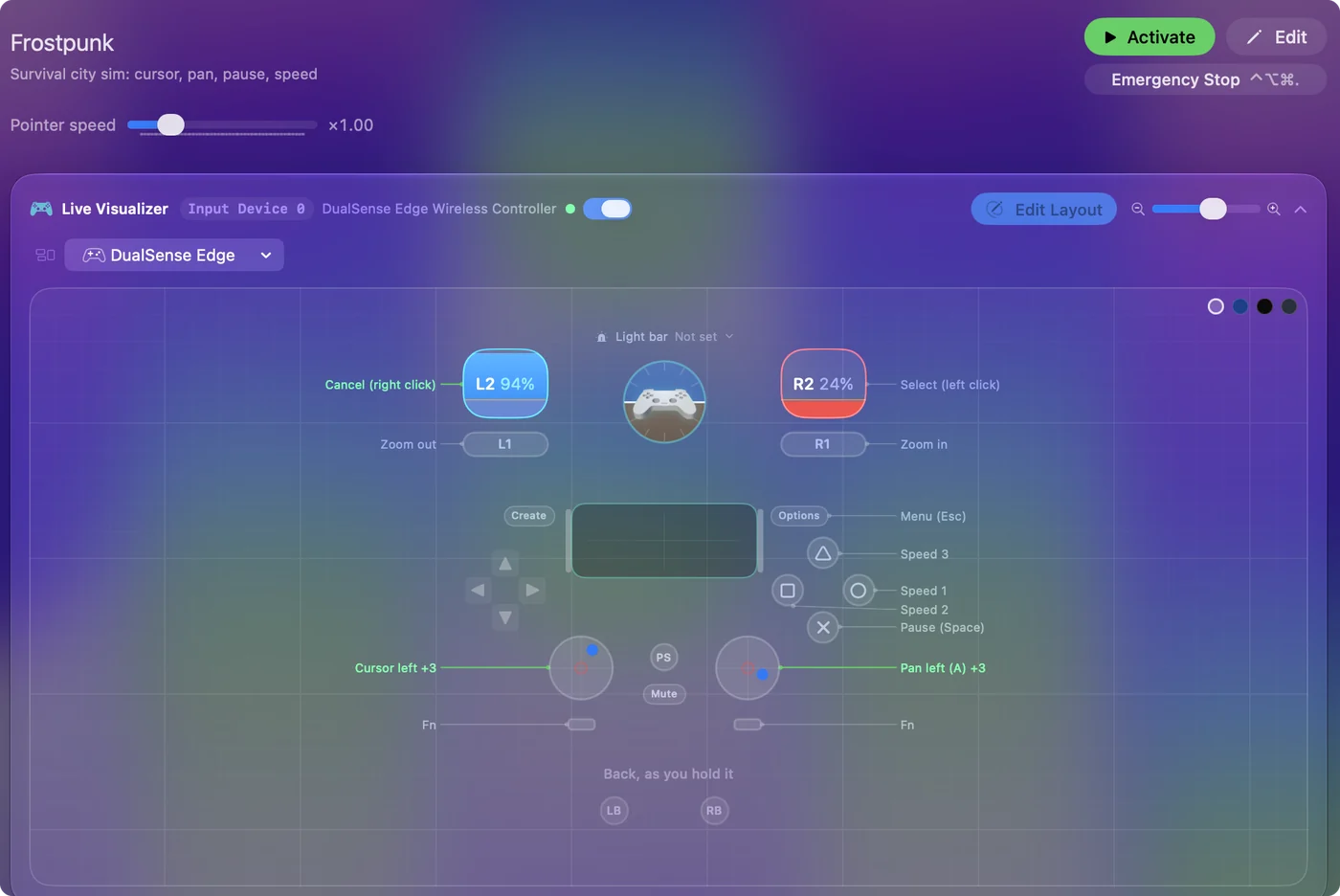
| Controller | Sends | What it does |
|---|---|---|
| Left stick left | Mouse motion left (speed 16) | Cursor left |
| Left stick right | Mouse motion right (speed 16) | Cursor right |
| Left stick up | Mouse motion up (speed 16) | Cursor up |
| Left stick down | Mouse motion down (speed 16) | Cursor down |
| Right stick left | A | Pan left (A) |
| Right stick right | D | Pan right (D) |
| Right stick up | W | Pan up (W) |
| Right stick down | S | Pan down (S) |
| Right trigger | Left click | Select (left click) |
| Left trigger | Right click | Cancel (right click) |
| A / Cross | Space | Pause (Space) |
| B / Circle | 1 | Speed 1 |
| X / Square | 2 | Speed 2 |
| Y / Triangle | 3 | Speed 3 |
| LB / L1 | Scroll down | Zoom out |
| RB / R1 | Scroll up | Zoom in |
| Start / Options | Escape | Menu (Esc) |
Names follow the editor's Xbox / PlayStation pair, and a Switch pad fires by position.
Questions
Can I get Frostpunk on a Mac?
Yes. Frostpunk and Frostpunk: Complete Edition are on the Mac App Store, and GOG sells a Mac version. The Steam version is Windows only. None of the Mac versions has a controller interface, which is what this layout adds.
Does Frostpunk on Mac support controllers?
No. This layout gives it a pad through the mouse and keyboard.
Related
Updated