Demon's Souls on a Mac with a controller
 The Demon's Souls layout is built into InputConfig, free on the Mac App Store. You don't have to make an account, there are no subscriptions, and nothing is locked. Optimized for Apple silicon.
On a Mac: PlayStation 5 only. No PC version exists, so there is nothing for a keyboard layout to send keys to. On a Mac, PS Remote Play streams it from your own PS5 and uses a DualSense or DualShock 4 directly.
No: InputConfig cannot play Demon's Souls on a Mac, because it is a PS5 exclusive with no PC version. InputConfig sends keyboard and mouse to a game running on a computer, and there is no computer version to send them to. PS Remote Play on the Mac with a DualSense is the way, and it needs nothing from this app.
The layout, control by control
Play it with PS Remote Play instead
- Get PS Remote Play. It is free for Mac from Sony's website.
- Connect a pad. It works with a DualSense or DualShock 4 connected to the Mac, read directly, with no layout.
- Stream from your PS5. Your own console runs the game. The Mac shows it.
For Demon's Souls on a Mac, PS Remote Play is the answer.
What this layout is for
InputConfig's catalog has a Souls layout under this name, with the same rows the other Souls games use.
- The shoulders. Light and heavy attacks on R1 and R2, block and parry on L1 and L2, as clicks and Shift clicks.
- The rest. Roll on the bottom face button, the healing item on the top, lock on with the left stick click, weapon swaps on the D-pad.
Dark Souls Remastered and Elden Ring have pages with a real game behind them. The layout is waiting for a game to send it to.
Get it in two clicks
- Open InputConfig and click Smart Preset Maker on the welcome screen.
- Search for Demon's Souls and pick it. The layout is created as a preset in your sidebar, named and ready.
- Press Activate. Every row can be changed afterwards: the editor's Scan button rebinds any control the moment you touch it.
To check the controller itself first, the gamepad tester shows every button and stick live in your browser.
Demon's Souls controls: every button and the key it sends
The Sends column is Demon's Souls's default keyboard and mouse controls, as this layout expects them. If you changed a key in the game's settings, change the same row in InputConfig.
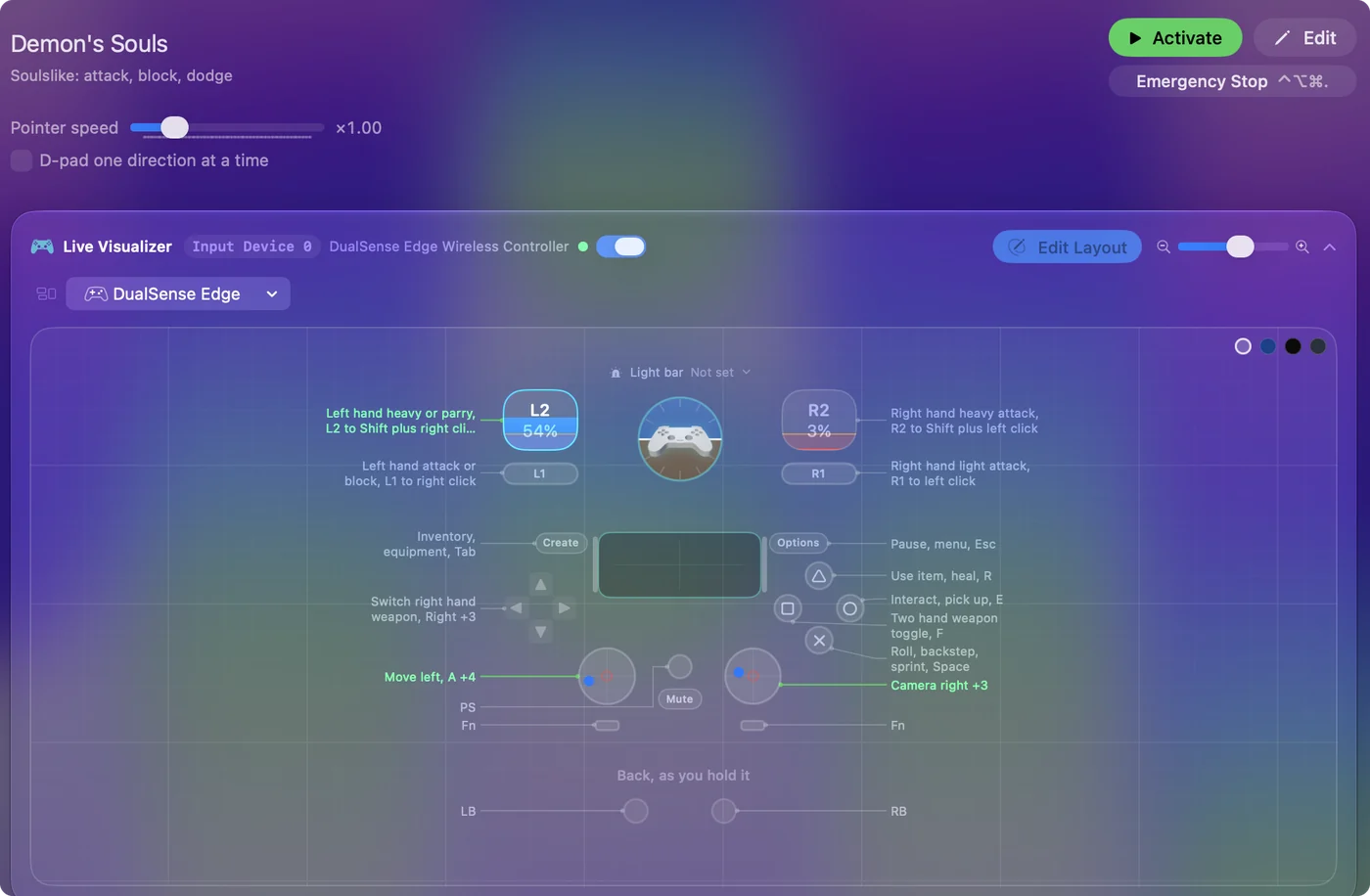
| Controller | Sends | What it does |
|---|---|---|
| Left stick left | A | Move left, A |
| Left stick right | D | Move right, D |
| Left stick up | W | Move forward, W |
| Left stick down | S | Move back, S |
| RB / R1 | Left click | Right hand light attack, R1 to left click |
| Right trigger | Shift (Left), Left click | Right hand heavy attack, R2 to Shift plus left click |
| LB / L1 | Right click | Left hand attack or block, L1 to right click |
| Left trigger | Shift (Left), Right click | Left hand heavy or parry, L2 to Shift plus right click |
| A / Cross | Space | Roll, backstep, sprint, Space |
| B / Circle | E | Interact, pick up, E |
| Y / Triangle | R | Use item, heal, R |
| X / Square | F | Two hand weapon toggle, F |
| L3 (left stick click) | Middle click | Lock on, reset camera, middle click |
| D-pad right | Right | Switch right hand weapon, Right |
| D-pad left | Left | Switch left hand weapon, Left |
| D-pad up | Up | Switch spell, Up |
| D-pad down | Down | Switch quick item, Down |
| Start / Options | Escape | Pause, menu, Esc |
| Back / Share / Select | Tab | Inventory, equipment, Tab |
| Right stick right | Mouse motion right (speed 18) | Camera right |
| Right stick left | Mouse motion left (speed 18) | Camera left |
| Right stick down | Mouse motion down (speed 18) | Camera down |
| Right stick up | Mouse motion up (speed 18) | Camera up |
Names follow the editor's Xbox / PlayStation pair, and a Switch pad fires by position.
Questions
Can InputConfig play Demon's Souls on a Mac?
No. It is PS5-only. PS Remote Play with a DualSense is the route, and it does not need InputConfig.
Related
Updated