Cyberpunk 2077 on a Mac with a controller
 The Cyberpunk 2077 layout is built into InputConfig, free on the Mac App Store. You don't have to make an account, there are no subscriptions, and nothing is locked. Optimized for Apple silicon.
On a Mac: Native on Apple silicon since 2025, with the game's own controller support. Use that first. This keyboard-and-mouse layout is for controllers the game does not detect, and for accessibility remaps beyond the in-game options.
Yes, Cyberpunk 2077 supports controllers on a Mac: the Ultimate Edition runs natively on Apple silicon, and Steam lists full controller support, DualSense included. If your controller shows up in the game, play it the game's way, because CD Projekt's pad scheme is good.
This layout is for the other cases:
- A controller the game cannot see. A Steam Controller, an adaptive controller, or a pad in a mode macOS reads but the game does not.
- A hand that cannot chord. Holding a trigger and pressing a face button at once is not possible for every hand.
- Keyboard habits. Night City's keyboard binds, with quickhacks on a chord and a toggled crouch, the way you played it for two hundred hours on a PC.
The layout, control by control
How the layout thinks
- Move and look. The left stick moves and the right stick is the mouse.
- Fight. The right trigger shoots and swings. The left trigger aims and blocks. That covers every fight.
- Face buttons. The four things V does constantly: jump on the bottom, crouch and dodge on the right (C, which the game uses for both), reload on the left, and interact on the top (F, which also takes and loots).
- Scanner and hacks. The left bumper is Tab, the scanner: hold it to see the world in yellow, release it to shoot. The right bumper is Q for quickhacks.
- Menus. Create opens the backpack and Options pauses.
The scanner is a held bumper, so you scan and shoot without letting go of anything.
Tune it to how you play
- Sprint. Shift sprints. Put it on the left stick click.
- Dodge. The game reads two quick presses of C as a dodge, and the crouch button already sends C, so a double press of that button dodges. You can also give the crouch row a double-tap action that sends C twice with a short gap.
- Quickhacks in a fight. Q opens the hack menu and the number keys pick. Bind the D-pad to 1 to 4 and the whole menu is one thumb.
- Weapon slots. 1, 2 and 3 are the three slots and 4 is fists. Put them on the face buttons with While also holding set to L1, so plain presses keep jump and the rest.
- Driving. The same keys as walking, so the left stick already drives. A small deadzone on the steering rows takes the twitch out at speed.
- Phone and journal. They are Z and J. The touchpad press and the right stick click are free for them.
Quickhacks on the D-pad turn the hack menu into one thumb.
When the game does see your pad
Deactivate the preset and let it. You get analog movement, aim assist and the game's own button prompts. Running both means one press arrives twice, as a button and as a key.
Keep the preset for the days a Bluetooth pad will not connect to the game, and for the accessibility settings the game does not have.
Cyberpunk 2077 controller support: controller or keyboard
Steam's store page lists full controller support for Cyberpunk 2077, so the game was made to be played on a controller, menus included. A keyboard and mouse work as well, and the choice is yours.
From Steam's listing, checked in October 2026. Every game's listing is in Mac games with controller support.
Get it in two clicks
- Open InputConfig and click Smart Preset Maker on the welcome screen.
- Search for Cyberpunk 2077 and pick it. The layout is created as a preset in your sidebar, named and ready.
- Press Activate. Every row can be changed afterwards: the editor's Scan button rebinds any control the moment you touch it.
To check the controller itself first, the gamepad tester shows every button and stick live in your browser.
Cyberpunk 2077 controls: every button and the key it sends
The Sends column is Cyberpunk 2077's default keyboard and mouse controls, as this layout expects them. If you changed a key in the game's settings, change the same row in InputConfig.
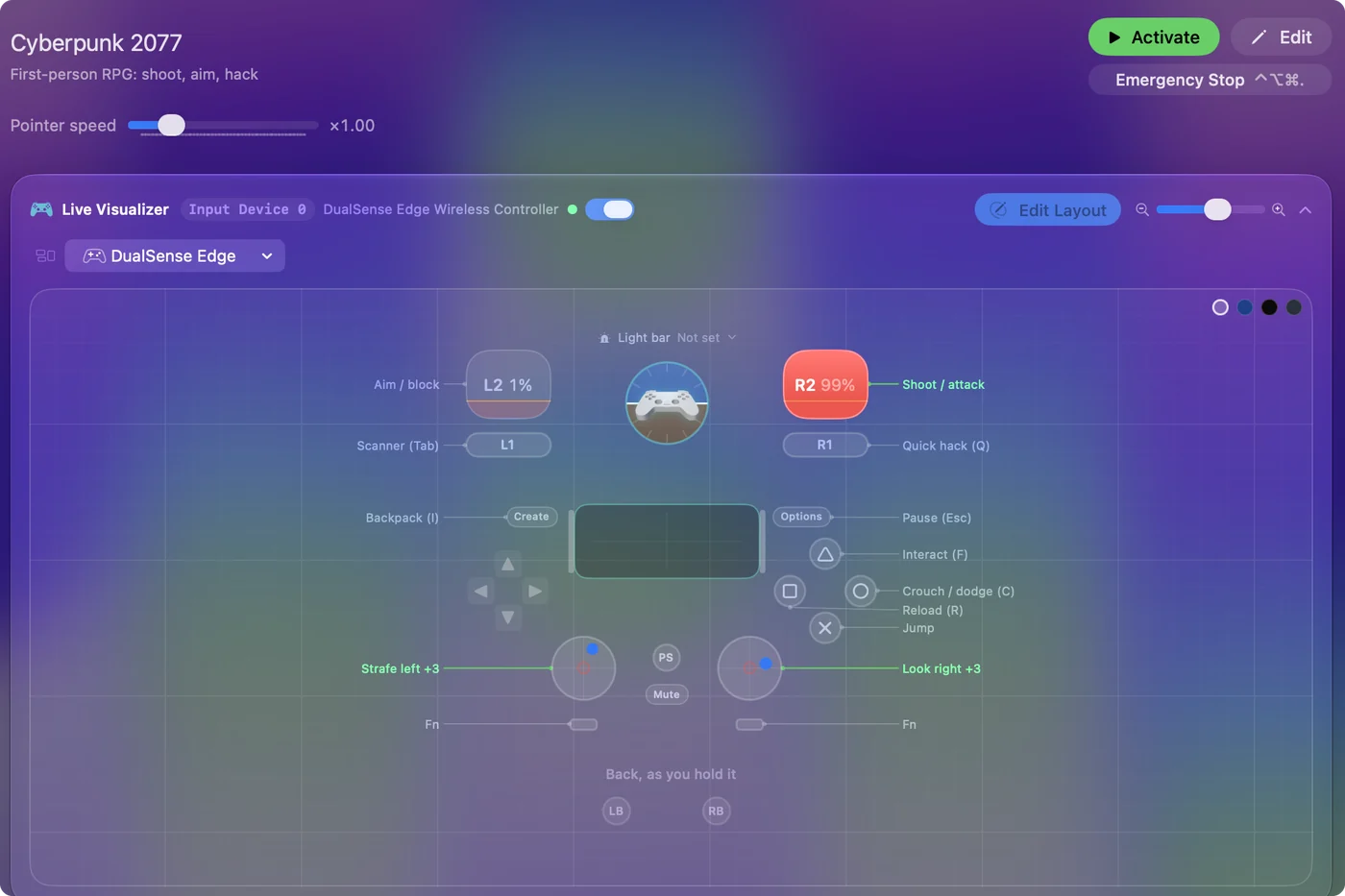
| Controller | Sends | What it does |
|---|---|---|
| Left stick left | A | Strafe left |
| Left stick right | D | Strafe right |
| Left stick up | W | Forward |
| Left stick down | S | Back |
| Right stick right | Mouse motion right (speed 20) | Look right |
| Right stick left | Mouse motion left (speed 20) | Look left |
| Right stick down | Mouse motion down (speed 14) | Look down |
| Right stick up | Mouse motion up (speed 14) | Look up |
| Right trigger | Left click | Shoot / attack |
| Left trigger | Right click | Aim / block |
| A / Cross | Space | Jump |
| B / Circle | C | Crouch / dodge (C) |
| X / Square | R | Reload (R) |
| Y / Triangle | F | Interact (F) |
| LB / L1 | Tab | Scanner (Tab) |
| RB / R1 | Q | Quick hack (Q) |
| Back / Share / Select | I | Backpack (I) |
| Start / Options | Escape | Pause (Esc) |
Names follow the editor's Xbox / PlayStation pair, and a Switch pad fires by position.
Questions
Why is my controller not working in Cyberpunk 2077 on Mac?
Check the Mac first: open System Settings, click Game Controllers in the sidebar, and look for your controller. If it is there and the game still ignores it, Steam Input is a common cause of a controller that works in Steam but not in the game. If nothing works, activate this layout and play with the game's keyboard and mouse controls from the pad.
Does it work with the Steam or GOG version?
It works with both. The preset launches the Steam version (steam://run/1091500), and GOG players open the game themselves. The keys arrive the same either way.
Why would I want the keyboard binds on a controller?
For chords, toggles, turbo and hold actions that the game's own remapping does not offer, and for a familiar layout if you learned the game on a keyboard.
Related
Updated