Borderlands 3 on a Mac with a controller
 The Borderlands 3 layout is built into InputConfig, free on the Mac App Store. You don't have to make an account, there are no subscriptions, and nothing is locked. Optimized for Apple silicon.
On a Mac: The Mac build was discontinued, and Steam now lists Windows only. It runs on Apple silicon through CrossOver or the Game Porting Toolkit, or streams from a Windows PC you own. A stream passes a controller. The wrappers often do not, and this layout sends keyboard and mouse instead.
Borderlands 3 plays on a Mac with a controller through CrossOver, the Game Porting Toolkit or a stream from a Windows PC, and when the wrapper loses the pad, this layout plays it. The Mac build was discontinued and Steam now lists Windows only.
It is a good fit for a keyboard layout, because Borderlands is about switching between four guns fast, and four guns on four D-pad directions is faster than any weapon wheel.
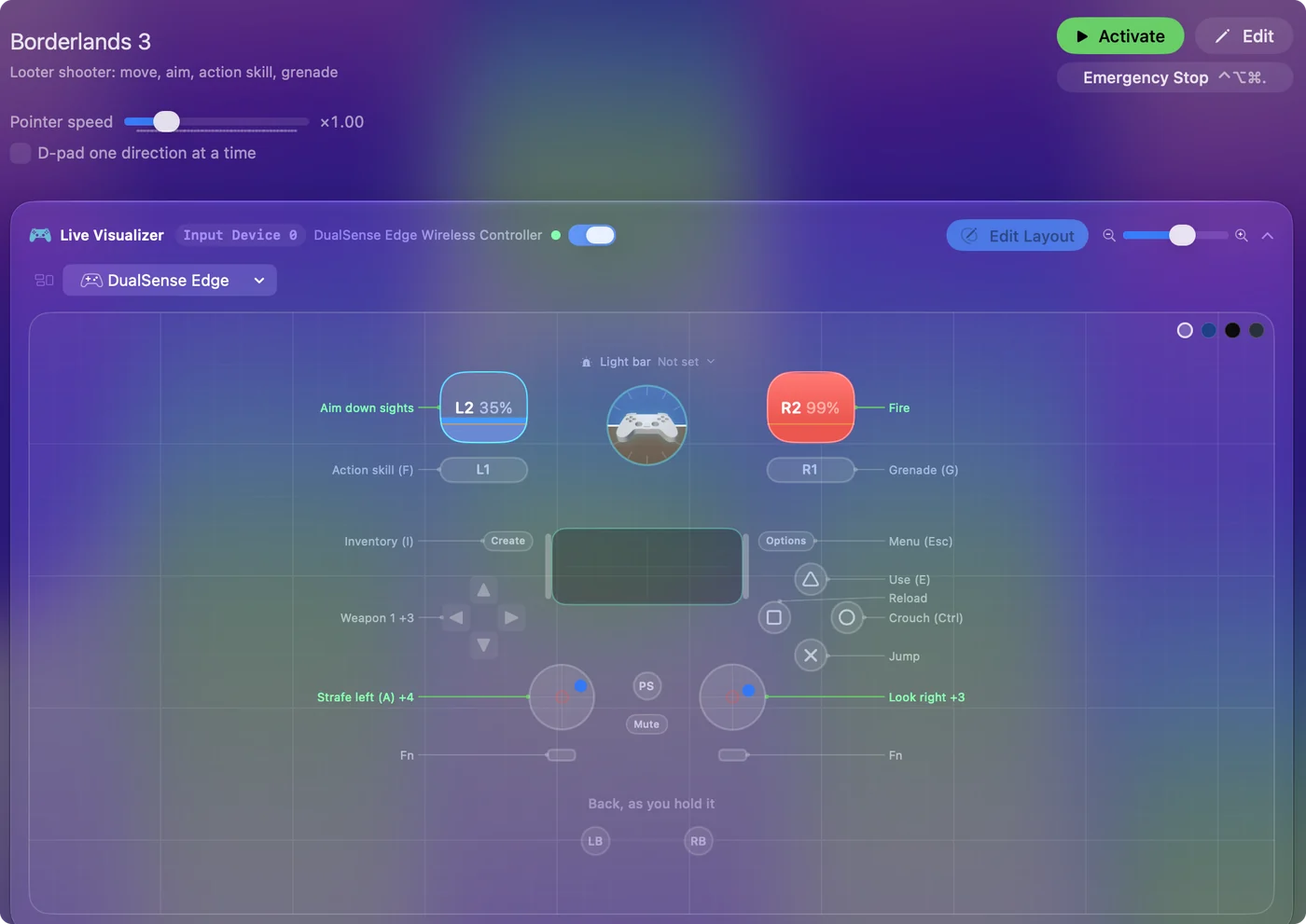
The layout, control by control
How the layout thinks
- Move and look. The sticks. Sprint is the left stick click.
- Shoot. The right trigger fires, the left trigger aims.
- Face buttons. Jump, crouch, reload and E.
- Skill and grenade. The action skill (F) on the left bumper and the grenade (G) on the right, both on fingers so you can use them while aiming.
- Guns and menus. The D-pad is weapons 1 to 4, one per direction. The inventory (I) is on Create, Escape on Options.
Four guns on four directions is the fastest weapon swap a pad can have.
Tune it to your Vault Hunter
- Melee. Put V on the right stick click.
- Slide and mantle. Sprint into crouch slides, and jump at a ledge mantles. Both are already there.
- Ping. Q marks enemies and loot for the co-op partner who is still looking at the ground. Put it on the touchpad press.
- Repeat fire for Moze. Some guns want the trigger tapped. Set the fire row to Repeats while held at a rate under the gun's fire rate.
- Emotes and photo mode. On a chord, if you must.
If the wrapper or stream passes your pad, use the native scheme and turn this preset off, so a press does not arrive twice. Melee on the stick click is the first addition to make.
Borderlands 3 controller support: controller or keyboard
Steam's store page lists full controller support for Borderlands 3, so the game was made to be played on a controller, menus included. A keyboard and mouse work as well, and the choice is yours. On a Mac, use the game's own controller support first when it sees your pad. This layout is for a pad it does not see, or for buttons it will not let you move.
From Steam's listing, checked in October 2026. Every game's listing is in Mac games with controller support.
If your controller is not working in Borderlands 3
When Borderlands 3 does not react to your controller on a Mac, check these in order:
- Check that the Mac sees the controller. Open the gamepad tester and press a button. If nothing lights up there, the problem is the connection, and a controller that is connected but not working covers that first.
- Pair the controller with the Mac first. A streaming app such as Steam Link, Moonlight or Parsec passes on only a controller the Mac already sees, so pair it before you start the stream, then press a button once Borderlands 3 is running. Streaming PC games to a Mac with a controller has the checks for each app.
- Expect less inside a wrapper. In CrossOver or the Game Porting Toolkit, Wine passes a controller to Borderlands 3 only some of the time, and the keyboard and mouse get through every time. Using a controller with CrossOver games has the checks.
- Play it from keys. If Borderlands 3 still ignores the pad, activate this layout. It sends the keyboard and mouse controls Borderlands 3 already reads. Turn the game's own controller option off while it runs, or a press can arrive twice. The layout works whether or not Borderlands 3 ever sees the controller.
Get it in two clicks
- Open InputConfig and click Smart Preset Maker on the welcome screen.
- Search for Borderlands 3 and pick it. The layout is created as a preset in your sidebar, named and ready.
- Press Activate. Every row can be changed afterwards: the editor's Scan button rebinds any control the moment you touch it.
Borderlands 3 controls: every button and the key it sends
The Sends column is Borderlands 3's default keyboard and mouse controls, as this layout expects them. If you changed a key in the game's settings, change the same row in InputConfig.
| Controller | Sends | What it does |
|---|---|---|
| Left stick left | A | Strafe left (A) |
| Left stick right | D | Strafe right (D) |
| Left stick up | W | Move forward (W) |
| Left stick down | S | Move back (S) |
| Right stick right | Mouse motion right (speed 20) | Look right |
| Right stick left | Mouse motion left (speed 20) | Look left |
| Right stick down | Mouse motion down (speed 14) | Look down |
| Right stick up | Mouse motion up (speed 14) | Look up |
| Right trigger | Left click | Fire |
| Left trigger | Right click | Aim down sights |
| A / Cross | Space | Jump |
| B / Circle | Ctrl (Left) | Crouch (Ctrl) |
| X / Square | R | Reload |
| Y / Triangle | E | Use (E) |
| LB / L1 | F | Action skill (F) |
| RB / R1 | G | Grenade (G) |
| L3 (left stick click) | Shift (Left) | Sprint (Shift) |
| D-pad up | 1 | Weapon 1 |
| D-pad left | 2 | Weapon 2 |
| D-pad right | 3 | Weapon 3 |
| D-pad down | 4 | Weapon 4 |
| Back / Share / Select | I | Inventory (I) |
| Start / Options | Escape | Menu (Esc) |
Names follow the editor's Xbox / PlayStation pair, and a Switch pad fires by position.
Questions
Does Borderlands 3 run on a Mac?
The native Mac version was discontinued. It runs through CrossOver or the Game Porting Toolkit, or streams from a Windows PC you own. In the wrappers the controller is often not seen, which this layout works around.
Can I play Borderlands 3 on an M1 Mac or a MacBook Air?
Yes, through a stream. Borderlands 3 runs on the other end, on your own PC, so the Mac only plays the video and sends your input. An M1 MacBook Air streams it like any other Mac.
Related
Updated